Plus One Chemistry Notes Chapter 7 Chemical Equilibrium

Students can Download Chapter 7 Chemical Equilibrium Notes, Plus One Chemistry Notes helps you to revise the complete Kerala State Syllabus and score more marks in your examinations.

Kerala Plus One Chemistry Notes Chapter 7 Chemical Equilibrium

Introduction
Chemical equilibria are very important in numerous biological and environmental processes. At equilibrium state, the rate of product formed is equal to the rate of reactants formed. The mixture of reactants and products at equilibrium state is called an equilibrium mixture. A equilibrium mixture involving ions in aqueous solutions which is called as ionic equilibrium

Equilibrium In Physical Processes
Phase transformation processes are the familiar example for equilibrium in Physical process.
They are,
Solid \(\rightleftharpoons \) liquid
Liquid \(\rightleftharpoons \) gas
Solid \(\rightleftharpoons \) gas

Solid Liquid Equilibrium
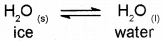
Consider a perfectly insulated thermos flask containing some ice and water at 273 K and normal atmospheric pressure. Since the flask is insulated, there will be no exchange of heat between its contents and the surroundings. It is seen that as long as the temperature remains constant, there is no change in the mass of ice and water. This represents an equilibrium state between ice and water and maybe represented as
Plus One Chemistry Notes Chapter 7 Chemical Equilibrium 1
We observe there is no change in mass of both ice and water. Since the rate of both reactions are equal.
rate of melting = rate of freezing For any pure substance at 1 atmospheric pressure the temperature at which the solid and liquid phases are at equilibrium is called the normal melting point or normal freezing point of the substance.

Liquid – Vapour Equilibrium
In order to understand the liquid-vapour equilibrium, let us consider evaporation of water in a closed vessel. Consider a closed vessel connected to a manometer. The water vapour present in the vessel is first removed by placing some drying agent such as anhydrous calcium chloride in it for some time. The drying agent is then removed. Now the level of mercury in both the limbs of the manometer will be same. Introduce some water into the vessel and allow to stay at room temperature. Now water starts evaporating. A Pressure will gradually develop within the vessel due to the formation of water vapours. The change of pressure can be easily measured from the manometer. As evaporation continues, the pressure goes on increasing and the level of mercury in the right limb of the manometer starts rising. After some time it is observed that pressure becomes constant. This shows that the quantity of water vapour is not increasing any more, although liquid water is still present in the vessel. This indicates that a state of dynamic equilibrium has been attained between liquid water and water vapours.
Plus One Chemistry Notes Chapter 7 Chemical Equilibrium 2

At equilibrium, both reaction take place at the same rate. Thus at equilibrium,
rate of evaporation = rate of condensation

Plus One Chemistry Notes Chapter 7 Chemical Equilibrium

The pressure exerted by the vapours in equilibrium with the liquid at a particular temperature is called
vapour pressure of the liquid.

It may be noted that the equilibrium between the vapours and the liquid is attained only in a closed vessel. If the vessel is open, the vapours leave the vessel and get dispersed. Hence the rate of conden-sation will never become equal to the rate of evapo-ration.

Solid – Vapour Equilibrium
Consider systems where solids sublime to vapour phase, For example,
Plus One Chemistry Notes Chapter 7 Chemical Equilibrium 3

Equilibrium involving Dissolution of Solid or Gas in Liquids
Solids in liquids: In a saturated solution, a dynamic equilibrium exits between the solute molecules in the solid state and in the solution: the rate of dissolution of sugar = rate of crystallisation of sugar. Gases in liquids: This equilibrium is governed by Henry’s law, which states that the mass of a gas dissolved in a given mass of a solvent at any temperature is proportional to the pressure of the gas above the solvent

General Characteristics of Equilibria involving Physical Processes
For the physical processes discussed above, following characteristics are common to the system at equilibrium:

  1. Equilibrium is possible only in a closed system at a given temperature.
  2. Both the opposing processes occur at the same rate and there is a dynamic but stable condition.
  3. All measurable properties of the system remain constant.
  4. When equilibrium is attained for a physical process, it is characterised by constant value of one of its parameters at a given temperature.
  5. The magnitude of such quantities at any stage indicates the extent to which the reaction has proceeded before reaching equilibrium.

Equilibrium In Chemical Processes – Dynamic Equilibrium
Consider a general reversible reaction
A+B \(\rightleftharpoons \) C+D

Suppose the reaction is carried out in a closed container. In the beginning, the concentrations of A and B are maximum and the concentrations of C and D are minimum (equal to zero). As the reaction proceeds, the concentrations of A and B will decrease whereas the concentrations of C and D will increase. Hence the rate of the forward reaction will be high in the beginning and it will decrease gradually because of the fall in concentrations of A and B. On the other hand the velocity of the reverse reaction will be minimum at the beginning and it will increase gradually due to the increase in concentrations of C and D. Finally a stage will be reached when the rate of the forward reaction becomes equal to the rate of the reverse reaction. This state of the system is known as the state of chemical equilibrium. At this state the concentrations of the reactants and the products remain constant.
Plus One Chemistry Notes Chapter 7 Chemical Equilibrium 4
We can also start with C and D and make the reaction to proceed in the reverse direction. The concentration of C and D decreases and A and B increases. Finally, equilibrium is attained. One such example is given.
H2(g) +l2(g) \(\rightleftharpoons \) 2Hl(g)

Law Of Chemical Equilibrium And Equilibrium Constant
The relation between rates of reaction and concentrations was given by Guldberg and Wage in 1864. This relation is known as law of mass action.
The relation is,
\(K_{c}=\frac{[C][D]}{[A][B]}\)
For a general reversible reaction of the type,
aA + bB \(\rightleftharpoons \) cC + dD
the equilibrium constant maybe represented as
\(K_{ c }=\frac { [c]^{ c }[D]^{ d } }{ [A]^{ a }{ \left[ B \right] }^{ b } } \)
The equation is known as the expression for the law of chemical equilibrium.

Plus One Chemistry Notes Chapter 7 Chemical Equilibrium

The law of chemical equilibrium or equilibrium law may thus be stated as :
At a given temperature, the product of concentrations of the reaction products raised to the respective stoichiometric coefficient in the balanced chemical equation divided by the prod-uct of concentrations of the reactants raised to their individual stoichiometric coefficients has a constant value. This is known as the Equilibrium Law or Law of Chemical Equilibrium.
If equilibrium constant for the backward reaction is
K’c then K’c = \(\frac{1}{K_{e}}\)

Homogeneous Equilibria
In a homogeneous system, all the reactants and products are in the same phase. For example, in the gaseous reaction,
N2(g) + 3H2(g) \(\rightleftharpoons \) 2NH3(g)

Heterogeneous Equilibria
Equilibrium in a system having more than one phase
is called heterogeneous equilibrium.
For example, H2O(l) \(\rightleftharpoons \) H2O(g)

Applications Of Equilibrium Constants

Predicting the Extent of a Reaction

  • If Kc >103, products predominate over reactants, i.e., if Kc is very large, the reaction proceeds nearly to completion.
  • If Kc < 10-3, reactants predominate over products, i.e., if Kc is very small, the reaction proceeds rarely.
  • If Kc is in the range of 10-3 to 103, appreciable concentrations of both reactants and products are present.

Plus One Chemistry Notes Chapter 7 Chemical Equilibrium 5

Predicting The Direction Of The Reaction
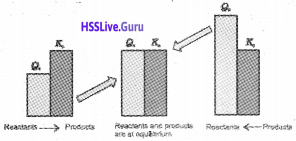
The equilibrium constant is also used to find in which direction the reaction mixture of reactants and products will proceed. For this, we have to calculate the reaction quotient (Qc) and compare with the equilibrium constant (Kc).

The concentrations of the species in Qc are not necessarily equilibrium values.
For a general reaction aA + bB → cC + dD
\(Q_{ c }=\frac { [c]^{ c }[D]^{ d } }{ [A]^{ a }{ \left[ B \right] }^{ b } } \)
If Qc > Kc, the reaction will proceed in the direction of the reactants (i.e., reverse reaction).
If Qc < Kc, the reaction will proceed in the direction of the products (i.e., forward reaction).
If Qc = Kc, the reaction mixture is already at equilibrium.
Plus One Chemistry Notes Chapter 7 Chemical Equilibrium 6

Calculating Equilibrium Concentrations
Step 1.
Write the balanced equation forthe reaction.

Step 2.
Under the balanced equation, make a table that lists foreach substance involved in the reaction:
a) the initial concentration,
b) the change in concentration on going to equilibrium, and
c) the equilibrium concentration.

In constructing the table, define x as the concentration ’ (mol/L) of one of the substances that reacts on going to equilibrium, then use the stoichiometry of the reaction to determine the concentrations of the other substances in terms of x.

Plus One Chemistry Notes Chapter 7 Chemical Equilibrium

Step 3.
Substitute the equilibrium concentrations into the equilibrium equation forthe reaction and solve for x. If you are to solve a quadratic equation choose the mathematical solution that makes chemical sense.

Step 4.
Calculate the equilibrium concentrations from the calculated value of x.

Step 5.
Check your results by substituting them into the equilibrium equation.

Problem
3.00 mol of PCl5 kept in 1L closed reaction vessel was allowed to attain equilibrium at 380 K. Calculate composition of the mixture at equilibrium. Kc = 1.80

Solution
Let x mol of PCl5 dissociated, At equilibrium:
(3 – x) x x
Kc = [PCl3][Cl2][PCl5]
1.8 = x²/(3 – x)
x² + 1.8x – 5.4 = 0
x = [-1.8 ± √(1.8)² – 4(-5.4)]/2
x = [-1.8 ± √3.24 + 21.6]/2
x = [-1.8 ± 4.98]/2
x = [-1.8 + 4.98]/2
x = 1.59
[PCl5] = 3.0 -x = 3 – 1.59 = 1.41 M
[PCl3] = [Cl2] = x = 1.59 M

Relationship Between Equilibrium Constant K, Reaction Quotient Q And Gibbs Energy G

  • ∆G is negative, then the reaction is spontaneous and proceeds in the forward direction.
  • ∆G is positive, then reaction is considered non-spontaneous. Instead, as reverse reaction would have a negative ”G, the products of the forward reaction shall be converted to the reactants.
  • ∆G is O, reaction has achieved equilibrium; at this point, there is no longer any free energy left to drive the reaction.

A mathematical expression of this thermodynamic view of equilibrium can be described by the following equation:

∆G = ∆G° + RT InQ
where, G° is standard Gibbs energy.
At equilibrium, when ∆G = 0 and Q=Kc the equation becomes,
∆G = ∆G° +RTIn K = 0
∆G° = -RTInK
InK = -∆G° / RT
Therefore, K = e∆Gv/RT

Factors Affecting Equilibria
In order to decide what course the reaction adopts and make a qualitative prediction about the effect of a change in conditions on equilibrium we use Le Chatelier’sprinciple. It states that a change in any of the factors that determine the equilibrium conditions of a system will cause the system to change in such a manner so as to reduce or to counteract the effect of the change. This is applicable to both physical and chemical equilibria.

Effect of Concentration Change
When the concentration of any of the reactants or products in a reaction at equilibrium is changed, the composition of the equilibrium mixture changes so as to minimize the effect of concentration changes.

Effect of Pressure Change
A pressure change obtained by changing the volume can affect the yield of products in case of a gaseous reaction where the total number of moles of gaseous reactants and total number of moles of gaseous products are different.

Effect of Inert Gas Addition
If the volume is kept constant and an inert gas such as argon is added which does not take part in the reaction, the equilibrium remains undisturbed. It is because the addition of an inert gas at constant volume does not change the partial pressures orthe molar concentrations of the substance involved in the reaction. So the reaction quotient does not change.

Effect of Temperature Change
Whenever an equilibrium is disturbed by a change in the concentration, pressure or volume, the composition of the equilibrium mixture changes because the reaction quotient, Qc no longer equals the equilibrium constant, Kc However, when a change in temperature occurs, the value of equilibrium constant, Kc is changed. In general, the temperature dependence of the equilibrium constant depends on the sign of ∆H for the reaction.

  • The equilibrium constant for an exothermic reaction (negative ∆H) decreases as the temperature increases.
  • The equilibrium constant for an endothermic reaction (positive ∆H) increases as the temperature increases.

Temperature changes affect the equilibrium constant and rates of reactions.

Effect of a Catalyst
A catalyst increases the rate of the chemical reaction by making available a new low energy pathway for the conversion of reactants to products. It increases the rate of forward and reverse reactions that pass through the same transition state and does not affect equilibrium. Catalyst lowers the activation energy for the forward and reverse reactions by exactly ‘ the same amount.

Ionic Equilibrium In Solution
Michael Faraday classified the substances into two categories based on their ability to conduct electricity. One category of substances conduct electricity in their aqueous solutions and are called electrolytes while the other do not and are thus, referred to as non-electrolytes.

Faraday further classified electrolytes into strong and weak electrolytes.

Plus One Chemistry Notes Chapter 7 Chemical Equilibrium

Strong electrolytes on dissolution in water are ionized almost completely, while the weak electrolytes are only partially dissociated.

Acids. Bases And Salts

Arrhenius Concept of Acids and Bases
According to Arrhenius theory, acids are substances that dissociates in water to give hydrogen ions H+(aq) and bases are substances that produce hydroxyl ions OH(aq). The ionization of an acid HX (aq) can be represented by the following equations:
HX(aq) → H+(aq) + X(aq)
or
HX(aq) + H2O(l) -> H3O+(aq) + X(aq)

The Bronsted-Lowry Acids and Bases
The Danish chemist, Johannes Bronsted and the English chemist, Thomas M. Lowry gave a more general definition of acids and bases. According to Bronsted-Lowry theory, acid is a substance that is capable of donating a hydrogen ion l-T and bases are substances capable of accepting a hydrogen ion, H+. In short, acids are proton donors and bases are proton acceptors.

Plus One Chemistry Notes Chapter 7 Chemical Equilibrium

The acid-base pair that differs only by one proton is called a conjugate acid-base pair. Therefore, OH is called the conjugate base of an acid H2O and NH4+ is called conjugate acid of the base NH3. If Bronsted acid is a strong acid then its conjugate base is a weak base and vice versa.
Consider the example of ionization of hydrochloric acid in water.
Plus One Chemistry Notes Chapter 7 Chemical Equilibrium 7

Ionization Of Acids And Bases

The Ionization constant of water and its ionic product
Water undergoes self ionisation to a small extent as follows.
Plus One Chemistry Notes Chapter 7 Chemical Equilibrium 8
Since [H2O] is constant, K[H2O]2 may be taken as a new constant Kw. Thus,
Kw= [H3O+][OH]

Where Kw is called ionic product of water. Its value is 1 x10‘14 mol2 L2 at 298 K. In pure water, the concen-tration of hydronium ions and hydroxyl ions are equal. Therefore in pure water,
[H3O+] = [OH] = 1 × 10⁻⁷ mol L-1

Since the ionisation of water increases with increase of temperature, Kw increases with rise of temperature.

The pH Scale
Hydronium ion concentration in molarity is more conveniently expressed on a logarithmic scale known as the pH scale.

The pH of a solution is defined as the negative logarithm to base 10 of the activity (aH+) of hydrogen ion.
i.e., pH = – log aHH+ = – log {[H+]/,mol L-1}
Acidic solution has pH < 7 Basic solution has pH > 7
Neutral solution has pH = 7

Ionization Constants of Weak Acids
Plus One Chemistry Notes Chapter 7 Chemical Equilibrium 9
Here, c= initial concentration of the undissociated acid, HXat time, t = 0. α = extent up to which HX is ionized into ions.
Ka = c²a² / c(1 – α) = cα²/1 – A
Ka is called the dissociation or ionization constant.

Ionization of Weak Bases
The equilibrium constant for base ionization is called base ionization constant and is represented by Kb.

When equilibrium is reached, the equilibrium constant can be written as:
Kb = (cα)² / c(1 – α) = cα² / (1 – α)
considering the base-dissociation equilibrium reaction:
Kb = [BH+][OH]/[B]
Then multiplying and dividing the above expression by [H+], we get:
Kb = [BH+][OH][H+]/[B][H+]
= {[OH][H+]}{[BH+]/[B][H+]}
= Kw/Ka
Then we get the following relation;
pKa + PKb = pKq = 14 (at 298 K)

Common ion effect in the ionization of Acids and Bases.
Common ion effect my be defined as the suppression of the dissociation of a weak electrolyte (weak acid or weak base) by the addition of some strong electrolyte containing a common ion.

Factors Affecting Acid Strength
Dissociation of an acid depends on the strength and polarity of the H-A bond.
Electronegativity of A increases CH4 < NH3 < H2O < HF Acid strength increases

Common Ion Effect in the Ionization of Acids and Bases
Ka = [H+] [Ac] / [HAc] acetate ions to an acetic acid solution results in decreasing the concentration of hydrogen ions, [H+], Also, if H+ ions are added from an external source then the equilibrium moves in the direction of undissociated acetic acid. This phenomenon is an example of common ion effect.

Hydrolysis of Salts and the pH of their Solutions
Salts formed by the reactions between acids and bases in definite proportions, undergo ionization in water. The cations/anions formed on ionization of salts either exist as hydrated ions in aqueous solutions or interact with water to reform corresponding acids/bases depending upon the nature of salts. The later process of interaction between water and cations/anions or both of salts is called hydrolysis.

Buffer Solutions
The solutions which resist change in pH on dilution or with the addition of small amounts of acid or alkali are called Buffer Solutions.

Solubilityequilibriaof Sparingly Soluble Salts

Solubility Product Constant
The equilibrium between the undisolved solid and the ions in a saturated solution can be represented by the equation:
Plus One Chemistry Notes Chapter 7 Chemical Equilibrium 10
We call Ksp the solubility product constant or simply solubility product.

Thus, solubility product of a salt is the product of concentration of ions in its saturated solution, raised to a power equal to the number of times the ions occur in the equation representing the dissociation of the salt.

Plus One Chemistry Notes Chapter 7 Chemical Equilibrium

The term Ksp in equation is given by Qsp when the concentration of one or more species is not the concentration under equilibrium. Obviously under equilibrium conditions Ksp = Qsp but otherwise it gives the direction of the processes of precipitation or dissolution.

Common Ion Effect on Solubility of Ionic Salts
The solubility of salts of weak acids like phosphates increases at lower pH. This is because at lower pH the concentration of the anion decreases due to its proto-nation. This, in turn, increases the solubility of the salt so that Ksp = Qsp.

Ncert Supplementary Syllabus

Designing Buffer Solution
Knowledge of pKa, pKb and equilibrium constant help us to prepare the buffer solution of known pH. Let us see how we can do this.

Preparation of Acidic Buffer
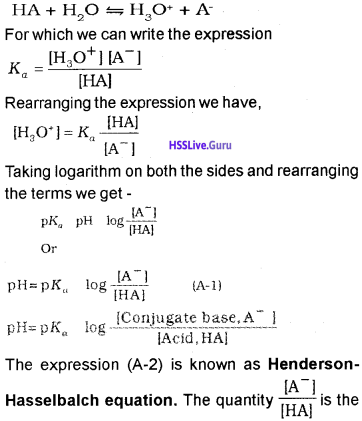
To prepare a buffer of acidic pH we use weak acid and its salt formed with strong base. We develop the equation relating the pH, the equilibrium constant, Ka of weak acid and ratio of concentration of weak acid and its conjugate
base. For the general case where the weak acid HA ionises in water,
Plus One Chemistry Notes Chapter 7 Chemical Equilibrium 11
ratio of concentration of conjugate base (anion) of the acid and the acid present in the mixture. Since acid is a weak acid, it ionises to a very little extent ‘and concentration of [HA] is negligibly different from concentration of acid taken to form buffer. Also, most of the conjugate base, [A], comes from the ionisation of salt of the acid. Therefore, the concentration of conjugate base will be negligibly different from the concentration of salt. Thus, equation (A-2) takes the form: pH-pKa + log\(\frac{[\mathrm{Salt}]}{[\mathrm{Acid}]}\)

Plus One Chemistry Notes Chapter 7 Chemical Equilibrium

In the equation (A-1), if the concentration of [A] is equal to the concentration of [HA], then pH = pKa because value of log 1 is zero. Thus if we take molar concentration of acid and salt (conjugate base) same, the pH of the buffer solution will be equal to the pKa of the acid. So for preparing the buffer solution of the required pH we select that acid whose pKa is close to the required pH. For acetic acid pKa value is 4.76, therefore pH of the buffer solution formed by acetic acid and sodium acetate taken in equal molar concentration will be around 4.76.

A similar analysis of a buffer made with a weak base and its conjugate acid leads to the result,
Plus One Chemistry Notes Chapter 7 Chemical Equilibrium 12

pH of the buffer solution can be calculated by using the equation pH + pOH =14.

We know that pH + pOH = pKw and pKa + pKb = pKw On putting these values in equation (A-3) it takes the form as follows:
Plus One Chemistry Notes Chapter 7 Chemical Equilibrium 13
If molar concentration of base and its conjugate acid (cation) is same then pH of the buffer solution will be same as pKa for the base. pK value for ammonia is 9.25; therefore a buffer of pH close to 9.25 can be obtained by taking ammonia solution and ammonium chloride solution of equal molar concentration. For a buffer solution formed by ammonium chloride and ammonium hydroxide, equation (A-4) becomes:
Plus One Chemistry Notes Chapter 7 Chemical Equilibrium 14
pH of the buffer solution is not affected by dilution because ratio under the logarithmic term remains unchanged.
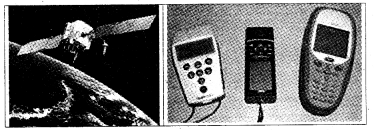
Plus One Computer Science Notes Chapter 12 Internet and Mobile Computing

Students can Download Chapter 12 Internet and Mobile Computing Notes, Plus One Computer Science Notes helps you to revise the complete Kerala State Syllabus and score more marks in your examinations.

Kerala Plus One Computer Science Notes Chapter 12 Internet and Mobile Computing

Summary
History of Internet:
Internet means international network of networks. The first form of Internet is ARPANET(Advanced Research Project Agency Network) started by US Department of Defence for their military during 1970’s. In 1989 a team lead by Tim Berners Lee introduced WWW(World Wide Web) by using the protocol HTTP. In 1998, Internet Corporation for Assigned Names and Numbers (ICANN) was established.

Internet:
It is a network of networks. It means that international network. We can transfer information between computers within nations very cheaply and speedily.

Intranet:
A private network inside a company or organisation is called intranet.

Extranet:
It allows vendors and business partners to access the company resources.

Plus One Computer Science Notes Chapter 12 Internet and Mobile Computing

The hardware and software requirement for internet:

  • A computer with a modem (internal/external)
  • A telephone connection
  • An account with an ISP
  • A browser S/W eg: Internet Explorer or Mozilla…

Types of connectivity:
There are two ways to connect to the internet. First one dialing to an ISP’s computer or with a direct connection to an ISP.

Dial-up Connection:
Here the internet connection is established by dialing into an ISP’s computer. If ISP is not busy they verify the user name and password if it is valid they will connect our computer to the internet.lt uses Serial Line Internet Protocol (SLIP) or Point to Point Protocol (PPP). It is slower and has a higher error rate.

Direct connection:
In direct connection there is a fixed cable or dedicated phone line to the ISP. Here it uses ISDN (Integrated Services Digital Network) a high speed version of a standard phone line. Another method is leased lines that uses fibre optic cables.

Digital Subscribers Line (DSL) is another direct connection, this uses copper wires instead of fibre optic for data transfer. Direct connection provides high speed internet connection and error rate is less. Fibre To The Home(FTTH) uses optical fibers for data transmission.

Wireless broadband connectivity:
1. Mobile broadband:
Accessing Internet using wireless devices like mobile phones, tablet, USB dongles.

2. Wi MAX(Wireless Microwave Access):
It uses micro waves to transmit information across a network in a range 2 GHz to 11 GHz over very long distance.

3. Satellite broadband:
Accessing internet through satellite. A Very Small Aperture Terminal(VSAT) dish antenna and transceiver and modem are required at the user’s location. Expensive and high speed.

Internet access sharing methods:
One Internet connection can be shared among several computers using a LAN, Wi Fi or Li Fi.
1. Using LAN:
The Internet connection in a LAN can be shared among other computers in the network

2. Using Wi Fi(Wireless Fidelity):
It uses radio waves to transmit information across a network in a range 2.4 GHz to 5 GHz in short distance. Nowadays this technology is used to access internet in campuses, hyper markets, hotels by using Laptops, Desktops, tablet, mobile phones etc

3. Using Li Fi(Light Fidelity) network:
It is a fast optical(uses visible light for data transmission) version of Wi Fi. Its main component is a LED lamp that can transmit data and a photodiode that acts as a receiver.

Plus One Computer Science Notes Chapter 12 Internet and Mobile Computing

Services on Internet:
1. www(World Wide Web):
This means this website address is unique and can be accessed each nook and corner of the world.

2. A browser is a piece of software that acts as an interface between the user and the internal working of the internet. With the help of a browser the user can search information on the internet and it allows user to navigate through the web pages. The different browsers are

  • Microsoft internet explorer
  • Mozilla Firefox
  • Netscape Navigator
  • Google Chrome
  • Opera.

3. Web Browsing:

  1. The browser determines the URL entered.
  2. The browser asks the DNS for URLS corresponding IP address (Numeric address)
  3. The DNS returns the address to the browser.
  4. The browser makes a TCP connection using the IP address.
  5. Then it sends a GET request for the required file to the server.
  6. The server collects the file and send it back to the browser.
  7. The TCP connection is released.
  8. The text and the images in the web pages are displayed in the browser.

Search engines:
By using search engines we will get a variety of information. It is a newly developed tool that helped to search the information on the internet more effectively and easily. Search engines are programs that help people to locate information from crores of website on internet using a database that consists of references.

Users can interact with the search engine through the home page of the search engine. To get the information about artificial intelligence just type this in the box provided for it and click the search button. Search engines searches by using a particular search algorithm then displays the matching documents or web addresses.

Search engine use soft wares called spiders or bots to search documents and their web addresses. Spiders search the internet using the directions given by the search engines and prepare an index and stores it in a database. The searching algorithm searched this database when the users submits a request and create a web page displaying the matching results as hyperlinks.
eg: Google, Yahoo, Rediff etc.

E mail(Electronic mail):
It is used to send text, multi media messages between computers over internet. An example of an email id is [email protected]. Here jobi_cg is the user name, rediffmail is the website address and .com is the top level domain which identifies the types of the organisation. To send an email we require an email address. Some websites provide free email facility.

To send an email first type the recipients address and type the message then click the send button. The website’s server first check the email address is valid, if it is valid it will be sent otherwise the message will not be sent and the sender will get an email that it could not deliver the message.

This message will be received by the recipient’s server and will be delivered to recipient’s mail box. He can read it and it will remain in his mail box as long as he will be deleted. Simple Mail Transfer Protocol(SMTP) is used.
The email message contains the following fields:

  1. To: Recipient’s address will be enter here. Multiple recipients are also allowed by using coma.
  2. CC: Enterthe address of other recipients to get a carbon copy of the message.
  3. bcc: The address to whom blind carbon copies are to be sent. This feature allows people to send copies to third recipient without the knowledge of primary and secondary recipients
  4. From: Address of the sender
  5. Reply to: The emait address to which replies are to be sent.
  6. Subject: Short summary of the message.
  7. Body: Here the actual message is to be typed.

The advantages of email are given below:

  1. Speed is high
  2. It is cheap
  3. We can send email to multiple recipients
  4. Incoming messages can be saved locally
  5. It reduces the usage of paper
  6. We can access mail box anytime and from anywhere.

The disadvantages are:

1. It requires a computer, a modem, software and internet connection to check mail.
2. Some mails may contain viruses
3. Mail boxes are filled with junk mail. So very difficult to find the relevant mail.

Plus One Computer Science Notes Chapter 12 Internet and Mobile Computing

Social media:
Various social medias are Internet forums, social blogs, microblogs etc.

  1. Internet forums: It is an online discussion site where people can exchange information about various issues like social, political, educational etc in the text form.
  2. Social blogs: Conducting discussions about . particular subjects by entries or posts. eg: Blogger.com
  3. Microblogs: It allows users to exchange short messages, multi media files etc. eg: www.twitter.com
  4. Wikis: In this we can give our contributions regarding various topics. eg: www.wikipedia.org
  5. Social networks: By using these web sites we can post our data and’ view others data. eg: www.facebook.com
  6. Content communities: By using these websites we can share multi media files. eg: www.youtube.com

Advantages of social media:

  1. Bring people together: It allows people to maintain the friendship
  2. Plan and organize events: It allows users to plan and organize events.
  3. Business promotion: It helps the firms to promote their sales.
  4. Social skills: There is a key role of the formation of society.

Disadvantages:

  1. Intrusion to privacy: Some people may misuse the personal information.
  2. Addiction: sometimes it may waste time and money.
  3. Spread rumours: The news will spread very quickly and negatively.

Cyber Security:
It is used to provide protection of valuable information such as credit card information from unauthorized access, intentional access, deletion, etc. while shopping on the internet.

Computer virus:
A virus is a bad program or harmful program to damage routine working of a computer system. It reduces the speed of a computer. It may delete the useful system files and make the computer useless.

Worm:
It is a stand alone malware program that replicates itself in order to spread to other computers. It slows down the traffic by consuming the bandwidth. In 2000 a worm called “ILOVEYOU” is affected many computers.

Trojan horse:
It appears as a useful software but it is a harmful software and it will delete useful software or files.

Spams:
Sending an email without recipient’s consent to promote a product or service is called spamming. Such an email is called a spam.

Hacking:
It is a process of trespassing computer networks. Two types white hats and black hats. White hats hack the computer networks to test the security but black hats intentionally stealing valuable data or destroying data.

Plus One Computer Science Notes Chapter 12 Internet and Mobile Computing

Phishing (Fishing):
It is an attempt to get others information such as usenames, passwords, bank a/c details etc by acting as the authorized website. Phishing websites have URLs and home pages similar to their original ones and mislead others , it is called spoofing.

Denial of Service(DoS) attack:
Its main target is a Web server. Due to this attack the Web server/computer forced to restart and this results refusal of service to the genuine users. If we want to access a website first you have to type the web site address in the URL and press Enter key, the browser requests that page from the web server.

Dos attacks send huge number of requests to the web server until it collapses due to the load and stops functioning.

Man in the Middle attacks:
It is an attack in which an attacker secretly intercepts electronic messages send by the sender to the receiver and then modifies the message and retransmit it to the receiver.

To prevent this type of attack encrypted connections such as HTTPS(HTTP Secure), SFTP(Secure FTP) etc, must be used, that will be displayed in the URL.

Preventing network attacks
Firewall:
It is a system that controls the incoming and outgoing network traffic by analyzing the data and then provides security to the computer network in an organization from other network (internet).

Antivirus scanners:
It is a tool used to scan computer files for viruses, worms and Trojan horses and cure the infected system. If any fault found it stops the file from running and stores the file in a special area called Quarantine(isolated area) and can be deleted later.

Cookies:
Cookies are small text files that are created when we visit a website that keep track of our details. This information will help the hacker to use it for malicious purposes. It acts as a spyware.

Guidelines for using computers over internet:

  • Emails may contain Viruses so do not open any unwanted emails
  • Download files from reputed sources(sites)
  • Avoid clicking on pop up Advt.
  • Most of the Viruses spread due to the use of USB drives so use cautiously.
  • Use firewall in your computer
  • Use anti virus and update regularly
  • Take backups in a regular time intervals

Plus One Computer Science Notes Chapter 12 Internet and Mobile Computing

Mobile Computing:
The advancements in computing technology have led to the developments of more computing power in hand held devices like laptops, tablets, smart phones, etc. Nowadays people are able to connect to others through internet even when they are in move.

Mobile communication:
The term ‘mobile’ help the people to change their life styles and become the backbone of the society. Mobile communication networks do not require any physical connection.

Generations in mobile communication:
The mobile phone was introduced in the year 1946. Early stage it was expensive and limited services hence its growth was very slow. To solve this problem, cellular communication concept was developed in 1960’s at Bell Lab. 1990’s onwards cellular technology became a common standard in our country.
The various generations in mobile communication are
1.First Generation networks(1 G):
It was developed around 1980, based on analog system and only voice transmission was allowed.

2. Second Generation networks (2G):
This is the next generation network that was allowed voice and data transmission. Picture message and MMS(Multimedia Messaging Service) were introduced. GSM and CDMA standards were introduced by 2G.
(i) Global System for Mobile(GSM):
It is the most successful standard. It uses narrow band TDMA(Time Division Multiple Access), allows simultaneous calls on the same frequency range of 900 MHz to 1800 MHz. The network is identified using the SIM(Subscriber Identity Module).
(a) GPRS(General Packet Radio Services):lt is a packet oriented mobile data service on the 2G on GSM. GPRS was originally standardized by European Telecommunications Standards Institute (ETSI) GPRS usage is typically charged based on volume of data transferred. Usage above the bundle cap is either charged per megabyte or disallowed.

(b) EDGE(Enhanced Data rates for GSM Evolution):
It is three times fasterthan GPRS. It is used for voice communication as well as an internet connection.

(ii) Code Division Multiple Access (CDMA):
It is a channel access method used by various radio communication technologies. CDMA is an example of multiple access, which is where several transmitters can send information simultaneously over a single communication channel. This allows several users to share a band of frequencies To permit this to be achieved without undue interference between the users, and provide better security.

3. Third Generation networks(3G):
It allows high data transfer rate for mobile devices and offers high speed wireless broadband services combining voice and data. To enjoy this service 3G enabled mobile towers and hand sets required.

4. Fourth Generation networks(4G):
lt is also called Long Term Evolution(LTE) and also offers ultra broadband Internet facility such as high quality streaming video. It also offers good quality image and videos than TV.

Plus One Computer Science Notes Chapter 12 Internet and Mobile Computing

Mobile communication services:
1. Short Message Service(SMS):
It allows transferring short text messages containing up to 160 characters between mobile phones. The sent message reaches a Short Message Service Center(SMSC), that allows ‘store and forward’ systems. It uses the protocol SS7(Signaling System No7). The first SMS message ‘Merry Christmas’ was sent on 03/12/1992 from a PC to a mobile phone on the Vodafone GSM network in UK.

2. Multimedia Messaging Service (MMS):
It allows sending Multi Media(text, picture, audio and video file) content using mobile phones. It is an extension of SMS.

3. Global Positioning System(GPS):
It is a space- based satellite navigation system that provides location and time information in all weather conditions, anywhere on or near the Earth where there is an unobstructed line of sight to four or more GPS satellites. The system provides critical capabilities to military, civil and commercial users around the world.

It is maintained by the United States government and is freely accessible to anyone with a GPS receiver. GPS was created and realized by the U.S. Department of Defense (DoD) and was originally run with 24 satellites. It is used for vehicle navigation, aircraft navigation, ship navigation, oil exploration, Fishing, etc. GPS receivers are now integrated with mobile phones.
Plus One Computer Science Notes Chapter 12 Internet and Mobile Computing 1

Smart Cards:
A smart card is a plastic card with a computer chip or memory that stores and transacts data. A smart card (may be like your ATM card) reader used to store and transmit data. The advantages are it is secure, intelligent and convenient. The smart card technology is used in SIM for GSM phones. A SIM card is used as an identification proof.

Plus One Computer Science Notes Chapter 12 Internet and Mobile Computing

Mobile operating system:
It is an OS used in hand held devices such as smart phone, tablet, etc. It manages the hardware, multimedia functions, Internet connectivity,etc. Popular OSs are Android from Google,iOS from Apple, BlackBerry OS from Black Berry and Windows Phone from Microsoft.

Android OS:
It is a Linux based OS forTouch screen devices such as smart phones and tablets.lt was developed by Android Inc. founded in Palo Alto, California in 2003 by Andy Rubin and his friends. In 2005, Google acquired this. A team led by Rubin developed a mobile device platform powered by the Linux Kernel.

The interface of Android OS is based on touch inputs like swiping, tapping, pinching in and out to manipulate on screen objects. In 2007 onwards this OS is used in many mobile phones and tablets. Android SDK(Software Development Kit) is available to create applications(apps) like Google Maps, FB, What’s App, etc.

It is of open source nature and many Apps are available for free download from the Android Play Store hence increase the popularity.
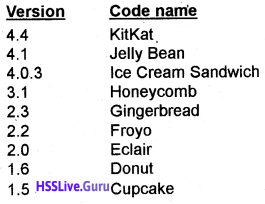
Different Android Versions are shown below
Plus One Computer Science Notes Chapter 12 Internet and Mobile Computing 2

Plus One Computer Science Notes Chapter 11 Computer Networks

Students can Download Chapter 11 Computer Networks Notes, Plus One Computer Science Notes helps you to revise the complete Kerala State Syllabus and score more marks in your examinations.

Kerala Plus One Computer Science Notes Chapter 11 Computer Networks

Summary
Computer network:
Two or more computers connected through a communication media that allows exchange of information between computers is called a Computer Network. Eg: Internet

Plus One Computer Science Notes Chapter 11 Computer Networks

Need for network:
The advantages of Networks are given below.
1. Resource sharing:
All the computers in a network can share software (programs, data ) and hardware (printer, scanner, CD drive, etc.).

2. Reliability:
If one computer fails, the other computer can perform the work without any delay. This is very important for banking, air traffic control and other application.

3. Price Vs Performance:
A main frame computer can be 10 times faster than a PC but it costs thousand times a PC. Therefore instead of a main frame 10 personal computers are used with less cost and same performance.

4. Communication Medium:
It is a powerful communication medium. We can exchange information between computers in a network.

5. Scalable:
This means, System performance can be increased by adding computers to a network.

Terminologies:

  1. Bandwidth: The maximum amount of data that can be transmitted by the medium measured in Hertz.
  2. Noise: It is the unwanted electrical or electromagnetic interferences that adversely affect the transmitted data signals.
  3. Node: A computer or an I/O device connected to a network is called Node.

Data communication system:
Communication is the exchange of information between two human beings. But data communication is the exchange of information between two computers(devices).

  1. Message: It is the data/information to be transmitted from one computer to another
  2. Sender: It is a computer or a device that sends data. It is also called.source or transmitter
  3. Receiver: It is a computer ora device that receives data
  4. Medium: It is the path through which message transmitted from the sender to the receiver. There are two types Guided and Un Guided media.
  5. Protocol: The rules and conventions for transmitting data.

Plus One Computer Science Notes Chapter 11 Computer Networks

Communication Medium:
There are two types guided and unguided.
Guided Media:
1. Twisted Pair cable:
2 types unshielded twisted pair and shielded twisted pair. Two copper wires individually insulated and twisted around each other and put in a plastic cover.

2. Coaxial cable:
A sturdy copperwire is insulated by plastic, it is covered just like a mesh by a conductor which is enclosed in an protective plastic coating. It is expenssive, less flexible and more difficult to install. But it is more reliable and carry for higher data rates.

3. Optical fibre:
These are made of glass fibres that are enclosed in a plastic jacket. It uses light instead of electrical signals. The light sources are LED or ILD.

Unguided Media:

  1. Radio waves: It transmits data at different frequencies ranging from 3 kHz. to 300 GHz.
  2. Microwaves: Microwave signals can travel in straight line if there is any obstacle in its path, it can’t bend. So it uses tall towers instead of short one.
  3. Infrared waves: These waves are used for transmitting data in short distance and its frequency range is 300 GHz to 400 GHz.

Plus One Computer Science Notes Chapter 11 Computer Networks

Wireless communication technologies using:
radio waves
1. Bluetooth:
This technology uses radio waves in the frequency range of 2.402 GHz to 2.480 GHz. And transmit data in short distance. Mobile phones, Laptops, tablets etc use Bluetooth technology to transmit data.

2. Wi Fi(Wireless Fidelity):
It uses radio waves to transmit information across a network in a range 2.4 GHz to 5 GHz in short distance. Nowadays this technology is used to access internet in Laptops, Desktops, tablets, Mobile phones etc.

3. Wi MAX(Wireless Microwave Access):
It uses micro waves to transmit information across a network in a range 2 GHz to 11 GHz over very long distance.

4. Satellites:
By using satellite we can communicate from eny part of the world to any other. The ground stations are connected via the satellite. The data signals transmitted from earth to satellite (uplink) and from the satellite to the earth (downlink).

Data communication devices:
It acts as an interface between computer and the communication channel

Network Interface Card (NIC):
This device enables a computer to connect to a network and transmit information.

Hub:
It is a small, simple and inexpensive device used to connect computers(devices) to a network. If a computer wants to transmit data to another computer. First it sends to the hub, the hub retransmits this data to all other computers.

Each and every computer gets the data and check whether it is for them or not. It increases the network traffic and hence the transmission speed is low.

Switch:
It is an expensive device used to connect computers(devices) to a network. Unlike hub, switch transmit data not to all computers, it retransmits data only to the intended computer. So the traffic is less and speed is high

Repeater:
It is a device used to strengthen weak signals on the network.

Bridge:
It is a device used to link same type of networks.

Router:
It is similar to a bridge, but it can connect two networks with different protocols.

Gateway:
It is used to connect two different networks with different protocols.

Data terminal equipments:
These devices are used to control data flow to and from a computer

Modem:
It is a device used to connect the computer to the internet. It converts digital signal into analog signal (modulation) and vice versa (Demodulation)

Multiplexer:
It combines the inputs from different channels of a medium and produces one output.

Plus One Computer Science Notes Chapter 11 Computer Networks

Network topologies:
Physical or logical arrangement of computers on a network is called structure or topology. It is the geometrical arrangement of computers in a network. The major topologies developed are star, bus, ring, tree and mesh.
1. Star Topology:
A star topology has a server all other computers are connected to it. If computer A wants to transmit a message to computer B. Then computer A first transmit the message to the server then the server retransmits the message to the computer B.

That means all the messages are transmitted through the server. Advantages are added or remove workstations to a star network is easy and the failure of a workstation will not effect the other. The disadvantage is that if the server fails the entire network will fail.

2. Bus Topology:
Here all the computers are attached to a single cable called bus. Here one computer transmits all other computers listen. Therefore it is called broadcast bus. The transmission from any station will travel in both the direction.

The connected computers can hear the message and check whether it is for them or not. Advantages are add or remove computer is very easy. It requires less cable length and the installation cost is less. Disadvantage is fault detection is very difficult because of no central computer.

3. Ring Topology:
Here all the computers are connected in the shape of a ring and it is a closed loop. Here also there is no central computer. Here a computer transmits a message, which is tagged along with its destination computer’s address.

The message travels in one direction and each node check whether the message is for them. If not, it passes to the next node. It requires only short cable length. If a single node fails, at least a portion of the network will fail. To add a node is very difficult.

4. Hybrid Topology:
It is a combination of any two or more network topologies. Tree topology and mesh topology can be considered as hybrid topology.
(a) Tree Topology:
The structure of a tree topology is the shape of an inverted tree with a central node and branches as nodes. It is a variation of bus topology. The data transmission takes place in the way as in bus topology. The disadvantage is that if one node fails, the entire portion will fail.

(b) Mesh Topology:
In this topology each node is connected to more than one node. It is just like a mesh (net). There are multiple paths between computers. If one path fails, we can transmit data through another path.

Types of networks:
The networks are classified into the following based upon the amount of geographical area that covers.
(i) Personal Area Network(PAN):
It is used to connect devices situated in a small radius by using guided media or unguided media

(ii) Local Area Network (LAN):
This is used to connect computers in a single room, rooms within a building or buildings of one location by using twisted pair wire or coaxial cable. Here the computers can share Hardware and software. Data transferrate is high and error rate is less, eg: The computers connected in a school lab.

(iii) Metropolitan Area Network (MAN):
A Metropolitan Area Network is a network spread over a city. For example a Cable TV network. MAN have lesser speed than LAN and the error rate is less. Here optical fiber cable is used.

(iv) Wide Area Network (WAN):
This is used to connect computers over a large geographical area. It is a network of networks. Here the computers are connected using telephone lines or Micro Wave station or Satellites. Internet is an example for this.

LAN and MAN are owned by a single organization but WAN is owned by multiple organization. The error rate in data transmission is high.

Plus One Computer Science Notes Chapter 11 Computer Networks

Logical classification of networks:
Peer to peer:
In this configuration all the computers have equal priority. That means each computer can function as both a client and a server. There is no dedicated server.

Client-Server:
In this configuration a computer is powerful which acts as a dedicated server and all others are clients (work stations). A Server fulfils the needs of the clients.

  1. File Server: A computer that stores and manages files for other devices on a network
  2. Web Server: A computer that handles the requests for web pages.
  3. Print Server: A computer that handles the print jobs from other computers on a network.
  4. Database Server: A computer that manages the database.

Network protocols:
A protocol is a collection of rules and regulations to transfer data from one location to another. Transmission Control Protocol (TCP), which uses a set of rules to exchange messages with other Internet points at the information packet level. Internet Protocol (IP), which uses a set of rules to send and receive messages at the Internet address level
1. FTP:
File Transfer Protocol which is used for transferring files between computers connected to local network or internet.

2. HTTP:
is a protocol used for WWW for enabling the web browse to access web server and request HTML documents.

3. DNS (Domain Name System):
When we type web sites address in the address bar, the browser determines the URL and asks the DNS for URLS corresponding IP address (Numeric address). The DNS returns the address to the browser.

Identification of computers over a network:
A computer gets a data packet on a network, it can identify the sender’s address easily. It is similar to our snails mail, each letter is stamped in sender’s post office as well as receiver’s post office.

Media Access Control(MAC) address:
It is a unique 12 digit hexadecimal number(IMEI for mobile phones, it is a 15 digit decimal number) assigned to each NIC by its manufacturer. This address is known as MAC address and its permanent. It is of the form. MM:MM:MM:SS:SS:SS.

The first MM:MM:MM contains the ID number of the adapter company and the second SS:SS:SS represents the serial number assigned to the adapter by the company.

Internet Protocol (IP) address:
An IP address has 4 parts numeric address. Each parts contains 8 bits. By using 8 bits we can represent a decimal number between 0 to 255(28 = 256 numbers). Each part is separated by dot. A total of 4 × 8 = 32 bits used. But nowadays 128 bits are used for IP address.

Plus One Computer Science Notes Chapter 11 Computer Networks

Uniform Resource Locator(URL):
Every resource on the internet has a unique URL. Mainly it has three parts
eg: http://www.hscap.kerala.gov.in /index.html.

  • http: http means hypertext transfer protocol. It is a protocol used to transfer hypertext.
  • www: World Wide Web. With an email address we can open our mail box from anywhere in the world.
  • hscap.kerala: It is a unique name. It is the official website name of Single Window System
  • gov: It is the top level domain. It means that it is a government organization’s website.
  • in: It is the geographical top level domain. It represents the country, in is used for India.
  • index.html: It represents the file name.

Top Level Domain Names:

  • .com The site register for commercial purpose
  • .edu The site register for educational purpose
  • .gov The site register by Government agencies
  • .mil The site register for military services
  • .net The site register for network purpose
  • .org The site register by organizations

Country Specific Domain Names:

  • .in India
  • .au Australia
  • .ca Canada
  • .ch China
  • .jp Japan
  • .us United States of America

Plus One Computer Science Notes Chapter 10 Functions

Students can Download Chapter 10 Functions Notes, Plus One Computer Science Notes helps you to revise the complete Kerala State Syllabus and score more marks in your examinations.

Kerala Plus One Computer Science Notes Chapter 10 Functions

Concept of modular programming:
The process of converting big and complex programs into smaller programs is known as modularisation. This small programs are called modules or sub programs or functions. C++ supports modularity in programming called functions
Merits of modular programming:

  • It reduces the size of the program
  • Less chance of error occurrence
  • Reduces programming complexity
  • Improves reusability

Demerits of modular programming:
While dividing the program into smaller ones extra care should be taken otherwise the ultimate result will not be right.

Plus One Computer Science Notes Chapter 10 Functions

Functions in C++:
Some functions that are already available in C++ are called pre-defined or built in functions. In C++, we can create our own functions for a specific job or task, such functions are called user defined functions. A C++ program must contain a main() function. A C++ program may contain many lines of statements(including so many functions) but the execution of the program starts and ends with main() function.

Pre-defined functions:
To invoke a function that requires some data for performing the task, such data is called parameter or argument. Some functions return some value back to the called function.

String functions:
To manipulate string in C++ a header file called string.h must be included.
1. strlen():
to find the number of characters in a string(i.e. string length).
Syntax: strlen(string);
eg:
cout<<strien(“Computer”); It prints 8.

2. strcpy():
It is used to copy second string into first string.
Syntax: strcpy(string1, string2);
eg:
strcpy(str,”BVM HSS”);
cout<<str; It prints BVM HSS.

3. strcat():
It is used to concatenate second string into first one.
Syntax: strcat(string1,string2)
eg:
strcpy(str1,’’Hello”);
strcpy(str2,” World”);
strcat(str1 ,str2);
cout<<str1; It displays the concatenated string “Hello World”

4. strcmp():
It is used to compare two strings and returns an integer.
Syntax: strcmp(string1,string2)

  • if it is 0 both strings are equal.
  • if it isgreaterthan 0(i.e. +ve) stringl is greater than string2
  • if it is less than 0(i.e. -ve) string2 is greater than stringl

eg:
#include<iostream>
#include<cstring>
using namespace std;
int main()
{
char str1 [10],str2[10];
strcpy(str1,”Kiran”);
strcpy(str2,”Jobi”);
cout<<strcmp(str1 ,str2);
}
It returns a +ve integer.

Plus One Computer Science Notes Chapter 10 Functions

5. strcmpi():
It is same as strcmpO but it is not case sensitive. That means uppercase and lowercase are treated as same.
eg: “ANDREA” and “Andrea” and “andrea” these are same.
#include<iostream>
#include<cstring>
using namespace std;
int main()
{
char str1 [10],str2[10];
strcpy(str1,”Kiran”);
strcpy(str2,”KIRAN”);
cout<<strcmpi(str1 ,str2);
}
It returns 0. That is both are same.

Mathematical functions:
To use mathematical functions a header file called math.h must be included.
1. abs():
To find the absolute value of an integer.
eg: cout<<abs(-25); prints 25.
Cout<<abs(+25); prints 25.

2. sqrt():
To find the square root of a number.
eg: cout<<sqrt(49); prints 7.

3. pow():
To find the power of a number.
Syntax. pow(number1, number2)
eg: cout<<pow(2,10); It is equivalent to 210. It prints 1024.

4. sin():
To find the sine value of an angle and the angle must be in radian. To convert an angle into radian multiply by 3.14(“) and divide by 180.
float x = 60 × 3.14/180;
cout<<sin(x); prints 0.86576.

5. cos():
To find the cosine value of an angle and the angle must be in radian. To convert an angle into radian multiply by 3.14(“) and divide by 180.
float x = 60 × 3.14/180;
cout<<cos(x); prints 0.50046.

Plus One Computer Science Notes Chapter 10 Functions

Character functions:
To manipulate character in C++ a header file called ctype.h must be included.
1. isupper():
To check whether a character is in uppercase or not. If the character is in uppercase it returns a value 1 otherwise it returns 0.
Syntax: isupper(charch);

2. islower():
To check whether a character is in lowercase or not. If the character is in lowercase it returns a value 1 otherwise it returns 0.
Syntax: islower(char ch);

3. isalpha():
To check whether a character is an alphabet or not. If the character is an alphabet it returns a value 1 otherwise it returns 0.
Syntax: isalpha(char ch);

4. isdigit():
To check whether a character is a digit or not. If the character is a digit it returns a value 1 otherwise it returns 0.
Syntax: isdigit(charch);

5. isalnum():
To check whether a character is an alphanumeric or not. If the character is an alphanumeric it returns a value 1 otherwise it returns 0.
Syntax: isalnum(char ch);

6. toupper():
It is used to convert the given character into uppercase.
Syntax: toupper(char ch);

7. tolower():
It is used to convert the given character into lowercase.
Syntax: tolower(char ch);

Conversion functions:
Some occasions we have to convert a data type into another for this conversion functions used. The header file stdlib.h must be included.
1. itoa():
It is used to convert an integer value to string type.
Syntax: itoa(int v, char str, int size); This function has 3 arguments, first one is the integer to be converted, second is the string variable to store and third is the size of the string.
eg: itoa(“123”,str,4);
cout<<str;

2. atoi():
It Is the opposite of itoa( ). That is it converts a string into integer.
Syntax: atoi(str);

I/O Manipulating function:
It is used to manipulate I /O operations in C++. The header file iomanip.h must be included,
(a) setw(): It is used to set the width for the subsequent string.
Syntax: setw(size);

User defined functions:
Syntax: Return type Function_name(parameterlist)
{
Body of the function
}

  • Return type: It is the data type of the value returned by the function to the called function;
  • Function name: A name given by the user.

Different types of User defined functions.

  • A function with arguments and return type.
  • A function with arguments and no return type.
  • A function with no arguments and with return type.
  • A function with no arguments and no return type.

Plus One Computer Science Notes Chapter 10 Functions

Prototype of functions:
Consider the following codes
Method 1:
#include<iostream>
using namespace std;
int sum(int n1,int n2)
{
return(n1 + n2);
}
int main()
{
int n1 ,n2;
cout<<“Enter 2 numbers:”;
cin>>n1>>n2;
cout<<“The sum is “<<sum(n1,n2);
}

Method 2:
#include<iostream>
using namespace std;
int main()
{
int n1 ,n2;
cout<<“Enter 2 numbers:”;
cin>>n1>>n2;
cout<<“The sum is “<<sum(n1,n2);
}
int sum(int n1 ,int n2)
{
return(n1 + n2); ‘
}
In method 1 the function is defined before the main function. So there is no error. In method 2 the function is defined after the main function and there is an error called “function sum should have a prototype”.

This is because of the function is defined after the main function. To resolve this a prototype should be declared inside the main function as follows.

Method 3:
#include<iostream>
using namespace std;
int main()
{
int n1,n2;
int sum(int.int);
cout<<“Enter 2 numbers:”;
cin>>n1>>n2;
cout<<“The sum is “<<sum(n1,n2);
}
int sum(int n1,int n2)
{
retum(n1 + n2);
}

Functions with default arguments:
We can give default values as arguments while declaring a function. While calling a function the user doesn’t give a value as arguments the default value will be taken. That is we can call a function with or without giving values to the default arguments.

Methods of calling functions:
Two types call by value and call by reference.
1. Call by value:
In call by value method the copy of the original value is passed to the function, if the function makes any change will not affect the original value.

2. Call by reference:
In call by reference method the address of the original value is passed to the function, if the function makes any change will affect the original value.

Plus One Computer Science Notes Chapter 10 Functions

Scope and life of variables and functions:
1. Local scope:
A variable declared inside a block can be used only in the block. It cannot be used any other block.
eg:
#include<iostream>
using namespace std;
int sum(int n1,int n2)
{
int s;
s = n1 + n2;
return(s);
}
int main()
{
int n1,n2;
cout<<“Enter 2 numbers:”;
cin>>n1>>n2;
cout<<“The sum is “<<sum(n1,n2);
}
Here the variable s is declared inside the function sum and has local scope;

2. Global scope:
A variable declared outside of all blocks can be used any where in the program.
#include<iostream>
using namespace std;
int s;
int sum(int n1,int n2)
{
s = n1 + n2;
return (s);
}
int main()
{
int n1 ,n2;
cout<<“Enter 2 numbers :”;
cin>>n1>>n2;
cout<<“The sum is “<<sum(n1 ,n2);
}
Here the variable s is declared out side of all functions and we can use variable s any where in the program

Recursive functions:
A function calls itself is called recursive function.

Plus One Chemistry Notes Chapter 5 States of Matter

Students can Download Chapter 5 States of Matter Notes, Plus One Chemistry Notes helps you to revise the complete Kerala State Syllabus and score more marks in your examinations.

Kerala Plus One Chemistry Notes Chapter 5 States of Matter

Introduction
The observable characteristics of chemical systems represent bulk properties of matter. Chemical properties do not depend the physical state of matter but chemical reactions do.

Inter Molecular Forces
Intermolecular forces are the forces of attraction and repulsion between interacting particles (atoms and molecules). This term does not include the electrostatic forces that exist between the two oppositely charged ions and the forces that hold atoms of a molecule together i.e., covalent bonds.

Dispersion Forces Or London Forces
A nonpolar atom or molecule has a positive centre surrounded by a symmetrical negative electron cloud. The displacement of electron cloud creates an instantaneous dipole temporarily. This instantaneous dipole distorts the electron distribution of other atoms or molecules which are close to it and induces dipole in them also. In this way, a large number of nonpolar molecules become temporarily polar and they mutually attracted by weak attractive forces. These forces are very weak and are known to operate in all types of molecules.

Dipole-Dipole Forces
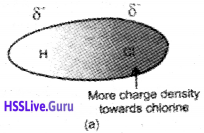
These type of interactions occur in polar molecules having permanent dipoles such as HCl, HBr, H2S, etc. Such molecules possess partial charges of opposite sign at their ends. The positive end of one molecule attracts the negative end of the other molecule and vice versa. A simple example is the of H-Cl in which chlorine being more electronegative acquires slight negative charge whereas hydrogen becomes slightly positively charged. The dipole-dipole inter-action then takes place in H-Cl as follows.
Plus One Chemistry Notes Chapter 5 States of Matter 1

Dipole-Induced Dipole Forces
These type of interactions are found in a mixture, containing polar and nonpolar molecules. When a nonpolar molecule is brought neara polar molecule, the positive end of the polar molecule attracts the electron cloud of the nonpolar molecule. Thus a polarity is induced in the nonpolar molecule. Then there will be attractive interacting between the polar molecule and the induced dipole of the nonpolar molecule.

Hydrogen Bond
Hydrogen bond can be defined as the attractive force which binds hydrogen atom of one molecule with the electronegative atom (F, O or N) of another molecule. When hydrogen is bonded to strongly electronegative element ‘X’, the electron pair shared between the two atoms moves far away from hydrogen atom. As a result, the hydrogen atom becomes, highly electropositive with respect to the other atom ‘X’. Since there is displacement of electrons towards X, the hydrogen acquires fractional positive charge (δ+) while ‘X’ attain fractional negative charge (δ). This results in the formation of a polar molecule having electrostatic force of attraction which can be represented as: Hδ+ – Xδ-

Plus One Chemistry Notes Chapter 5 States of Matter

The magnitude of H-bonding depends on the physical state of the compound. It is maximum in the solid state and minimum in the gaseous state. Thus, the hydrogen bonds have strong influence on the structure and properties of the compounds.

Types of Hydrogen Bonds
There are two types of hydrogen bonds

  1. Intermolecular hydrogen bond
  2. Intramolecular hydrogen bond

1. Intermolecular hydrogen bond:
It is formed between two different molecules of the same or different compounds. For example, H-bond in case of HF molecule, alcohol or water molecules, etc.

2. Intramolecular hydrogen bond:
It is formed when hydrogen atom is in between the two highly electronegative (F, O, N) atoms present within the same molecule. For example, in o-Nitrophenol the hydrogen is in between the two oxygen atoms as shown below:

Thermal Energy
Thermal energy is the energy of a body arising from motion of its atoms or molecules. It is directly proportional to the temperature of the substance. The movement of particles using thermal energy is called thermal motion.

Intermolecular Forces Vs Thermal Interactions
Intermolecular forces tend to keep the molecules together but thermal energy of the molecules tends to keep them apart. Three states of matter are the result of balance between intermolecular forces and the thermal energy of the molecules.

The Gaseous State

  • Gases are highly compressible.
  • Gases exert pressure equally in all directions.
  • Gases have much lower density than the solids and liquids.
  • The volume and the shape of gases are not fixed. These assume volume and shape of the container.
  • Gases mix evenly and completely in all proportions without any mechanical aid.

The Gas Laws

Boyle’s Law (Pressure – Volume Relationship)
On the basis of his experiments, Robert Boyle reached to the conclusion that at constant temperature, the pressure of a fixed amount of gas
varies inversely with its volume. This is known as Boyle’s law. It can be written as p ∝ \(\frac{1}{V}\)
where temperature(T) and number of moles(n)are constant.

Plus One Chemistry Notes Chapter 5 States of Matter

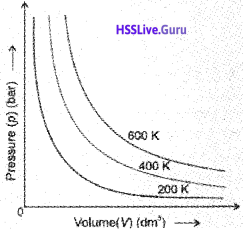
If a fixed amount of gas at constant temperature T occupying volume V1 at pressure p1 undergoes expansion, so that volume becomes V2 and pressure becomes p2, then according to Boyle’s law :
p1V1 = p2V2 = constant
\(\Rightarrow \frac{p_{1}}{p_{2}}=\frac{V_{2}}{V_{1}}\)
Plus One Chemistry Notes Chapter 5 States of Matter 2
Here T is constant and the graph is called isotherm

Charles’ Law (Temperature – Volume Relationship)
Charles’ law, which states that pressure remaining constant, the volume of a fixed mass of a gas is directly proportional to its absolute temperature. According to this law
Plus One Chemistry Notes Chapter 5 States of Matter 3

Here we use new temperature scale called the kelvin temperature scale or Absolute temperature scale, t °C in Celsius scaleis equal to (273.15+t) kelvin in kelvin scale.
Plus One Chemistry Notes Chapter 5 States of Matter 4

Each line of the volume vs temperature graph is called isobar. The lowest hypothetical or imaginary temperature at which gases are supposed to occupy zero volume is called Absolute zero.
We can see that the volume of the gas at – 273.15 °C will be zero.

Gay Lussac’s Law (Pressure-Temperature Relationship)
The relationship between pressure and temperature was given by Joseph Gay Lussac and is known as Gay Lussac’s law. It states that at constant volume, pressure of a fixed amount of a gas varies directly with the temperature. Mathematically,
P ∝ T
⇒ \(\frac{p}{T}\) = constant
This relationship can be derived from Boyle’s law and Charles’ Law.Each line of Pressure vs temperature (kelvin) graph at constant molar volume is called isochore.

Avogadro Law (Volume -Amount Relationship)
In 1811 Italian scientist Amedeo Avogadro tried to combine conclusions of Dalton’s atomic theory and Gay Lussac’s law of combining volumes which is now known as Avogadro law. It states that equal volumes of all gases under the same conditions of temperature and pressure contain equal number of molecules.

Mathematically we can write v α n where n is the number of moles.

Plus One Chemistry Notes Chapter 5 States of Matter

The number of molecules in one mole of a gas has been determined to be 6.022 *1023and is known as Avogadro constant. A gas that follows Boyle’s law, Charles’ law and Avogadro law strictly is called an ideal gas.

Ideal Gas Equation
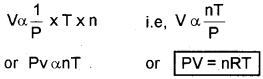
The combination of Boyle’s law, Charles’ law, and Avagadro’s law leads to an equation which gives the combined effect of change of temperature and pressure on the volume of a gas.
According to Boyle’s law, V α \(\frac{1}{P}\) ——- (i) (at constant T and n)
According to Charles’ Law, V α T ——- (ii) (at constant P and n)
According to Avogardro’s Law, V α n ——- (iii) (at constant T and P
Plus One Chemistry Notes Chapter 5 States of Matter 5

Where R is a constant known as the universal gas constant. The equation is known as ideal gas equation.

Density and Molar Mass of a Gaseous Substance
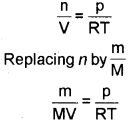
Ideal gas equation can be rearranged as follows:
Plus One Chemistry Notes Chapter 5 States of Matter 6
we get \(\frac{d}{M}=\frac{p}{R T}\)
(where d is the density)
On rearranging equation we get the relationship for calculating molar mass of a gas.
\(M=\frac{d R T}{p}\)

Dalton’s Law of Partial Pressures
The law was formulated by John Dalton in 1801. It states that the total pressure exerted by the mix-ture of non-reactive gases is equal to the sum of the partial pressures of individual gases.
PTotal = P1 + P2 + P3 + ………. (at constant T, V)

where ptotal is the total pressure exerted by the mixture of gases and p1, p2, p3 etc. are partial pressures of gases.

Partial pressure in terms of mole fraction
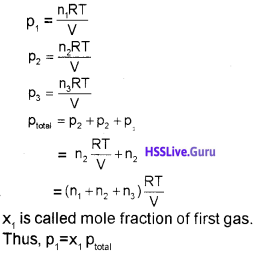
Plus One Chemistry Notes Chapter 5 States of Matter 7

Kinetic Molecular Theory Of Gases
Maxwell, Boltzmann, and others put forward a theoretical model of the gas. The theory is known as
Kinetic molecular theory of gases or microscopic
model of gases.
Postulates of kinetic molecular theory.

  1.  All gases are made up of a large number of extremely small particles called molecules.
  2. The molecules are separated from one another by large distances so that the actual volume of the molecules is negligible as compared to the total volume of gas.
  3. The molecules are in a state of continuous rapid motion in all directions. During their motion, they keep on colliding with one another and also with the walls of the container.
  4. Molecular collisions are perfectly elastic i.e. there is no net loss or gain of energy in their collisions. However, there may be redistribution of energy during such collisions.
  5. There are no attractive forces between the molecules. They move completely independent of each other.
  6. The pressure exerted by the gas is due to the bombardment of its molecules on the walls of the container.
  7. At any instant, different molecules possess different velocities and hence different energies. However, the average kinetic energy of the molecules is directly proportional to its absolute temperature.

Behaviour Of Real Gases:
Deviation From Ideal Gas Behaviour
There are two types of curves are seen in the graph. In the curves for dihydrogen and helium, as the pressure increases the value of pV also increases. The second type of plot is seen in the case of other gases like carbon monoxide and methane. In these plots first, there is a negative deviation from ideal behaviour, the pV value decreases with increase in pressure and reaches to a minimum value characteristic of a gas. After that pV value starts increasing. The curve then crosses the line for ideal gas and after that shows positive deviation continuously. It is thus, found that real gases do not follow ideal gas equation perfectly under all conditions.
Plus One Chemistry Notes Chapter 5 States of Matter 8

We find that two assumptions of the kinetic theory do not hold good. These are

  1. There is no force of attraction between the molecules of a gas.
  2. Volume of the molecules of a gas is negligibly small in comparison to the space occupied by the gas.

If assumption (a) is correct, the gas will never liquify. This means that forces of repulsion are powerful enough and prevent squashing of molecules in tiny volume. If assumption (b) is correct, the pressure vs volume graph of experimental data (real gas) and that theoritically calculated from Boyles law (ideal gas) should coincide.

Plus One Chemistry Notes Chapter 5 States of Matter

The volume occupied by the molecules also becomes significant because instead of moving in volume V, these are now restricted to volume (V-nb) where nb is approximately the total volume occupied by the molecules themselves. Here, b is a constant. Having taken into account the corrections for pressure and volume, we can rewrite equation as This equation is known as van der Waals’ equation.

Value of ‘a’ is measure of magnitude of intermolecular attractive forces within the gas and is independent of temperature and pressure.
Real gases show ideal behaviour when conditions of temperature and pressure are such that the intermolecular forces are practically negligible. The real gases show ideal behaviour when pressure approaches zero.

The deviation from ideal behaviour can be measured in terms of compressibility factor Z, which is the ratio of product pV and nRT. Mathematically
\(z=\frac{p V}{n R T}\)

For ideal gas Z = 1 at all temperatures and pressures because pV = nRT.
At high pressure, all the gases have Z > 1. These are more difficult to compress. At intermediate pressures, most gases have Z < 1. The temperature at which a real gas obeys ideal gas law over an appreciable. range of pressure is called Boyle temperature or Boyle point.

Liquefaction Of Gases
The highest temperature at which liquefaction of the gas first occurs is called Critical temperature (T<sub>c</sub>). Volume of one mole of the gas at critical temperature is called critical volume (V<sub>c</sub>) and pressure at this temperature is called critical pressure (P<sub>c</sub>).
The critical temperature, pressure, and volume are called critical constants.

Liquid State
Intermolecular forces are stronger in liquid state than in gaseous state.

Vapour Pressure
The pressure exerted by the vapour on the walls of the container is known as vapour pressure.

Surface Tension
Liquids tend to minimize their surface area. The molecules on the surface experience a net downward force and have more energy than the molecules in the bulk, which do not experience any net force. This characteristic property of liquids is known as surface tention. Liquids tend to have minimum number of molecules at their surface due to surface tention.
Plus One Chemistry Notes Chapter 5 States of Matter 9

If surface of the liquid is increased by pulling a molecule from the bulk, attractive forces will have to be overcome. This will require expenditure of energy. The energy required to increase the surface area of the liquid by one unit is defined as surface energy.

Viscosity
It is a common observation that certain liquids flow faster than others. For example, liquid like water, ether, etc. flow rapidly while liquids like glycerine, castor oil, honey, etc. flow slowly. These differences in flow rates result from a property known as viscosity. Every liquid has some internal resistance to flow. This internal resistance to flow possessed by a liquid is called its viscosity. Liquids which flow slowly have high internal resistance and are said to have high viscosity. On the other hand, liquids which flow rapidly have low internal resistance and are said to have low viscosity.

Plus One Chemistry Notes Chapter 5 States of Matter

Viscosity is also related to intermolecular forces in liquids. If the intermolecular forces are large, the vis-cosity will be high. Viscosity of a liquid decreases with rise in temperature. This is because at higher temperature the attractive forces between molecules are overcome by the increased kinetic energies of the molecules.

Ncert Supplementary Syllabus

Kinetic Energy And Molecular Speeds
Molecules of gases remain in continuous motion. While moving they collide with each other and with the walls of the container. This results in change of their speed and redistribution of energy. So the speed and energy of all the molecules of the gas at any instant are not the same. Thus, we can obtain only average value of speed of molecules. If there are n number of molecules in a sample
and their individual speeds are u1, u2, ……… un, then average speed of molecules uav can be calculated as follows:
\(u_{a v}=\frac{u_{1}+u_{2}+\ldots u_{n}}{n}\)

Maxwell and Boltzmann have shown that actual distribution of molecular speeds depends on temperature and molecular mass of a gas. Maxwell derived a formula for calculating the number of molecules possessing a particular speed. Fig. A(1) shows schematic plot of number of molecules vs. molecular speed at two different temperatures T1 and T2 (T2 is higher than T1). The distribution of speeds shown in the plot is called Maxwell-Boltzmann distribution of speeds.
Plus One Chemistry Notes Chapter 5 States of Matter 10

The graph shows that number of molecules possessing very high and very low speed is very small. The maximum in the curve represents speed possessed by maximum number of molecules. This speed is called most probable speed, ump. This is very close to the average speed of the molecules. On increasing the temperature most probable speed increases. Also, speed distribution curve broadens at higher temperature. Broadening of the curve shows that number of molecules moving at higher speed increases. Speed distribution also depends upon mass of molecules. At the same temperature, gas molecules with heavier mass have slower speed than lighter gas molecules. For example, at the same temperature, lighter nitrogen molecules move faster than heavier chlorine molecules. Hence, at any given temperature, nitrogen molecules have higher value of most probable speed than the chlorine molecules. Though at a particular temperature the individual speed of molecules keeps changing, the distribution of speeds remains same.
Plus One Chemistry Notes Chapter 5 States of Matter 11

The kinetic energy of a particle is given by the expression:
Kinetic Energy = \(\frac{1}{2}\) mu²
Therefore, if we want to know average translational kinetic energy, \(\frac{1}{2} m \overline{u^{2}}\) , for the movement of a gas particle in a straight line, we require the value of mean of square of speeds, \(\overline{u^{2}}\), of all molecules. This is represented as follows:
\(u^{2}=\frac{u_{1}^{2}+u_{2}^{2}+\ldots . u_{n}^{2}}{n}\)

Plus One Chemistry Notes Chapter 5 States of Matter

The mean square speed is the direct measure of the average kinetic energy of gas molecules. If we take the square root of the mean of the square of speeds then we get a value of speed which is different from most probable speed and average speed. This speed is called root mean square speed and is given by the expression as follows:
\(u_{m s}=\sqrt{u_{2}}\)

Root mean square speed, average speed and the most probable speed have following relationship:
urms uav ump

The ratio between the three speeds is given below:
ump : uav : urms :: 1 : 1.128 : 1.224

Plus One Computer Science Notes Chapter 9 String Handling and I/O Functions

Students can Download Chapter 9 String Handling and I/O Functions Notes, Plus One Computer Science Notes helps you to revise the complete Kerala State Syllabus and score more marks in your examinations.

Kerala Plus One Computer Science Notes Chapter 9 String Handling and I/O Functions

Summary
String handling using arrays:
A string is a combination of characters hence char data type is used to store string. A string should be enclosed in double quotes. In C++ a variable is to be declared before it is used.Eg. “BVM HSS KALPARAMBU”.

Plus One Computer Science Notes Chapter 9 String Handling and I/O Functions

Memory allocation for strings:
To store “BVM” an array of char type is used. We have to specify the size. Remember each and every string is end with a null (\0) character. So we can store only size- 1 characters in a variable. Please note that \0 is treated as a single character. \0 is also called as the delimiter.
char school_name[4]; By this we can store a maximum of three characters.
Plus One Computer Science Notes Chapter 9 String Handling and IO Functions 1
Consider the following declarations

  • char my_name[10] = ”Andrea”;
  • char my_name2[ ] = ”Andrea”;
  • char str[ ] = ”Hello World”

In the first declaration 10 Bytes will be allocated but it will use only 6 + 1 (one for ‘\0’) = 7 Bytes the remaining 3 Bytes will be unused. But in the second declaration the size of the array is not mentioned so only 7 Bytes will be allocated and used hence no wastage of memory.

Similarly in the third declaration the size of the array is also not mentioned so only 12( one Byte for space and one Byte for ‘\0’) Bytes will be allocated and used hence no wastage of memory

Input/output operations on strings:
Consider the following code
#include<iostream>
using namespace std;
int main()
{
char name[20];
cout<<“Enter your name:”;
cin>>name;
cout<<“Hello “<<name;
}
If you run the program you will get the prompt as follows
Enter your name: Alvis Emerin
The output will be displayed as follows and the “Emerin” will be truncated.
Hello Alvis
This is because of cin statement that will take upto the space. Here space is the delimiter. To resolve this gets() function can be used. To use gets() and puts() function the header file stdio.h must be included. gets() function is used to get a string from the keyboard including spaces.

puts() function is used to print a string on the screen. Consider the following code snippet that will take the input including the space.
#include<iostream>
#include<cstdio>
using namespace std;
int main()
{
char name[20];
cout<<“Enter your name:”;
gets(name);
cout<<“Hello “<<name;
}

Plus One Computer Science Notes Chapter 9 String Handling and I/O Functions

More console functions:
Plus One Computer Science Notes Chapter 9 String Handling and IO Functions 2

Stream functions for I / O operations:
Somefunctions that are available in the header file iostream.h to perforrn I/O operations on character and strings(stream of characters). It transfers streams of bytes between memory and objects. Keyboard and monitor are considered as the objects in C++.

Input functions:
The input functions like get( )(to read a character from the keyboard) and getline() (to read a line of characters from the keyboard) is used with cin and dot(.) operator.
Plus One Computer Science Notes Chapter 9 String Handling and IO Functions 3
eg:
#include<iostream>
using namespace std;
int main()
{
char str[80],ch=’z’;
cout<<“enter a string that end with z:”;
cin.getline(str,80,ch);
cout<<str;
}
If you run the program you will get the prompt as follows
Enter a string that end with z: Hi I am Jobi. I am a teacher. My school is BVM HSS The output will be displayed as follows and the string after ‘z’ will be truncated.
Hi, I am Jobi. I am a teacher

Plus One Computer Science Notes Chapter 9 String Handling and I/O Functions

Output function:
The outputt functions like put() (to print a character on the screen) and write() (to print a line of characters on the screen) is used with cout and dot(.) operator.
Plus One Computer Science Notes Chapter 9 String Handling and IO Functions 4


Plus One Computer Science Notes Chapter 8 Arrays

Students can Download Chapter 8 Arrays Notes, Plus One Computer Science Notes helps you to revise the complete Kerala State Syllabus and score more marks in your examinations.

Kerala Plus One Computer Science Notes Chapter 8 Arrays

Summary
An array is a collection of elements with same data type Or with the same name we can store many elements, the first or second or third, etc can be distinguished by using the index(subscript). The first element’s index is 0, the second elements index is 1, and so on.

Plus One Computer Science Notes Chapter 8 Arrays

Declaring arrays:
Suppose we want to find the sum of 100 numbers then we have to declare 100 variables to store the values. It is a laborious work. Hence the need for array arises.
Syntax: data_type array_name[size];
To store 100 numbers the array declaration is as follows
int n[100]; By this we store 100 numbers. The index of the first element is 0 and the index of last element is 99.

Memory allocation for arrays:
The amount of memory requirement is directly related to its type and size,

  • int n[100]; It requires 2Bytes(for each integer) × 100 = 200 Bytes.
  • float d[100]; It requires 4Bytes(for each float) × 100=400 Bytes.

Array initialization:
Array can be initialized in the time of declaration. eg: int age[4] = {16, 17, 15, 18};

Accessing elements of arrays:
Normally loops are used to store and access elements in an array.
eg:
int mark[50], i;
for(i=0;i<50;i++)
{
cout<<“Enter value for mark”<<i+1;
cin>>mark[i];
}
cout<<“The marks are given below:”;
for(i=0;i<50;i++)
cout<<mark[i];

Array operations:
Traversal:
Accessing all the elements of an array is called traversal.

Plus One Computer Science Notes Chapter 8 Arrays

Sorting:
Arranging elements of an array in an order(ascending or descending)
1. Bubble sort:
It is a simple sorting method. In this sorting considering two adjascent elements if it is out of order, the elements are interchanged. After the first iteration the largest(in the case of ascending sorting) or smallest(in the case of descending sorting) will be the end of the array. This process continues.

2. Selection sort:
In selection sort the array is divided into two parts, the sorted part and unsorted part. first smallest element in the unsorted part is searched and exchanged with the first element. Now there is 2 parts sorted part and unsorted part. This process continues.

Searching:
It is the process of finding the position of the given element.
1. Linear search:
In this method each element of the array is compared with the element to be searched starting from the first element. If it finds the position of the element in the array is returned.

2. Binary search:
It uses a technique called divide and conquer method. It can be performed only on sorted arrays. First we check the element with the middle element. There are 3 possibilities. The first possibility is the searched element is the middle element then search can be finished.

The second possibility is the element is less than the middle value so the upper bound is the middle element. The third possibility is the element is greater than the middle value so the lower bound is the middle element. Repeat this process.

Two dimensional (2D) arrays:
Some occasions we have to store 6 different marks of 50 students. For this we use 2D arrays. An array with two subscripts is used.
eg: int mark[r][c]; Here r is the row and c is the column.

Declaring 2D arrays:
Syntax: datatype array_name[rows][columns];
The elements of this array is referred as mark[0][0], mark[0][1], mark[r – 1][c – 1].
eg: int m[5][5]; This array can store 5 × 5 = 25 elements.

Matrices as 2D arrays:
Matrix is a concept in mathematics that can be represented by 2D array with rows and columns. A nested loop(a loop contains another loop) is used to store and access elements in an array.

Plus One Computer Science Notes Chapter 8 Arrays

Multi-dimensional arrays:
3 Dimensional(3D) array is an example for this.
Syntax: data_type array_name[size1 ][size2][size3];
eg: int m[5][5][5]; This array can store 5 × 5 × 5 = 125 elements.

Plus One Computer Science Notes Chapter 7 Control Statements

Students can Download Chapter 7 Control Statements Notes, Plus One Computer Science Notes helps you to revise the complete Kerala State Syllabus and score more marks in your examinations.

Kerala Plus One Computer Science Notes Chapter 7 Control Statements

Summary
These are classified into two decision making and iteration statements

Plus One Computer Science Notes Chapter 7 Control Statements

Decision making statements:
if statement:
Syntax: if (condition)
{
Statement block;
}
First the condition is evaluated if it is true the statement block will be executed otherwise nothing will be happened.

if…else statement:
Syntax: if (condition)
{
Statement block1;
}
else
{
Statement block2;
}

Nested if:
An if statement contains another if statement completely then it is called nested if.
if (condition 1)
{
if (condition 2)
{
Statement block;
}
}
The statement block will be executed only if both the conditions evaluated are true.

The else if ladder:
The syntax will be given below
if (expression1)
{
statement block1;
}
else if (expression 2)
{
statement block 2;
}
else if (expression 3)
{
statement block 3;
}
……..
else
{
statement block n;
}
Here firstly, expression 1 will be evaluated if it is true only the statement blockl will be executed otherwise expression 2 will be evaluated if it is true only the statement block2 will be executed and so on. If all the expression evaluated is false then only statement block n will be executed

Plus One Computer Science Notes Chapter 7 Control Statements

switch statement:
It is a multiple branch statement. Its syntax is given below.
switch(expression)
{
case value: statements;break;
………
default: statements;
}
First expression evaluated and selects the statements with matched case value. If all values are not matched the default statement will be executed.

Conditional operator:
It is a ternary operator hence it needs three operands. The operator is “?:”.
Syntax:
expression ? value if true : value if false. First evaluates the expression if it is true the second part will be executed otherwise the third part will be executed.

Iteration statements:
If we have to execute a block of statements more than once then iteration statements are used.

while statement:
It is an entry controlled loop. An entry controlled loop first checks the condition and execute(or enters in to) the body of loop only if it is true. The syntax is given below
Loop variable initialised
while(expression)
{
Body of the loop;
Update loop variable;
}
Here the loop variable must be initialised before the while loop. Then the expression is evaluated if it is true then only the body of the loop will be executed and the loop variable must be updated inside the body. The body of the loop will be executed until the expression becomes false.

Plus One Computer Science Notes Chapter 7 Control Statements

for statement:
The syntax of for loop is
for(initialization; checking ; update loop variable)
{
Body of loop;
}
First part, initialization is executed once, then checking is carried out if it is true the body of the for loop is executed. Then loop variable is updated and again checking is carried out this process continues until the checking becomes false. It is an entry controlled loop.

do-while statement:
It is an exit controlled loop. Exit control loop first execute the body of the loop once even if the condition is false then check the condition.
do
{
Statements
} while(expression);
Here the body executes at least once even if the condition is false. After executing the body it checks the expression if it false it quits the body otherwise the process will be continue.

Plus One Computer Science Notes Chapter 6 Data Types and Operators

Students can Download Chapter 6 Data Types and Operators Notes, Plus One Computer Science Notes helps you to revise the complete Kerala State Syllabus and score more marks in your examinations.

Kerala Plus One Computer Science Notes Chapter 6 Data Types and Operators

Summary
Concepts of data types:
The nature of data is different, data type specifies the nature of data we have to store.

C++ data types:
Plus One Computer Science Notes Chapter 6 Data Types and Operators 1

Plus One Computer Science Notes Chapter 6 Data Types and Operators

Fundamental data types:
It is also called built in data type. They are int, char, float, double and void
1. int data type:
It is used to store whole numbers without fractional (decimal point) part. It can be either negative or positive. It consumes 4 bytes (32 bits) of memory. i.e. 232 numbers. That is 231 negative numbers and 231 positive numbers (0 is considered as +ve) So a total of 232 numbers. We can store a number in between -231 to + 231-.

2. char data type:
Any symbol from the keyboard, eg: ‘A’, ‘?’, ‘9’ and so on. It consumes one byte( 8 bits) of memory. It is internally treated as integers, i.e. 28 = 256 characters. Each character is having a ASCII code, ‘a’ is having ASCII code 97 and zero is having ASCII code 48.

3. float data type:
It is used to store real numbers i.e. the numbers with decimal point. It uses 4 bytes(32 bits) of memory. eg: 67.89, 89.9 E-15.

4. double data type:
It is used to store very large real numbers. It uses 8 bytes(64 bits) of memory.

5. void data type:
void means nothing. It is used to represent a function returns nothing.

  1. User defined Data types: C++ allows programmers to define their own data type. They are Structure(struct), enumeration (enum), union, class, etc.
  2. Derived data types: The data types derived from fundamental data types are called Derived data types. They are Arrays, pointers, functions, etc

Plus One Computer Science Notes Chapter 6 Data Types and Operators

Variables:
The named memory locations are called variable. A variable has three important things

  1. variable name: A variable should have a name
  2. Memory address: Each and every byte of memory has an address. It is also called location (L) value.
  3. Content: The value stored in a variable is called content. lt is also called Read(R) value.

Operators:
An operator is a symbol that performs an operation. The data on which operations are carried out are called operands. Following are the operators
1. lnput(>>) and output(<<) operators are used to perform input and output operation.
eg: cin>>n;
cout<<n;

2. Arithmetic operators:
It is a binary operator. It is used to perform addition(+), subtraction(-), division (/), multiplication(*) and modulus(%- gives the remainder) operations.
eg: If x = 10 and y = 3 then
Plus One Computer Science Notes Chapter 6 Data Types and Operators 2
x/y = 3, because both operands are integer. To get the floating point result one of the operand must be float.

3. Relational operator:
It is also a binary operator. It is used to perform comparison or relational operation between two values and it gives either true(1) or false(O). The operators are <, <=, >, >=, == (equality)and !=(not equal to)
eg: If x = 10 and y = 3 then
Plus One Computer Science Notes Chapter 6 Data Types and Operators 3

4. Logical operators:
Here AND(&&) , OR(||) are binary operators and NOT (!) is a unary operator. It is used to combine relational operations and it gives either true(1) orfalse(O). If x = 1 and y = 0 then

Both operands must be true to get a true value in the case of AND (&&) operation. If x = 1 and y = 0 then
Plus One Computer Science Notes Chapter 6 Data Types and Operators 5
Either one of the operands must be true to get a true value in the case of OR(||) operation. If x = 1 and y = 0 then

!x!y
01

Plus One Computer Science Notes Chapter 6 Data Types and Operators

5. Conditional operator:
It is a ternary operator hence it needs three operands. The operator is”?:”.
Syntax:
expression ? value if true : value if false. First evaluates the expression if it is true the second part will be executed otherwise the third part will be executed.
eg: If x = 10 and y = 3 then x>y ? cout<<x : cout<<y;
Here the output is 10

6. sizeof():
This operator is used to find the size used by each data type. eg: sizeof(int) gives 2.

7. Increment and decrement operator:
These are unary operators.

  • Increment operator (++): It is used to increment the value of a variable by one i.e., x++ is equivalent to x = x + 1.
  • Decrement operator (- -): It is used to decrement the value of a variable by one i.e., x – – is equivalent to x = x – 1.

8. Assignment operator (=):
lt is used to assign the value of a right side to the left side variable.eg. x = 5; Here the value 5 is assigned to the variable x.

Expressions:
It is composed of operators and operands
Plus One Computer Science Notes Chapter 6 Data Types and Operators

Arithmetic expression:
It is composed of arithmetic operators and operands. In this expression the operands are integers then it is called Integer expression. If the operands are real numbers then it is called Floating point expression. If the operands are constants then it is called constant expression.

Relational expression:
It is composed of relational operators and operands

Logical expression:
It is composed of logical operators and operands

Statements:
Statements are smallest executable unit of a programming language. Each and every statement must be end with semicolon(;).

Declaration statement:
Each and every variable must be declared before using it. eg: int age;

Assignment statements:
Assignment operator is used to assign the value of RHS to LHS. eg: x = 100

Input statements:
lnput(>>) operator is used to perform input operation. eg: cin>>n;

Output statements:
output(<<) operator is used to perform output operation. eg: cout<<n;

Cascading of I/O operations:
The multiple use of input or output operators in a single statement is called cascading of i/o operators. eg: To take three numbers by using one statement is as follows
cin>>x>>y>>z;
To print three numbers by using one statement is as follows
cout<<x<<y<<z;

Plus One Chemistry Notes Chapter 3 Classification of Elements and Periodicity in Properties

Students can Download Chapter 3 Classification of Elements and Periodicity in Properties Notes, Plus One Chemistry Notes helps you to revise the complete Kerala State Syllabus and score more marks in your examinations.

Kerala Plus One Chemistry Notes Chapter 3 Classification of Elements and Periodicity in Properties

Introduction
The systematic classification of elements made the study of elements easy. In this unit, we will study the historical development of the periodic table and also learn how elements are classified.

Genesis Of Periodic Classification
While Dobereiner initiated the study of periodic relationship, it was Mendeleev who was responsible for publishing the Periodic Law for the first time. It states as follows:

The properties of the elements are a periodic function of their atomic weights.
Mendeleev arranged elements in horizontal rows and vertical columns of a table in order of their increasing ‘ atomic weights. Elements with similar properties occupied the same vertical column or group. He realized that some of the elements did not fit in with his scheme of classification if the order of atomic weight was strictly followed. He ignored the order of atomic weights, thinking that the atomic measurements might be incorrect, and placed the elements with similar properties together.

Plus One Chemistry Notes Chapter 3 Classification of Elements and Periodicity in Properties

At the same time, keeping his primary aim of arranging the elements of similar properties in the same group, he proposed that some of the elements were still undiscovered and, therefore, left several gaps in the table. He left the gap under aluminium and a gap under silicon, and called these elements Eka-Aluminium and Eka-Silicon. Mendeleev predicted the existence of gallium and germanium, and their general physical properties. These elements were discovered later.

Modern Periodic Law And The Present Form Of The Periodic Table
Modem periodic law states that “The physical and chemical properties of the elements are periodic functions of their atomic numbers”. Atomic number is equal to the nuclear charge and the elements are arranged in the increasing order of atomic number.

The period number correspond to the highest principal quantum number (n) of the elements.

Nomenclature Of Elements With Atomic Number Greater Than 100
The names (IUPAC) are derived directly form the atomic number using numerical roots for zero and numbers 1 to 9. The roots are linked together in the order of digits and ‘ium’ is added at the end. The roots for 0,1, 2 9 are nil, un, bi, tri, quad, pent, hex, sept, oct and enn respectively. For example, the element with atomic number 110 will have the name Ununnilium (Un+ un+nil + ium), The element with atomic number 114 has the name Ununquadium (un + un + quad + ium) and the element with atomic number 120 will be Unbinilium (un + bi + nil + ium).

Electronic Configurations And Types Of Elements: s, p, d, f- Blocks

The s-Block Elements
The elements of Group 1 (alkali metals) and Group 2 (alkaline earth metals) which have ns1 and ns2 outermost electronic configuration belong to the s-Block Elements. They are all reactive metals with low ionization enthalpies.

They lose the outermost electron(s) readily to form 1+ ion (in the case of alkali metals) or 2+ ion (in the case of alkaline earth metals). The metallic character and the reactivity increase as we go down the group. Because of high reactivity they are never found pure in nature.

Plus One Chemistry Notes Chapter 3 Classification of Elements and Periodicity in Properties

The compounds of the s-block elements, with the exception of those of lithium and beryllium are predominantly ionic.

The p-Block Elements
The p-Block Elements comprise those belonging to group 13 to 18 and these together with the s-Btock Elements are called the Representative Elements or Main Group Elements. The outermost electronic configuration varies from ns2np1 to ns2np6in each period. At the end of each period is a noble gas element with a closed valence shell ns2np6 configuration. All the orbitals in the valence shell of the noble gases are completely filled by electrons and it is very difficult to alter this stable arrangement by the addition or removal of electrons. The noble gases thus exhibit very low chemical reactivity. Preceding the noble gas family are two chemically important groups of non-metals. They are the halogens (Group 17) and the chalcogens (Group 16). These two groups of elements have high negative electron gain enthalpies and readily add one or two electrons respectively to attain the stable noble gas configuration. The non-metallic character increases as we move from left to right across a period and metallic character increases as we go down the group.

The d-Block Elements (Transition Elements)
These are the elements of group 3 to 12 in the centre of the Periodic Table. These are characterised by the filling of inner d orbitals by electrons and are therefore referred to as d-Block Elements. These elements have the general outer electronic configuration (n-1) d1-10ns^2. They are all metals. They mostly form coloured ions, exhibit variable valence (oxidation states), paramagnetism and oftenly used as catalysts. However, Zn, Cd and Hg which have the electronic configuration, (n-1) d10ns2 do not show most of the properties of transition elements. In a way, transition metals form a bridge between the chemically active metals of s-block elements and the less active elements of groups 13 and 14 and thus take their familiar name “Transition Elements”.

The f-Block Elements (Inner-Transition Elements)
The two rows of elements at the bottom of the Periodic Table, called the Lanthanoids, Ce(Z = 58) -Lu(Z = 71) and actinoids, Th(Z = 90)-Lr(Z= 103) are characterised by the outer electronic configuration (n-2)f1-14 (n-1 )d°-1ns2. The last electron added to each element is filled in f- orbital. These two series of ‘ elements are hence called the Inner Transition Elements (f-Block Elements). They are all metals. Within each series, the properties of the elements are quite similar. The elements after Uranium are called Transuranium Elements.

Plus One Chemistry Notes Chapter 3 Classification of Elements and Periodicity in Properties

Metals, Non-metals and Metalloids. In addition to displaying the classification of elements into s, p, d and f-blocks, they can be divided into Metals and Non-Metals. Metals usually have high melting and boiling points. They are good conductors of heat and electricity. They are malleable (can be flattened into thin sheets by hammering) and ductile (can be drawn into wires). In contrast, non-metals are located at the top right hand side of the Periodic Table.

In fact, in a horizontal row, the property of elements change from metallic on the left to non-metallic on the right. Non-metals are usually solids or gases at room temperature with low melting and boiling points (boron and carbon are exceptions). They are poor conductors of heat and electricity. Most nonmetallic solids are brittle and are neither malleable nor ductile. The elements become more metallic as we go down a group; the nonmetallic character increases as one goes from left to right across the Periodic Table. The elements (e.g., silicon, germanium, arsenic, antimony and tellurium) running diagonally across the Periodic Table show properties that are characteristic of both metals and nonmetals. These elements are called Semi-metals or Metalloids.

Periodic Trends In Properties Of Elements
Most of the properties such as atomic radius, ionic radius, Ionisation enthalpy, electron gain enthalpy and electron negativity are directly related to electronic configuration of their atoms. They show variation with change in atomic number within a period or a group.

Trends In Physical Properties

1. Atomic Radius :
lt is defined as the distance from the centre of the nucleus of an atom to the outermost shell of electrons. Electron cloud surrounding the atom does not have a sharp boundary since, the determination of the atomic size cannot be precise. Hence it is expressed in terms of different types of radii. Some of these are covalent radius and metallic radius. Covalent radius is defined as one half of the distance between the centres of nuclei of two similar atoms bonded by a single covalent bond. Metallic radius may be defined as half of the internuclear distance between two adjacent atoms in the metallic crystal.

Plus One Chemistry Notes Chapter 3 Classification of Elements and Periodicity in Properties

2. Ionic Radius:
The removal of an electron from an atom results in the formation of a cation, whereas gain of an electron leads to an anion. The ionic radii can be estimated by measuring the distances between cations and anions in ionic crystals. When we find some atoms and ions which contain the same number of electrons, we call them isoelectronic species. For example, O2-, F~, Na+ and Mg2+ have the same number of electrons (10). Their radii would be different because of their different nuclear charges.

3. Ionization Enthalpy:
A quantitative measure of the tendency of an element to lose electron is given by its Ionization Enthalpy. It represents the energy required to remove an electron from an isolated gaseous atom (X) in its ground state. To understand the trends in ionization enthalpy, we have to consider two factors: (i) the attraction of electrons towards the nucleus, and (ii) the repulsion of electrons from each other. The effective nuclear charge experienced by a valence electron in an atom will be less than the actual charge on the nucleus because of “shielding” or “screening” of the valence electron from the nucleus by the intervening core electrons.

The first ionization enthalpy of boron (Z = 5) is slightly less than that of beryllium (Z = 4) even though the former has a greater nuclear charge. It is because, s-electron is attracted to the nucleus more than a p-electron. In beryllium, the electron removed during the ionization is an s-electron whereas the electron removed during ionization of boron is a p-electron. The penetration of a 2s-electron to the nucleus is more than that of a 2p-electron; hence the 2p electron of boron is more shielded from the nucleus by the inner core of electrons than the 2s electrons of beryllium. Therefore, it is easier to remove the 2p-electron from boron Compared to the removal of a 2s-electron from beryllium.

Plus One Chemistry Notes Chapter 3 Classification of Elements and Periodicity in Properties

Thus, boron has a smaller first ionization enthalpy than beryllium. Another “anomaly” is the smaller first ionization enthalpy of oxygen compared to nitrogen. This arises because in the nitrogen atom, three 2p-electrons reside in different atomic orbitals (Hund’s rule) whereas, in the oxygen atom, two of the four 2p-electrons must occupy the same 2p-orbital resulting in an increased electron-electron repulsion. Consequently, it is easier to remove the fourth 2p-electron from oxygen than it is, to remove one of the three 2p-electrons from nitrogen.

4. Electron Gain Enthalpy :
When an electron is added to a neutral gaseous atom (X) to convert it into a negative ion, the enthalpy change accom-panying the process is defined as the Electron Gain Enthalpy (∆eg H).

5. Electronegativity:
A qualitative measure of the ability of an atom in a chemical compound to attract shared electrons to itself is called electronegativity. Unlike ionization enthalpy and electron gain enthalpy, it is not a measurable quantity. However, a number of numerical scales of electronegativity of elements viz., Pauling scale, Mulliken-Jaffe scale, Allred-Rochow scale have been developed.

Trends In Chemical Properties
1. Oxidation State :
The atomic property, valency is better explained in terms of oxidation state. It is the charge which an atom of element has or appears to have when present in the combined state. Electronegative elements generally acquire negative oxidation states while electropositive elements acquire positive oxidation states.

2. Anomalous properties of second-period elements:
The first element of each group in s and p block differs in many respects from the remaining members of the respective groups. This is due to their small size, high charge/ radius ratio, high electronegativity and availability of less valence orbitals. The first member has only 4 valence orbitals (2s, 2p) whereas the second member of the same group will have nine valence orbitals (3s, 3p, 3d) for bonding. B can form only (BF4) while Al forms (AlF6)3-

Plus One Chemistry Notes Chapter 3 Classification of Elements and Periodicity in Properties

In group 1 only Li forms covalent compounds and in many respects, Li resembles Mg of group 2. Similarly, Be resembles Al of group 13. This type of similarity in properties is known as diagonal relationship.

Chemical Reactivity
Across a period ionisation enthalpy increases and electron gain enthalpy becomes more negative. Thus elements at the extreme left show lower ionisation enthalpies (more electropositive nature) and those at the right (excluding nobel gases) show larger negative electron gain enthalpies (more electronegative). Therefore high chemical reactivity is found with elements at the two extremes compared to those at the centre. Electropositivity leads to metallic behaviour and electronegativity leads to non-metallic behaviour.

Plus One Computer Science Notes Chapter 5 Introduction to C++ Programming

Students can Download Chapter 5 Introduction to C++ Programming Notes, Plus One Computer Science Notes helps you to revise the complete Kerala State Syllabus and score more marks in your examinations.

Kerala Plus One Computer Science Notes Chapter 5 Introduction to C++ Programming

Summary
It is developed by Bjarne Stroustrup. It is an extension of C Language.

Plus One Computer Science Notes Chapter 5 Introduction to C++ Programming

Character set:
To study a language first we have to familiarize the character set. For example to study English language first we have to study the alphabets. Similarly here the character set includes letters(A to Z & a to z), digits(0 to 9), special characters(+, -, ?, *, /, …..) white spaces(non printable) etc..

Token:
It is the smallest individual units similar to a word in English or Malayalam language. C++ has 5 tokens
1. Keywords:
These are reserved words for the compiler. We can’t use for any other purposes eg: float is used to declare variable to store numbers with decimal point. We can’t use this for any other purpose

2. Identifier:
These are user defined words. Eg: variable name, function name, class name, object name, etc…

3. Literals (Constants):
Its value does not change during execution
(a) Integer literals:
Whole numbers without fractional parts are known as integer literals, its value does not change during execution. There are 3 types decimal, octal and hexadecimal.
eg:

  • For decimal 100, 150, etc
  • For octal 0100, 0240, etc
  • For hexadecimal 0x100, 0x1A, etc

(b)Float literals:
A number with fractional parts and its value does not change during execution is called floating point literals. eg: 3.14157, 79.78, etc.

(c) Character literal-: A valid C++ character enclosed in single quotes, its value does not change during execution. eg: ‘m’, ‘f ’ etc

(d) String literal:
One or more characters enclosed in double quotes is called string constant. A string is automatically appended by a null character(‘\0’)
eg: “Mary’s”, ’’India”, etc.

4. Punctuators:
In English or Malayalam language punctuation mark are used to increase the readability but here it is used to separate the tokens. eg: {,}, (,).

5. Operators:
These are symbols used to perform an operation(Arithmetic, relational, logical, etc…)

Plus One Computer Science Notes Chapter 5 Introduction to C++ Programming

Integrated Development Environment(IDE):
It is used for developing programs

  1. It helps to write as well as editing the program.
  2. It helps to compile the program and linking it to other (header files and other user) programs
  3. It helps to run the program

Turbo C++ IDE:
Following is an C++ IDE
Plus One Computer Science Notes Chapter 5 Introduction to C++ Programming 1
(a) Opening the edit window:
Method I: File → Click the menu item New
Method II: Press Alt and F simultaneously then press N

(b) Saving the program:
Click File → Save or Press Function key F2 or Alt + F and then press S. Then give a file name and press ok.

(c) Running/executing the program:
Press Alt + R then press R OR Click Run → press R, OR Press Ctrl + F9

(d) Viewing the output:
Press Alt + F5

(e) Closing Turbo C++ IDE:
Click File → then press Quit menu Or Press Alt + X

Plus One Computer Science Notes Chapter 5 Introduction to C++ Programming

Geany IDE
Plus One Computer Science Notes Chapter 5 Introduction to C++ Programming 2
Step 1: Take Geany Editor and type the program (source code)
Step 2: Save the file with extension .cpp
Step 3: Compile the program by Click the Compile Option
Step 4: After successful compilation, Click Build option
Step 5: Then click on Execute option

Plus One Computer Science Notes Chapter 4 Principles of Programming and Problem Solving

Students can Download Chapter 4 Principles of Programming and Problem Solving Notes, Plus One Computer Science Notes helps you to revise the complete Kerala State Syllabus and score more marks in your examinations.

Kerala Plus One Computer Science Notes Chapter 4 Principles of Programming and Problem Solving

Summary
Problem solving using computers:
It has no intelligent quotient. Hence they are slaves and human beings are the masters. It can’t take its own decisions.
They can perform tasks based upon the instructions given by the humans (programmers) .

Plus One Computer Science Notes Chapter 4 Principles of Programming and Problem Solving

Approaches in problem solving:
Top down design:
Larger programs are divided into smaller ones and solve each tasks by performing simpler activities. This concept is known as top down design in problem solving

Bottom up design:
Here also larger programs are divided into smaller ones and the smaller ones are again subdivided until the lowest level of detail has been reached. We start solving from the lowest module onwards. This approach is called Bottom up design.

Phases in Programming:
1. Problem identification:
This is the first phase in programming. The problem must be identified then only it can be solved, for this we may have to answer some questions.

During this phase we have to identify the data, its type, quantity and formula to be used as well as what activities are involved to get the desired out put is also identified for example if you are suffering from stomach ache and consult a Doctor.

To diagnose the disease the Doctor may ask you some question regarding the diet, duration of pain, previous occurrences etc, and examine some parts of your body by using stethoscope X-ray, scanning etc.

2. Deriving the steps to obtain the solution:
There are two methods, Algorithm and flowchart, are used for this.
(a) Algorithm:
The step-by-step procedure to solve a problem is known as algorithm. It comes from the name of a famous Arab mathematician Abu Jafer Mohammed Ibn Musaa Al-Khowarizmi, The last part of his name Al-Khowarizmi was corrected to algorithm.

(b) Flowchart:
The pictorial or graphical representation of an algorithm is called flowchart.
Flow chart symbols are explained below
(i) Terminal (Oval):
Plus One Computer Science Notes Chapter 4 Principles of Programming and Problem Solving 1
It is used to indicate the beginning and ending of a problem.
(ii) Input/Output (parallelogram):
Plus One Computer Science Notes Chapter 4 Principles of Programming and Problem Solving 2
It is used to take input or print output.
(iii) Processing (Rectangle):
Plus One Computer Science Notes Chapter 4 Principles of Programming and Problem Solving 3
It is used to represent processing. That means to represent arithmetic operation such an addition, subtraction,multiplication and, etc.
(iv) Decision (Rhombus):
Plus One Computer Science Notes Chapter 4 Principles of Programming and Problem Solving 4
Plus One Computer Science Notes Chapter 4 Principles of Programming and Problem Solving

It is used to represent decision making. It has one entry flow and two exit flows but one exit path will be executed at a time.
(v) Flow lines (Arrows):
Plus One Computer Science Notes Chapter 4 Principles of Programming and Problem Solving 5
It is used to represent the flow of operation
(vi) Connector:
Plus One Computer Science Notes Chapter 4 Principles of Programming and Problem Solving 6

3. Coding:
The dummy codes (algorithm) or flowchart is converted into program by using a computer language such s Cobol, Pascal, C++, VB, Java, etc.

4. Translation:
The computer only knows machine language. It does not know HLL, but the human beings HLL is very easy to write programs. Therefore a translation’ is needed to convert a program written in HLL into machine code (object code).

During this step, the syntax errors of the program will be displayed. These errors are to be corrected and this process will be continued till we get “No errors” message. Then it is ready for execution.

5. Debugging:
The program errors are called ‘bugs’ and the process of detecting and correcting errors is called debugging. In general there are two types of errors syntax errors and logical errors. When the rules or syntax of the language are not followed then syntax errors occurred and it is displayed after compilation.

When the logic of a program is wrong then logical errors occurred and it is not displayed after compilation but it is displayed in the execution and testing phase.

Plus One Computer Science Notes Chapter 4 Principles of Programming and Problem Solving

6. Execution and Testing:
In this phase the program will be executed and give test data for testing the purpose of this is to determine whether the result produced by the program is correct or not. There is a chance of another type of error, Run time error, this may be due to inappropriate data.

7. Documentation:
It is the last phase in programming. A computerized system must be documented properly and it is an ongoing process that starts in the first phase and continues till its implementation. It is helpful for the modification of the program later.

Plus One Computer Science Notes Chapter 3 Components of the Computer System

Students can Download Chapter 3 Components of the Computer System Notes, Plus One Computer Science Notes helps you to revise the complete Kerala State Syllabus and score more marks in your examinations.

Kerala Plus One Computer Science Notes Chapter 3 Components of the Computer System

Summary
Hardware:
The tangible parts of a computer that we can touch and see are called hardware. Eg: Monitor, Keyboard, Mouse, CPU, Etc.

Plus One Computer Science Notes Chapter 3 Components of the Computer System

Processors:
It is the brain of the computer and consists of three components

  • Arithmetic Logic Unit(ALU) – As the name implies it performs all calculations and comparison operations.
  • Control Unit(CU) – It controls overall functions of a computer
  • Registers – It stores the intermediate results temporarily.

A CPU is an Integrated Circuit(IC) package contains millions of transistors and other components. Popular Processors are Intel core i3, core i5, core i7, AMD Quadcore etc.

Important registers inside a CPU are:

  1. Accumulator: After performing an operation (arithmetic or logical) the result is stored in the accumulator
  2. Memory Address Register(MAR): It stores the address of memory location to which data is either read or written by the processor.
  3. Memory Buffer Register (MBR): It stores the data, either to be written to or read from the memory by the processor.
  4. Instruction Register(IR): It stores the instructions to be executed by the processor.
  5. Program Counter(PC): It stores the address of the next instruction to be executed by the processor.

Motherboard:
It is a Printed Circuit Board(PCB). All the major components like Processor (Remember the processor must be compatible with the Motherboard), RAM, ROM, HDD, Graphics card, Sound card, etc are connected to the Motherboard.

Peripherals and Ports:

  1. Serial Port: It transmits data one bit at a time(eg: 101000001010 ). Its transmission speed is low but it is cheaper. It is suitable to transmit data over long distance.
  2. Parallel port: It can transmit data more than one bit at a time. It is faster and used to connect printer.
  3. USB (Universal Serial Bus) port: It has high bandwidth hence it is faster. Nowadays it is used to connect all the devices like keyboard,mouse,printer, scanner, pen drive, digital camera, mobile phones, dongle etc.
  4. LAN port: By using this port we can connect our computer to another network by a cable.
  5. PS/2(Personal System/2) port: It is introduced by IBM for connecting keyboard and mouse earlier.
  6. Audio ports: It is used to connect audio devices like speakers, mic etc.
  7. Video Graphics Array(VGA) port: It is introduced by IBM to connect monitor or LCD projector to a computer.
  8. High Definition Multimedia Interface(HDMI): Through this port we can connect high definition quality video and multi-channel audio over a single cable.

Memory:
Storage Unit(Memory Unit): A computer has huge storage capacity. It is used to store data and instructions before starts the processing. Secondly it stores the intermediate results and thirdly it stores information(processed data), that is the final results before send to the output unit(Visual Display Unit, Printer, etc). Memory measuring units are given below.

  • 1 bit = 1 or 0(Binary Digit)
  • 4 bits = 1 Nibble
  • 8 bits = 1 Byte
  • 1024 Bytes = 1 KB(Kilo Byte)
  • 1024 KB = 1 MB(Mega Byte)
  • 1024 MB = 1 GB(Giga Byte)
  • 1024 GB = 1 TB(Tera Byte)
  • 1024 TB = 1 PB(Peta Byte)

1. Primary Storage alias Main Memory:
It is further be classified into Two – Random Access Memory (FRAM) and Read Only Memory(ROM). The one and only memory that the CPU can directly access is the main memory at a very high speed. It is expensive hence storage capacity is less.

RAM is volatile(when the power is switched off the content will be erased) in nature but ROM is non volatile(lt is permanent). In ROM a “boot up” program called BIOS(Basic Input Output System) is stored to “boots up” the computer when it switched on. Some ROMs are given below.

  • PROM(Programmable ROM): It is programmed at the time of manufacturing and cannot be erased.
  • EPROM (Erasable PROM): It can be erased and can be reprogrammed using special electronic circuit.
  • EEPROM (Electrically EPROM): It can be erased and rewritten electrically

Cache Memory:
The processor is a very high speed memory but comparatively RAM is slower than Processor. So there is a speed mismatch between the RAM and Processor, to resolve this a high speed memory is placed in between these two this memory is called cache memory. Commonly used cache memories are Level(L1) Cache(128 KB), L2(1 MB),L3(8 MB), L4(128MB).

2. Secondary Storage alias Auxiliary Memory:
Because of limited storage capacity of primary memory its need arises. When a user saves a file, it will be stored in this memory hence it is permanent in nature and its capacity is huge. Eg: Hard Disc Drive(HDD), Compact Disc(CD), DVD, Pen Drive, Blu Ray Disc etc.
(i) Magnetic storage device:
It uses plastic tape or metal/plastic discs coated with magnetic material. .
(a) Hard Disk:
Instead of flexible or soft disk it uses rigid material hence the name hard disk. Its storage capacity and data transfer rate are high and low access time. These are more lasting and less error prone. The accessing mechanism and storage media are combined together in a single unit and connect to the motherboard via cable.

(ii) Optical storage device:
(a) Optical Disk:
The high power laser uses a concentrated, narrow beam of light, which is focuses and directed with lenses, prisms and mirrors for recording data. This beams burns very very small spots in master disk, which is used for making molds and these molds are used for making copies on plastic disks.

A thin layer of aluminium followed by a transparent plastic layer is deposited on it. The holes made by the laser beam are called pits, interpreted as bit 0 and unburned areas are called lands interpreted as bit 1. Lower power laser beam is used to retrieve the data.

(b) DVD(Digital Versatile Disc):
It is similar to CD but its storage capacity is much higher. The capacity of a DVD starts from 4.7 GB

(c) Blu-ray Disc:
It is used to read and write High Definition video data as well as to store very huge amount of data. While Cd and DVD uses red laser to read and write but it uses Blue-Violet laser, hence the name Blu ray disc. The blue violet laser has shorter wavelength than a red laser so it can pack more data tightly.

(iii) Semiconductor storage (Flash memory):
It uses EEPROM chips. It is faster and long lasting.

  • USB flash drive: It is also called thumb drive or pen drive. Its capacity varies from 2 GB to 32 GB.
  • Flash memory cards: It is used in Camera, Mobile phones, tablets etc to store all types of data.

Plus One Computer Science Notes Chapter 3 Components of the Computer System

Input / Output devices:
It is used to supply: data to the computer for processing
1. Keyboard:
It is the most widely used device to input information in the form of words, numbers etc. There are 101 keys on a standard keyboard. The keys on the keyboard are often classified into alpha numeric keys (A to Z, 0 to 9), function keys (F1 to F12), special purpose keys (Special characters), cursor movement keys (arrow keys). While pressing a key, the corresponding code’s signal is transmitted to the computer.

2. Mouse:
It is a pointing device, that controls the movement of the cursor, or pointer as a display screen. A mouse has two or three buttons, it is often used in GUI oriented computers.

Under the mouse there is a ball, when the mouse moves o.n a flat surface this ball also moves. This mechanical motion is converted into digital values that represents x and y values of the mouse movement.

3. Light Pen:
It is an input device that use a lightsensitive detector to select objects directly on a display screen using a pen. Light pen has a photocell placed in a small tube. By using light pen, we can locate the exact position on the screen.

4. Touch screen:
It allows the user to enter data by simply touching on the display screen. This technology is applied in tablets, cell phones, computers etc.

5. Graphic tablet:
It consists of an electronic writing area. We can create graphical images by using a special pen.

6. Touchpad:
It is a pointing device found on the portable computers(lap top). Just like a mouse it consists of two buttons below the touch surface to do the operations like left click and right click. By using our fingers we can easily operate.

7. Joy Stick:
It is a device that lets the user move an object quickly on the screen. It has a liver that moves in all directions and controls the pointer or object. It is used for computer games and CAD/CAM systems.

8. Microphone:
By using this device we can convert voice signals into digital form.

9. Scanner:
It is used to read text or pictures printed on paper and translate the information into computer usable form. It is just like a photostat machine but it gives information to the computer.

10. Optical Mark Reader (OMR):
This device identifies the presence or absence of a pen or pencil mark. It is used to evaluate objective type exams. In this method special preprinted forms are designed with circles can be marked with dark pencil or ink.

A high intensity beam in the OMR converts this into computer usable form and detects the number and location ofthe pencil marks. By using this we can evaluate easily and reduce the errors.

11. Bar code/Quick Response (QR) code reader:
Light and dark bars are used to record item name, code and price is called Bar Code. This information can be read and input into a computer quickly without errors using Bar Code Readers.

It consists of a photo electric scanner and it is used in super market, jewellery, textiles etc. QR codes are similar to barcodes but it uses two dimensional instead of single dimensional used in Barcode.

12. Biometric sensor:
It is used to read unique human physical features like finger prints, retina, iris pattern, facial expressions etc. Most of you give these data to the Government for Aadhaar.

13. Smart card reader:
A plastic card(may be like your ATM card) stores and transmit data with the help of a reader.

Plus One Computer Science Notes Chapter 3 Components of the Computer System

14. Digital Camera:
By using digital camera, we can take photographs and store in a computer. Therefore we can reduce the use of film. Hence it is economical.

Output devices:
After the data processing the result is displayed as soft copy(soft copy can view, only by using a device) or hard copy(lt can read easily).
1. Visual Display Unit:
a. Cathode Ray Tube (CRT):
There are two types of CRT’s, monochrome (Black and white) and colour. Monochrome CRT consists of one electron gun but colour CRT consists of 3 electron guns (Red, Green and Blue) at one end and the other end coated with phosphor. It is a vacuum tube. The phosphor coated screen can glow when electron beams produced by electron guns hit.

It is possible to create all the colours using Red, Green and Blue. The images produced by this is refreshed at the rate of 50 or 60 times each second. Its disadvantage is it is heavy and bulky. It consumes more power and emits heat. But it is cheap. Nowadays its production is stopped by the company.

b. Liquid Crystal Display (LCD):
It consists of two electrically conducting plates filled with liquid crystal. The front plate has transparent electrodes and the back plate is a mirror.

By applying proper electrical signals across the plates, the liquid crystals either transmit or block the light and then reflecting it back from the mirror to the viewer and hence produce images. It is used in where small sized displays are required.

c. Light Emitting Diode(LED):
It uses LED behind the liquid crystals in order to light up the screen. It gives a better quality and clear image with wider viewing angle. Its power consumption is less.

d. Plasma Panels:
It consists of two glass plates filled with neon gas. Each plate has several parallel electrodes, right angles to each other. When low voltage is applied between two electrodes, one on each plate, a small portion of gas is glow and hence produce images.

Plasma displays provide high resolution but are expensive. It is used in, where quality and size is a matter of concern.

e. Organic Light Emitting Diode(OLED) Monitors:
It is made up of millions of tiny LEDs. OLED monitors are thinner and lighter than LCDs and LEDs. It consumes less power and produce better quality images but it is very expensive.

  • LCD projector: It is used to display video, images or data from a computer on a large screen. Its main component is a high intensity light producing bulb and a lens.

2. Printer:
There are two types of printers impact and non impact printers. Printers are used to produce hard copy.
Impact Printers:
There is a mechanical contact between print head and the paper.
(i) Dot Matrix Printer:
Here characters are formed by using dots. The printing head contains a vertical array of pins. The letters are formed by using 6 dot rows and 7 dot columns. Such a pattern is called 5 × 7 matrix.

This head moves across the paper, the selected pins fire against an inked ribbon to form characters by dot. They are capable of faster printing, but their quality is not good.

Non-impact Printers:
There is no mechanical contact between print head and paper so carbon copies cannot be possible to take. They are inkjet, laser, thermal printers etc.
(a) Inkjet Printer:
It works in the same fashion as dot matrix printers, but the dots are formed with tiny droplets of ink to be fired from a bottle through a nozzle. These droplets are deflected by an electric field using horizontal and vertical deflection plates to form characters and images.

It is possible to generate colour output. They produce less noise and produce high quality printing output. The printing cost is higher. Here liquid ink is used.

Plus One Computer Science Notes Chapter 3 Components of the Computer System

(b)Laser Printer:
It uses photo copying technology. Here instead of liquid ink dry ink powder called toner is used. A drum coated vyith positively charged photo conductive material is scanned by a laser beam.

The positive charges that are illuminated by the beam are dissipated. The drum is then rolled through a reservoir of negatively charged toner which is picked up by the charged portions of the drum.

It adheres to the positive charges and hence creating a page image on the drum. Monochrome laser printer uses a single toner whereas the colour, laser printer uses four toners. Its print quality is good less noise and printing cost is higher.

(c) Thermal Printers:
It is same as dot matrix printer but it needs heat sensitive paper. It produces images by pushing electrically heated pins to the special paper. It does not make an impact on the paper so we cannot produce carbon copies. It produce less noise, low quality print and inexpensive. It is used in fax machine.

3. Plotter:
A plotter is a device that draws pictures or diagrams on paper based on commands from a computer. Plotters draw lines using.a pen. Pen plotters generally use drum or flat bed paper holders. In a drum plotter the paper is mounted on the surface of a drum.

Here the paper is rotated. But in a flat bed plotter the paper does not move and the pen holding mechanism provides the motion that draws pictures. Plotters are used in engineering applications where precision is needed.

4. Three Dimensional (3D) printer:
This device is used to print 3D objects.

5. Audio output devices:
Speakers are used to produce sound by the backward and forward movement of the diaphragm in the speaker according to the electrical signals from the computer through the audio port.

e-Waste(electronic waste):
It refers to the mal functioning electronic products such as faulty computers, mobile phones, tv sets, toys, CFL etc.

Why should we concern about e Waste:
Itcontains poisonous substances such as lead, mercury, cadmium etc and may cause diseases if not properly managed.

What happens to the e Waste:
A small amount is recycled. Due to this our natural resources are contaminated(poisoned). Some of them can recycle properly. But it is a very big problem in front of the Government to collect segregate, recycle and disposal of e-Waste.

e-Waste disposal methods:

  1. Reuse: Reusability has an important role of e-Waste management and can reduce the volume of e-Waste
  2. Incineration: It is the process of burning e Waste at high temperature in a chimney
  3. Recycling of e-Waste: It is the process of making new products from this e-Waste.
  4. Land filling: It is used to level pits and cover by thick layer of soil.

Plus One Computer Science Notes Chapter 3 Components of the Computer System

Students’ role in e-Waste disposal:

  • Stop buying unnecessary electronic equipments
  • Repair Faulty electronic equipments instead of buying a new one.
  • Give electronic equipments to recycle
  • Buy durable, efficient, quality, toxic free, good warranty products
  • check the website or call the dealer if there is any exchange scheme
  • Buy rechargeable battery products

Green computing or Green IT:
It is the study and practice of eco friendly computing or IT such as designing, manufacturing, using and disposal of. computers and components (monitors, printers, storage devices etc.)
Following are some steps to follow to reduce the adverse impact on the global environment

  • Turn off computer and other devices when not in use
  • Use power saver mode
  • Use laptops instead of desktops
  • Avoid print outs if not needed
  • Use LCD s instead of CRT s to save power
  • Use Energy Star rated H/W or S/w and Solar energy(Hybrid Energy)
  • Dispose e Waste properly as per norms

Following are the steps to promote green computing:

  1. Green design: Design energy efficient and eco friendly devices
  2. Green manufacturing: reduce non eco friendly parts while manufacturing
  3. Green use: Use energy saver devices
  4. Green disposal: Use easily disposable devices

Software:
The set of instructions that tell the hardware how to perform a task is called software. Without software computer cannot do anything. Two types System s/w and Application s/w
A. System software: It is a collection of programs used to manage system resources and control its operations. It is further classified into two.

  1. Operating System
  2. Language Processor

1. Operating System:
It is collection of programs which acts as an interface between user and computer. Without an operating system computer cannot do anything. Its main function is make the computer usable and use hardware in an efficient manner, eg:- Windows XP, Windows Vista, Linux, Windows 7, etc.
Major functions of an operating System

  1. Process management: It includes allocation and de allocation of processes(program in execution) as well as scheduling system resources in efficient manner
  2. Memory management: It.takes care of allocation and de allocation of memory in efficient manner
  3. File management: This includes organizing, naming, storing, retrieving, sharing , protecting and recovery of files.
  4. Device management: Many devices are connected to a computer so it must be handled efficiently.

2. Language Processes:
We know that a program is a set of instructions. The instructions to the computer are written in different languages. They are high level language (HLL) and low level language. In HLL English like statements are used to write programs. They are C, C++, COBOL, PASCAL, VB, Java etc. HLL is very easy and can be easily understood by the human being.

Low level language are classified into Assembly Language and Machine Language. In assembly language mnemonics (codes) are used to write programs
Plus One Computer Science Notes Chapter 3 Components of the Computer System 1
In Machine Language 0’s and 1 ’s are used to write program. It is very difficult but this is the only language which is understood by the computer. Usually programmers prefer HLL to write programs because of its simplicity.

But computer understands only machine language. So there is a translation needed. The program which perform this job are language processors. The different language processors are given below:

  1. Assembler: This converts programs written in assembly language into machine language.
  2. Interpreter: This converts a HLL program into machine language by converting and executing it line by line. The first line is converted if there is no error it will be executed otherwise you have to correct it and the second line and so on.
  3. Compiler: It is same as interpreter but there is a difference it translate HLL program into machine language by converting all the lines at a time. If there is no error then only it will executed.

Plus One Computer Science Notes Chapter 3 Components of the Computer System

B. Application Software:
Programs developed to serve a particular application is known as application software. eg: MS Office, Compression Utility, Tally etc. Application software can further be sub divided into three categories.

  1. Packages
  2. Utilities
  3. Customized Software

1. Packages:
Application software that makes the computer useful, for people to do every task. Packages are used to do general purpose application.
They are given below:
(i) Word Processes:
This is used for creation and modification of text document. That means a word processor helps the people to create, edit and format a textual data with less effort and maximum efficiency.

By using word processor we can change font and font size of character, change alignment (left, right, center and justify), check spelling and grammar of the whole document etc. eg: MS Word.

(ii) Spread Sheets:
It contains data or information in rows and columns and can perform calculation (Arithmetic, Relational and logical operation). It helps to calculate results of a particular formula and the formula can apply different cells (A cell is the intersection of a row and column. Each column carries an alphabet for its name and row is numbered).

It is used to prepare budgets, balance sheets, P & L account, Pay roll etc. We can easily prepare graphs and charts using data entered in a worksheet. A file is a work book that contains one or more work sheets, eg: MS Excel is a spread sheet software.

(iii) Presentation and Graphics:
You can present your idea with sound and visual effects with the help of presentation software by preparing slides. The application software that manipulate visual images is known as graphics software. Eg: MS Power Point is a presentation package.

(iv) Data base package:
Data base is a collection of large volume of data. DBMS is a set of programs that manages the datas are for the centralized control of data such that creating new records to the database, deleting, records whenever not wanted from the database and modification of the existing database. Example for a DBMS is MS Access.

DTP Packages:
DTP means Desk Top Publishing. By using this we can create books, periodicals, magazines etc. easily and fastly. Now DTP packages are used to create in Malayalam also, eg: PageMaker.

2. Utilities:
Utilities are programs which are designed to assist computer for its smooth functioning. The utilities are given below.

  1. Text editor: It is used for creating and editing text files.
  2. Backup utility: Creating a copy of files in another location to protect them against loss, if your hard disk fails or you accidentally overwrite or delete data.
  3. Compression Utility: It is used to reduce the size of a file by using a program and can be restored to its original form when needed.
  4. Disk Defragmenter: It is used to speeds up disk access by rearranging the files that are stored in different locations as fragments to contiguous memory and free space is consolidated in one contiguous block.
  5. Virus Scanner: It is a program called antivirus software scans the disk for viruses and removes them if any virus is found.

3. Specific purpose software (Customized software):
It is collection of programs which are developed to meet user needs to serve a particular application. It is also called tailor made software.

Plus One Computer Science Notes Chapter 3 Components of the Computer System

Free and open source software:
Here “free” means there is no copyright or licensing. That is we can take copies of the s/w or modify the source code without legal permission of its vendor (creator) we can use and distribute its copy to our friends without permission. That is Freedom to use to modify and redistribute.
The Four freedoms are:

  1. Freedom 0: To run program for any purpose
  2. Freedom 1: To study how it works and allows you to adapt according to your needs. Also allows to access source code.
  3. Freedom 2: Allows to take copies and distribute
  4. Freedom 3: Allows you to change source code and release the program .

Examples for Free and open source software are given below
(i) Linux:
it is a free s/w. It was written by Linux Trovalds at the University of Helsinki. It is a GUI and multi-user, multi-tasking O.S. with many more other features. It is also independent of the hardware. It is used by ISP’s, programmers who uses Java to write program, etc. The main Linux distributors are. Open Linux Red hat, Debian, Gnu Linux, etc.

(ii) GNU/Linux:
It was organized by Richard Stallman in 1983

(iii) GIMP (GNU Image Manipulation Program):
It is a very helpful software to perform all the activities to an image.

(iv) Mozilla Firefox:
This web browser helps the users to browse safely.

(v) OpenOffice.org:
This package contains different s/w s that helps the users to draft letters neatly by using “Writer”, perform calculations by using “Calc” and prepare presentations by using “Impress”. It is platform independent (That means it works on both Linux and Windows platforms.

Freeware:
A s/w with Copy right is available free of cost for unlimited use.
Shareware: It is an introductory pack distributed on a trial basis with limited functionality and period.

Plus One Physics Notes Chapter 1 Physical World

Students can Download Chapter 1 Physical World Notes, Plus One Physics Notes helps you to revise the complete Kerala State Syllabus and score more marks in your examinations.

Kerala Plus One Physics Notes Chapter 1 Physical World

Summary
What is Physics?

a. Science And Scientific Method
Science is exploring, experimenting and predicting from what we see around us. ie. It is basically an systematic attempt to understand natural phenomena.

b. Physics
Two approaches are used in Physics: unification and reduction. In unification diverse physical phenomena are explained in terms of a few concepts or laws. For example all electric and magnetic phenomena can be explained by laws of electromagnetism (Maxwell’s equations).

Plus One Physics Notes Chapter 1 Physical World

In reduction, we derive properties of complex (bigger) system from properties and interactions of constituent parts. For example, the temperature of system is related to average kinetic energy of molecule of system.

Scope And Excitement Of Physics
The different subdisciplines of physics belongs to two domains: microscope domain and macroscopic domain. The macroscopic domain includes phenomena at laboratory, terrestrial and astronomic scales.

The microscopic domain of physics deals with constitution and structure of matter and their interaction with elementary particles like electron, proton, photon etc.

Physics covers a wide range of magnitude of physical quantities like length, time, mass, energy, etc. Physics includes phenomena involving elementary particles like electron, proton etc. whose range is 10-14m.

It also deals with astronomical phenomena at the scale of even the entire universe (10+26m). The range of time extends from 10-22 s to 1018s. The range of mass goes from 10-30 kg (mass of electron) to 1055kg (mass of entire universe).

Plus One Physics Notes Chapter 1 Physical World

Physics, Technology And Society
The relation between Physics, technology and society can be seen in many examples. The steam engine has an important role in the Industrial Revolution in England in eighteenth century. The discovery of basic laws of electricity and magnetism contributed wireless communication technology.

Fundamental Forces Of Nature
There occur four fundamental forces in nature. They are gravitational force, electromagnetic force, strong nuclear force and weak nuclear force.

1. Gravitational Force:
It is a universal force. Gravitational force is the attractive force existing between any two bodies by virtue of its mass.

2. Electromagnetic Force:
The electromagnetic force exist between charged bodies. The electrostatic force of attraction or repulsion exist between charges at rest. A moving charge has magnetic effect in addition to electric effect. The electric and magnetic effects are inseparable and hence force experienced by charge is called electromagnetic force.

3. Strong Nuclear Force:
The strong nuclear force binds the nucleons (protons and neutrons) inside the nucleus. It is the strongest of all fundamental forces. The range of nuclear force is 1o-15m (fermi) and it is charge independent.

Plus One Physics Notes Chapter 1 Physical World

4. Weak Nuclear Force:
The range of weak nuclear force is 10-16m. This force exists only in few nuclear, reactions like b-decay.

5. Towards Unification of Forces:
Isac Newton unified terrestrial and celestial domain by applying law of gravitation in two domains. Oersted and Faraday showed that electric and magnetic phenomena are inseparable. Maxwell unified electromagnetism and optics by showing light is an electromagnetic wave.

1.5 Nature Of Physical Laws
The physical quantity that remains unchanged in process is called conserved quantity. Some of the conservation laws in nature are laws of conservation of mass, energy, linear momentum, angular momentum, charge etc.

Conservation laws have a deep connection with symmetries of nature. The symmetry of nature w.r.t. translation in time is equivalent to conservation of energy. Similarly the symmetry of nature w.r.t. translation in space is equivalent to conservation of linear momentum.

Symmetries of space and time and other types of symmetry play an important role n modern theories of fundamental forces in nature.

Plus One Physics Chapter Wise Questions and Answers Chapter 15 Waves

Students can Download Chapter 15 Waves Questions and Answers, Plus One Physics Chapter Wise Questions and Answers helps you to revise the complete Kerala State Syllabus and score more marks in your examinations.

Kerala Plus One Physics Chapter Wise Questions and Answers Chapter 15 Waves

Plus One Physics Waves One Mark Questions and Answers

Question 1.
Velocity of sound in vacuum is
(a) 330ms-1
(b) 165ms-1
(c) zero
(d) 660ms-1
Answer:
(c) zero
Sound requires a material medium for propation. Hence, velocity of sound in vacuum is zero.

Question 2.
The physical quantity that remains unchanged when a sound wave goes from one medum to another is
(a) amplitude
(b) speed
(c) wavelength
(d) frequency
Answer:
(d) frequency
When a sound wave goes from one medium to another the frequency of the wave remains unchanged.

Plus One Physics Chapter Wise Questions and Answers Chapter 15 Waves

Question 3.
What is the range of frequency of audible sound?
Answer:
20Hz to 20KHz.

Question 4.
Why does sound travel faster in iron than in air?
Answer:
Because solids are more elastic compared to air.

Question 5.
What kind of waves help the bats to find their way in dark?
Answer:
Ultrasonic wave

Question 6.
In which gas, hydrogen and oxygen will the sound have greater velocity?
Answer:
As velocity, v α \(\sqrt{1 / ρ}\), velocity of sound will be greater in hydrogen gas.

Plus One Physics Chapter Wise Questions and Answers Chapter 15 Waves

Question 7.
Why transverse waves can not setup in gas?
Answer:
The rigidity modulus of gas is zero.

Question 8.
What is the effect of pressure on the velocity of sound waves?
Answer:
No effect

Question 9.
Why bells are made up of metal and not wood?
Answer:
The wood causes high damping.

Question 10.
What is the velocity of sound in perfect rigid body?
Answer:
The velocity is infinite cause young’s modulus of perfect rigid body is infinite.

Plus One Physics Waves Two Mark Questions and Answers

Question 1.
If a tuning fork is held above a resonance column, then maximum sound can be heard at certain height of the air column.

  1. Name the type of wave produced in the air col¬umn.
  2. What do you mean by beats?

Answer:

  1. Longitudinal
  2. Periodic variation of intensity of sound is called beats.

Plus One Physics Chapter Wise Questions and Answers Chapter 15 Waves

Question 2.
Why bells of colleges and temple are of large size?
Answer:
Larger, the area of source of sound more is the energy transmitted into the medium. Hence intensity of sound is more and loud sound is heard.

Plus One Physics Waves Three Mark Questions and Answers

Question 1.
A sound wave of frequency 400 Hz is travelling in air at a speed of 320m/s.

  1. The speed of sound wave in vaccum is______
    • 320m/s
    • more than 320m/s
    • less than320m/s
    • Zero
  2. What is the wavelength of the above wave?
  3. Calculate the diffference in phase between two points on the wave 0.2m apart in the direction of travel.

Answer:
1. Zero

2. v = fλ
λ = \(\frac{v}{f}=\frac{320}{400}\) = 0.8m

3. At 0.2 m apart, the phase differnce’is given by
∆Φ = \(\frac{0.2}{0.8} \times 2 \pi=\frac{\pi}{2} \mathrm{rad}\).

Plus One Physics Chapter Wise Questions and Answers Chapter 15 Waves

Question 2.
A string fixed one end is suddenly brought in to up and down motion.

  1. What is the nature of the wane produced in the string and name the wave.
  2. A brass wire 1 m long has a mass 6 × 10⁻³ kg. If it is kept at a tension 60N, What is the speed of the wave on the wire.

Answer:
1. Transverse wave

2.
Plus One Physics Waves Three Mark Questions and Answers 1

Plus One Physics Waves Four Mark Questions and Answers

Question 1.
A sonometer wire of length 30cm vibrates in the second overtone

  1. Represent it pictorially
  2. What is the distance between two points in the string which has a phase difference of n
  3. A violin string resonates in its fundamental frequency of 196hz. Where along the string must you place your finger so that the fundamental frequency becomes 440Hz, If the length of violin string is 40cm.

Answer:
1.
Plus One Physics Waves Four Mark Questions and Answers 2

2. 0.30 = \(\frac{3}{2}\)λ
λ = \(\frac{2 \times 0.3}{3}\) = 0.2
We know 2π = λ
ie. π radian = \(\frac{λ}{2}\) wave length
= \(\frac{0.2}{2}\) = 0.1m
∴ The distance between two points is 0.1 m (for a a phase difference of π radian).

3. For fundamental mode of vibration.
Plus One Physics Waves Four Mark Questions and Answers 3
The finger must be placed 37.5 from one end.

Plus One Physics Chapter Wise Questions and Answers Chapter 15 Waves

Question 2.
A horizontal metal wire is fixed on a state of tension between two vertical supports when plucked it gives a fundamental frequency fO.

  1. Obtain a mathematical expression for fO
  2. A 5.5 m wire has a mass of 0.035 kg. If the tension of the string is 77N, the speed of wave on the string is
    • 110 ms-1
    • 11\(\sqrt{10}\)ms-1
    • 77 ms-1
    • 11 ms-1
    • 102 ms-1
  3. What change, if any, will be observed in the fundamental frequency if the wire is now immersed in water and plucked again?

Answer:
We know velocity on a string, V = \(\sqrt{T / m}\)
But V = λf
Plus One Physics Waves Four Mark Questions and Answers 4

2. Mass per unit length,m = \(\frac{M}{\ell}=\frac{0.035}{5.5}\)
= 6.36 × 10⁻³kg/m
T = 77N
Plus One Physics Waves Four Mark Questions and Answers 5

3. Frequency does not change.

Plus One Physics Chapter Wise Questions and Answers Chapter 15 Waves

Question 3.
When a pebble is dropped to the surface of water, certain waves are formed on the water surface.

  1. What type of wave is it?
  2. Is it a progressive wave? Explain?
  3. The equation for such a wave is y = 4sinπ (2t – 0.01x). where ‘y’ and ‘x’ are in cm. and ‘t’ in sec. find its
    • Amplitude
    • Wavelength
    • initial phase
    • Frequency

Answer:
1. Transverse wave.

2. It is a progressive wave. It moves from one point to another point.

3. y = 4sinπ(2t – 0.01x)
y = 4 sin (2πt-0.01πx)
= -4 sin (0.01 πx – 2πt)
Comparing with standard wave equation, y = A sin (kx – ωt), we get

  • Amplitude A = 4 m
  • Kx = 0.01 × πx
    \(\frac{2 \pi}{\lambda}\)x = 0.01 πx, λ = 200m
  • Initial phase = 0
  • ωt = 2 πt, 2 π f t = 2 πt, f = 1 Hz.

Plus One Physics Chapter Wise Questions and Answers Chapter 15 Waves

Question 4.
The speed of a wave along a stretched string depends only on the tension and the linear mass density of the string and does not dependent on the frequency of the wave.

  1. Give the equation of speed of transverse wave along a stretched string.
  2. Why the speed does not depend on the frequency of the wave.
  3. A steel wire 0.72 long has a mass of 5 × 10⁻³Kg. If the wire is under a tension 60N, what is the speed of transverse wave on the wire?

Answer:

  1. v = \(\sqrt{\frac{T}{m}}\) Where T is the tension and m is the mass per unit length.
  2. The frequency of the wave is determined by the source that generates the wave.
  3. Plus One Physics Waves Four Mark Questions and Answers 6

Question 5.
While discussing the propagation of sound through atmospheric air, one argued that the velocity of sound is 280 ms-1 and said that he calculated it using Newton’s formula. But another learner argued that velocity of sound is 330 ms1. He justified his argument by saying that he has applied Laplace corrected formula.

  1. Write the formula used by the second learner.
  2. Using the above relation, show that velocity depends on temperature and humidity while is independent of pressure.
  3. “Sound can be heard over longer distance on rainy days.” Justify.

Answer:
1. a = \(\sqrt{\frac{2 \lambda P}{\rho}}\)

2.
Plus One Physics Waves Four Mark Questions and Answers 7
If temperature remain same
PV = constant
∴ v is independent of p.

3. During rainy day as ρ decreases. Hence v increase and sound propagate longer distance.

Plus One Physics Chapter Wise Questions and Answers Chapter 15 Waves

Question 6.
When a stone is dropped in to the river, certain waves are formed on its surface.

  1. What type of wave it is?
  2. Is it a progressive wave? Explain.
  3. If yes, derive a mathematical expression for the above wave.

Answer:
1. Transverse wave.

2. Yes, because each particles of the medium vi¬brates simple harmonically.

3. Consider a harmonic wave travelling along the +ve x-direction with a speed V. Let ‘0’ be the particle in the medium. Its displacement at any instant of time may be written as y = A sin ωt
Plus One Physics Waves Four Mark Questions and Answers 8
Consider another particle ‘p’ at a distance x from ‘0’ to its right. The displacement of p at any instant.
y = A sin (ωt – α) ______(1)
α is the phase difference between 0 and P. Here
α = \(\frac{2 \pi}{\lambda}\)x equation (1) becomes
Plus One Physics Waves Four Mark Questions and Answers 9

Plus One Physics Waves Five Mark Questions and Answers

Question 1.
A boy standing near a railway track found that the pitch of the siren of a train increases as it approaches him

  1. State the phenomenon behind it?
  2. List any two applications of the same Phenomenon
  3. Obtain an expression for the apparent frequency of the siren as heard by the boy.

Answer:
1. Doppler effect.

2. Doppler effect can be used to find the speed of moving object. Dopplar effect in light is used to find speed of galaxies.

3. The apparent change in the frequency of sound wave due to the relative motion of source or listener or both is called Doppler effect. It was proposed by John Christian Doppler and it was experimentally tested by Buys Ballot.
Plus One Physics Waves Five Mark Questions and Answers 10
Considers source is producing sound of frequency v. Let V be the velocity of sound in the medium and λ the wavelength of sound when the source and the listener are at rest.

The frequency of sound heard by the listener is ν = \(\frac{v}{\lambda}\). Let the source and listener be moving with velocities vs and vl in the direction of propogation of sound from source to listener. (The direction S to L is taken as positive).

Plus One Physics Chapter Wise Questions and Answers Chapter 15 Waves

The relative velocity of sound wave with respect to the source = V – Vs
Apparent wavelength of sound,
λ1 = \(\frac{V-V_{s}}{v}\) _____(1)
Since the listener is moving with velocity v^, the relative velocity of sound with respect to the listener,
V1 = V – Vl ______(2)
Apparent frequency of sound as heard by the listener is given by
ν = \(\frac{v^{1}}{\lambda^{1}}\) ______(3)
Sub (1) and (2) in eq.(3) we get
Plus One Physics Waves Five Mark Questions and Answers 11

Question 2.

  1. Waves are means of transferring energy from one point to another. Distinguish between longitudinal and transverse waves.
  2. What is a plane progressive wave? Arrive at an expression for the displacement of a particle on the path of the wave, advancing in the positive x-direction.
  3. The velocity of sound is greater in solids than in gases. Explain.

Answer:
1.

Longitudinal waveTransverse wave
1. Can’t be polarized
2. Direction of propagation is parallel to the direction of vibration of particles.
1. Can be polarized
2. Direction of propagation is perpendicular to the direction of vibration of particles.

2. Out of syllabus

3. Solids are highly elastic as compared to liquids and gases.

Plus One Physics Chapter Wise Questions and Answers Chapter 15 Waves

Question 3.

  1. Sound produced by an open pipe contains:
    • Fundamental component only
    • Odd harmonics only
    • All the harmonics
    • Even harmonics only
  2. A pipe 30 cm long is open at both ends. Which harmonic mode of the pipe is resonantly exerted by a 1.1 kHz source?
  3. Will resonance with the same source be observed if one end of the pipe is closed? (Take the speed
    of sound in air to be 330 ms-1)

Answer:
1. All the harmonics.

2. We know frequency of oscillation in the Pipe, f = \(\frac{n V}{2 L}\)
Substituting the values v, L and f we get
Plus One Physics Waves Five Mark Questions and Answers 12
n = 2 means that the oscillation is second harmonics.

3. The condition for second harmonics in closed pipe is
Plus One Physics Waves Five Mark Questions and Answers 13
The frequency required for resonance in a closed pipe is 825 Hz. Hence we do not get resonance at 1.1 Khz.

Plus One Physics Chapter Wise Questions and Answers Chapter 15 Waves

Question 4.
A boy plucks at the centre of a stretched string of length 1 m and abserves a wave pattern.

  1. Which type of wave is produced on the string?
  2. What are the conditions for the formation of the above mentioned wave?
  3. The distance between consecutive nodes is
    1. λ
    2. λ/2
    3. λ/4
  4. A steel rod100 cm long is clamped at its middle. The fundamental frequency of longitudiral vibrations of the rod is given to be 2.5kHz. What is the speed of sound in steel?

Answer:
1. Standing wave (or) stationary wave

2. Same frequency, same amplitude, travelling in opposite direction.

3. λ/2

4. Length of the rod l = \(\frac{\lambda_{1}}{2}\)
λ1 = 2l =2m
v = ν1λ1
v = 2500 × 2 = 5000 m/s.

Plus One Physics Waves NCERT Questions and Answers

Question 1.
A string of mass 2.50kg is under a tension of200N. The length of the stretched string is 20.0m. If the transverse jerk is struck at one end of the string, how long does the disturbance take to reach the other end?
Answer:
Tension T = 200N
Length I = 20.0m; Mass M = 2.50kg
Plus One Physics Waves NCERT Questions and Answers 14

Plus One Physics Chapter Wise Questions and Answers Chapter 15 Waves

Question 2.
A stone droped from the top of a tower of height 300m high splashes into the water of a pond near the base of the tower. When is the splash heard at the top. Given that the speed of sound in air is 340ms-1? (g = 9.8ms-2)
Answer:
Time after which the splash is heard at the top is equal to the sum of the time t1 taken by the stone to fall down and the time t2 taken by the sound to travel from bottom to top.
Using S = ut + \(\frac{1}{2}\) at2, we 9et S = \(\frac{1}{2}\)gt12
(∵ u = 0 and a =g)
Plus One Physics Waves NCERT Questions and Answers 15

Question 3.
A hospital uses an ultrasonic scanner to locate tumours in a tissue. What is the wavelength of sound in the tissue in which the speed of sound is 1.7kms-1? The operating frequency of the scanner is 4.2MHz.
Answer:
λ = ? u = 1.7kms-1 = 1700ms-1
v = 4.2 × 10⁶ Hz, u = vλ = or λ = \(\frac{u}{v}\)
or λ = \(\frac{1700}{4.2 \times 10^{6}}\) m = 4.05 × 10⁻⁴ m = 0.405mm.

Plus One Physics Chapter Wise Questions and Answers Chapter 15 Waves

Question 4.
A wire stretched between two rigid supports vibrates in its fundamental mode with a frequency of 45Hz. The mass of the wire is 3.5 × 10⁻²kg and its linear mass density is 4.0 × 10⁻²kgm-1. What is

  1. the speed of a transverse wave on the string and
  2. the tension in the string?

Answer:
mass of wire M = 3.5 × 10⁻²kg
Linear density µ = mass / length
= M/l = 4.0 × 10⁻²kg
∴ Length of wire l = \(\frac{M}{\mu}=\frac{3.5 \times 10^{-2}}{4 \times 10^{-2}}\) m = 0.875m
In the fundamental mode,
λ =2l = 2 × 0.875m = 1.75m

1. Speed of transverse vyaves u = v λ
= 45 × 1.75ms-1 = 78.75ms-1

2. u= \(\sqrt{\frac{T}{\mu}}\) or T = µu2 = 4 × 10⁻²(78.75)2N
= 278.06N.

Plus One Physics Chapter Wise Questions and Answers Chapter 15 Waves

Question 5.
A steel rod 100cm long is clamped at its middle. The fundemental frequency of longitudinal vibrations of the rod are given to be 2.53kHz. What is the speed ‘ of sound in steel?
Answer:
l = 1m, v = 2.53 × 10³HZ, \(\frac{\lambda}{2}\) = I or λ = 2m
u = v λ = 2.53 × 103 × 2ms3-1 = 5.06 × 10³ ms-1
= 5.06kms-1