Plus One Business Studies Notes Chapter 7 Formation of a Company

Students can Download Chapter 7 Formation of a Company Notes, Plus One Business Studies Notes helps you to revise the complete Kerala State Syllabus and score more marks in your examinations.

Kerala Plus One Business Studies Notes Chapter 7 Formation of a Company

Contents

  • Promotion- Functions and Legal position of promoter
  • Incorporation-Steps
  • Capital subscription-Steps
  • Commencement of business- Steps
  • Memorandum of Association and its clauses- Articles of Association and its clauses- Prospectus and its clauses
  • Differences between Memorandum and Articles of Association

The steps involved in the formation of a company are:

  • Promotion
  • Incorporation
  • Capital subscription
  • Commencement of business

Plus One Business Studies Notes Chapter 7 Formation of a Company

Promotion:
Promotion is the first stage in the formation of a company. The identification of business opportunities, analysis of its prospects and initiating steps to form a joint stock company is called promotion. The person who undertakes to form a company is called promoter.
Functions of a Promoter:
1. Identification of business opportunity:
The first and foremost activity of a promoter is to identify a business opportunity.

2. Feasibility studies:
After identifying a business opportunity, the promoters undertake some feasibility studies to determine the viability and profitability of the proposed activity.

  • Technical feasibility: To determine whether the raw materials or technology is easily available
  • Financial feasibility: To determine the total estimated cost of the project
  • Economic feasibility: To determine the I profitability of the proposed project

3. Name approval:
After selecting the name of company the promoters submit an application to the Registrar of companies for its approval. The selected name is not the same or identical to an existing company.

4. Fixing up signatories to the Memorandum of Association:
Promoters have to decide about the members who will be signing the Memorandum of Association of the proposed company.

5. Appointment of professional:
Promoters appoint merchant bankers, auditors etc. to assist them in the preparation of necessary documents.

6. Preparation of necessary documents:
The promoters prepare certain legal documents which are to be submitted to the Registrar of companies. They are

  • Memorandum of Association
  • Articles of Association,
  • Consent of proposed Directors
  • Agreement, if any, with proposed managing or whole time director
  • Statutory declaration

Position of Promoters
The promoter is neither an agent nor a trustee of the company. The promoter stands in the fiduciary relationship with the company. He should not make any secret profits out of the dealings. Any, such gains are to be disclosed.

The promoter must act honestly, in good faith and in the best interest of the company. The promoter is personally liable for all the preliminary contracts with the other parties before incorporation. The promoter is also liable for any omission of facts or false statements in the prospectus.

Plus One Business Studies Notes Chapter 7 Formation of a Company

Incorporation:
A company comes into existence only when it is registered with the Registrar of Companies. For this purpose the promoter has to take the following steps.
Steps for Incorporation:
(a) Application for incorporation:
Promoters make an application for the incorporation of the company to the Registrar of companies.

(b) Filing of documents:
The following documents must be filed with the Registrar of Companies for incorporation.

  1. The Memorandum of Association duly stamped, signed and witnessed
  2. Articles of Association duly stamped, signed and witnessed
  3. Written consent of the proposed directors
  4. Agreement, if any, with proposed managing or whole time director
  5. A copy of the Registrar’s letter approving the name of the company.
  6. Statutory declaration
  7. A notice about the exact address of the registered office.
  8. Documentary evidence of payment of registration fees.

The Registrar verifies the entire document submitted. If he is satisfied then he enters the name of the company in his Register. After the registration, the Registrar issues a Certificate called Certificate of Incorporation.

This is called the birth certificate of the company. With effect from November 1, 2000, the Registrar of Companies allots a CIN (Corporate Identity Number) to the Company.

Effect of the Certificate of Incorporation Certificate of Incorporation is the conclusive evidence of the legal existence of the company. A private company can commence its business after receiving Certificate of Incorporation. The certificate of incorporation is the birth certificate of the company.

Plus One Business Studies Notes Chapter 7 Formation of a Company

Capital Subscription:
A public company can raise funds from the public by issuing shares and Debentures. Forthis it has to issue prospectus. The following steps are required for raising funds from the public:

  1. A.public company is required to take approval from SEBI. (Securities and Exchange Board of India)
  2. File a copy of prospectus or a statement in lieu of prospectus with the Registrar of Companies.
  3. Appointment of Bankers, Brokers, Underwriters:
  4. Ensure that minimum subscription is received;
  5. Application for listing of company’s securities;
  6. Refund/adjust excess application money received;
  7. Issue allotment letters to successful applicants;
  8. File return of allotment with the Registrar of Companies (ROC).

Commencement of Business:
A public company can commence business only after getting certificate of commencement of business from the Registrar. The company must file the following documents to obtain the certificate of commencement of business.

  1. Declaration that the minimum subscription has been received in cash to allot shares.
  2. A declaration that all directors have taken up and paid for their qualification shares
  3. A statutory declaration stating that necessary legal formalities have been complied with has to be filed.

The Registrar shall examine these documents. If these are found satisfactory, a ‘Certificate of Commencement of Business’ will be issued. This certificate is conclusive evidence that the company is entitled to do business.

With the grant of this certificate the formation of a public company is complete and the company can legally start doing business. Documents used in the formation of a company.

Memorandum of Association:
It is the charter or magnacarta of the company. It defines the objects of the company and provides the framework beyond which the company cannot operate. It lays down the relationship of the company with outside world.

Memorandum of Association must be printed, divided into paragraphs, numbered consecutively. The Memorandum of Association must be signed by at least seven persons in case of a public company and by two persons in case of a private company.

Contents of Memorandum of Association:
Plus One Business Studies Notes Chapter 6 Social Responsibilities of Business and Business Ethics 1
1. The name clause: Under this clause the name of the company is mentioned. A company can select any name subject to the following restrictions.

  1. The proposed name should not be identical with the name of another company
  2. A name which can mislead the public
  3. In case of a public company the name should end with the word ‘Limited’ and in case of a private company the name should end with the word ‘Private Limited’
  4. The name must not directly or indirectly imply any participation of the Central or State Govt.
  5. The name must not suggest any connection or patronage of a national hero
  6. It should not include the word co operative.

2. Registered office clause:
This clause contains the name of the state, in which the registered office of the company is proposed to be situated. It must be informed to the Registrar within thirty days of the incorporation of the company.

3. Objects clause:
This is the most important clause of the memorandum. It defines the purpose for which the company is formed. A company is not legally entitled to undertake an activity, which is beyond the objects stated in this clause.

4. Liability clause:
It states that the liability of members is limited to the face value of shares held by them or the amount guaranteed to be paid on winding up.

5. Capital clause:
This clause specifies the maximum capital which the company will be authorised to raise through, the issue of shares.

6. Association clause:
In this clause, the signatories to the Memorandum of Association state their intention to be associated with the company and also give their consent to purchase qualification shares.

Plus One Business Studies Notes Chapter 7 Formation of a Company

Articles of Association:
The Articles of Association is the second important document of a company. The Articles define the rights, duties and powers of the officers and the Board of directors. It contains the rules regarding internal management of the company. It shows the relationship between the company and its members.
Contents of Articles of Association:

  1. The share capital of the company and its division.
  2. Rights of each class of shareholders.
  3. Details of contracts made with different parties.
  4. Procedure for making allotment of shares.
  5. Procedure for issuing share certificate.
  6. Procedure for transfer and transmission of shares.
  7. Procedure for forfeiture and reissue of shares.
  8. Procedure for conducting meetings, voting, proxy and poll
  9. Procedure for appointing, removal and remuneration of directors.
  10. Procedure for declaration of and payment of dividend.
  11. Keeping books of account and audit of the company.
  12. Procedure regarding alteration of share capital.
  13. Procedure regarding winding up of the company.

Table A:
A public limited company may adopt Table A which is a model set of articles given in the Companies Act. Table A is a document containing rules and regulations for the internal management of a company. If a company adopts Table A, there is no need to prepare separate Articles of Association.

Difference between Memorandum of Association and Articles of Association:

Memorandum of AssociationArticles of Association
It defines the object for which the company is formedThey are rules of internal management of the company. They indicate how the objectives of the company are to be achieved
It is the main document of the companyIt is a subsidiary document of the Memorandum of Association
It defines the relationship of the company with outsidersIt defines the relationship of the company with members
Acts beyond the Memorandum of Association are invalid and cannot be ratified.Acts beyond the Articles of Association can be ratified by the members. But they do not violate memorandum
Filing of Memorandum is compulsoryFiling of Articles is not compulsory for public company
Alteration of Memorandum is very difficultIt can be altered by passing a special resolution

Plus One Business Studies Notes Chapter 7 Formation of a Company

Prospectus:
Prospectus is a document issued by the public companies inviting the public to subscribe for shares or debentures of the company. It contains all information regarding the company’s affairs and its future prospects.

A prospectus must be dated and signed by all the directors. A copy of the prospectus must be filed with Registrar before it is issued to public.
Contents of prospectus:

  1. Name and address of the registered office of the company.
  2. Main objects of the company.
  3. Classes of shares and debentures.
  4. Name, address and occupation of the signatories to the memorandum.
  5. Details of the borrowing powers of the company.
  6. Name, address and occupation of the directors and managing director.
  7. Name and address of the promoters.
  8. Minimum subscription.
  9. Time of opening and closing of subscription.
  10. The amount payable on application and allotment of each class of shares.
  11. Name of underwriters.
  12. Details of preliminary expenses.

Companies which do not want to issue a prospectus may submit a statement in lieu of prospectus to the Registrar of Companies. It is a copy of the prospectus but is not issued to the public.

Statement in lieu of prospectus:
Sometimes a company may not invite public subscription and hence may not issue a prospectus. In such a case the Companies Act provides that at least three days before the first allotment, a statement called Statement in lieu of prospectus must be filled with the Registrar for registration of a company. It is drafted according to the Part 1 of Schedule 3 of the Act.

Minimum Subscription:
Minimum subscription is the minimum amount of shares that must be subscribed by the public. A company can make allotment of shares only after receiving the minimum subscription. Otherwise, the application money received must be returned to the applicants. Minimum subscription is 90% of the total number of shares offered to the public.

Preliminary contract:
During the promotion of the company, promoters enter into certain contracts with third parties on behalf of the company. These are called preliminary contracts. Promoters are personally liable to third parties for these contracts.

Qualification Shares:
According to the Articles of Association, a director must take a certain number of shares in a company to act as a director. These are called Qualification Shares. They have to pay for these shares before the company obtains Certificate of Commencement of Business.

Plus One Business Studies Notes Chapter 7 Formation of a Company

Underwriting:
The process of appointing underwriters to ensure the minimum subscription of capital is known as underwriting. Underwriters undertake to buy the shares if these are not subscribed by the public. For this, they get underwriting commission.

Plus One Physics Notes Chapter 7 Systems of Particles and Rotational Motion

Students can Download Chapter 7 Systems of Particles and Rotational Motion Notes, Plus One Physics Notes helps you to revise the complete Kerala State Syllabus and score more marks in your examinations.

Kerala Plus One Physics Notes Chapter 7 Systems of Particles and Rotational Motion

Summary
Introduction
In the earlier chapters we discussed the motion of particle. We applied the results of our study to the motion of bodies of finite size.

A large class of problems with extended bodies can be solved by considering them to be rigid bodies. Ideally a rigid body is a body with a perfectly definite and unchanging shape. The distances between different pairs of particles of such a body do not change.

(i) Basically a rigid body can have two types of motion.

  1. translational
  2. Rotational motion

1. Translational motion:
Plus One Physics Notes Chapter 7 Systems of Particles and Rotational Motion 1
In pure translational motion, at any instant of time every particle of the body has the same velocity. Explanation
Consider a rectangular block moving down along an inclined plane as shown in the figure: This body is rigid. Hence all the particles have same velocity. Any points like P1 or P2 of the body moves with the same velocity at any instant of time.

Plus One Physics Notes Chapter 7 Systems of Particles and Rotational Motion

2. Rotational motion:
In pure rotational motion at any instant of time every particle of the body have different velocities. Explanation
Plus One Physics Notes Chapter 7 Systems of Particles and Rotational Motion 2
Consider a cylinder rolling down along inclined plane as shown in figure. Points P1, P2, P3 and P4 have different velocities (shown by arrows) at any instant of time.
Note: The above figure shows a combination motion of both translational and rotational motion.

Centre Of Mass
The centre of mass of a system of particles is the point where all the mass of the system may be assumed to be concentrated.
Position vector of two particle system:
Plus One Physics Notes Chapter 7 Systems of Particles and Rotational Motion 3
Consider two particles of masses m1 and m2 with position vectors \(\vec{r}_{1}\) and \(\vec{r}_{2}\) respectively with respect to the origin O. Now the position coordinate of the center of mass C is defined as.
Plus One Physics Notes Chapter 7 Systems of Particles and Rotational Motion 4
X, Y and Z coordinate of centre of mass of two particle system
Plus One Physics Notes Chapter 7 Systems of Particles and Rotational Motion 5
Position vector of N particle system:
Consider a system of N particles of mass m1, m2…….,mN with position vectors \(\vec{r}_{1}, \vec{r}_{2}, \ldots \ldots \ldots \vec{r}_{N}\) respectively. Then the centre of mass of the system of N particle is defined as
Plus One Physics Notes Chapter 7 Systems of Particles and Rotational Motion 6

Plus One Physics Notes Chapter 7 Systems of Particles and Rotational Motion
Position vector of CM of continuous distribution of mass:
If body is continuous distribution of mass, we divide the body into n small elements of mass: Dm1, Dm2,………..DmN. Let r1, r2,……….rN be the position vectors of those small elements respectively.
Then position vector of CM is,
Plus One Physics Notes Chapter 7 Systems of Particles and Rotational Motion 7
when we take N as bigger ((Dmi) becomes smaller) the summation can be changed into integration.
Plus One Physics Notes Chapter 7 Systems of Particles and Rotational Motion 8

Motion Of Centre Of Mass
Velocity of centre of mass. The position vector of the centre of mass of N particle system is given
Plus One Physics Notes Chapter 7 Systems of Particles and Rotational Motion 9
Differentiating the position vector of C.M., we get velocity of CM. ie;
Plus One Physics Notes Chapter 7 Systems of Particles and Rotational Motion 10
Acceleration of centre of mass:
Acceleration of centre of mass a = \(\frac{\mathrm{d}}{\mathrm{dt}} \overrightarrow{\mathrm{v}}\)
Plus One Physics Notes Chapter 7 Systems of Particles and Rotational Motion 11
Plus One Physics Notes Chapter 7 Systems of Particles and Rotational Motion 12

Plus One Physics Notes Chapter 7 Systems of Particles and Rotational Motion
Force acting on the centre of mass:
Force acting on the centre of mass = Total mass at the centre of mass × acceleration of the centre of mass.
ie; \(\overrightarrow{\mathrm{F}}\) = M\(\overrightarrow{\mathrm{a}}\) ______(1)
But F = Finternal + Fextenal
By Newton’s third law, sum of the internal forces is zero.
∴ F = Fextenal
Therefore eq(1) becomes
Plus One Physics Notes Chapter 7 Systems of Particles and Rotational Motion 13
Therefore the centre of mass moves as if it were a particle of mass equal to the total mass of the system and all the external forces are acting on it.

Linear Momentum Of A System Of Particles
Momentum of centre of mass
Velocity of centre of mass,
Plus One Physics Notes Chapter 7 Systems of Particles and Rotational Motion 14
The equation means that, the total momentum of a system of particles is equal to the product of the total mass of the system and the velocity of its centre of mass.
Momentum conservation and centre of mass motion:
statement:
The total momentum of the centre of mass is conserved if no external force acts.
Proof:
According to Newton’s second law, rate of change momentum of centre of mass is directly proportional s to force acting on it.
Plus One Physics Notes Chapter 7 Systems of Particles and Rotational Motion 15
If the total external force acting on the system is zero; the centre of mass moves with a constant velocity.
Application of the idea of centre of mass:

1. Explosion of a shell inflight
Plus One Physics Notes Chapter 7 Systems of Particles and Rotational Motion 16
Consider a shell projected into air. If it is not exploded, its path will be a parabola. If it is exploded in air, the centre of mass follows the same parabolic path. Because the forces due to explosion are internal. Internal force can’t change the direction of centre of mass.
Note: External force can change the direction of centre of mass

2. Decay of radio active nuclei at rest:
Plus One Physics Notes Chapter 7 Systems of Particles and Rotational Motion 17

Plus One Physics Notes Chapter 7 Systems of Particles and Rotational Motion
Consider radioactive decay of radium nucleus moving along a straight line. A radium nucleus disintegrates into a nucleus of radon and an alpha particle. The two particles produced in the decay move in different directions. But the centre of mass (of radon and α particle) moves along a straight line, because the force leading to decay is internal. Internal force can’t change the direction of centre of mass.

Centre of mass frame:
If we observe this decay from the frame of reference in which the centre of mass (of a particle and radon) at rest, the product particle seems to be moving in opposite direction along a straight line.
Plus One Physics Notes Chapter 7 Systems of Particles and Rotational Motion 18
In centre of mass frame, the motion of product particles become simple.

3. Binary stars:
Plus One Physics Notes Chapter 7 Systems of Particles and Rotational Motion 19
Consider the trajectories of the two stars of equal mass as shown in figure. If there are no external forces, the centre of mass moves along a straight line as shown in figure.

Centre of mass frame of Binary stars:
If we look the trajectories of S1 and S2 from the centre of mass frame, we find that these two stars are moving in a circle as shown in figure.
Plus One Physics Notes Chapter 7 Systems of Particles and Rotational Motion 20

Plus One Physics Notes Chapter 7 Systems of Particles and Rotational Motion
In this frame of reference, the trajectories of the stars are a combination of

  1. uniform motion in a straight line of the centre of mass and
  2. circular orbits of the stars about the centre of mass.

Vector Product Of Two Vectors
The vector product of two vectors \(\overrightarrow{\mathrm{a}}\) and \(\overrightarrow{\mathrm{b}}\) is
Plus One Physics Notes Chapter 7 Systems of Particles and Rotational Motion 21
Plus One Physics Notes Chapter 7 Systems of Particles and Rotational Motion 22
Screw rule:
Rotate a right handed screw from \(\overrightarrow{\mathrm{a}}\) to \(\overrightarrow{\mathrm{b}}\). Then the direction of advance of the. tip of the screw gives the direction of (\(\overrightarrow{\mathrm{a}}\) × \(\overrightarrow{\mathrm{b}}\))
Plus One Physics Notes Chapter 7 Systems of Particles and Rotational Motion 23
Right hand rule:
Curl the fingers of the right hand from \(\overrightarrow{\mathrm{a}}\) to \(\overrightarrow{\mathrm{b}}\) along the shorter angle. Then the direction in which the thumb points gives the direction of (\(\overrightarrow{\mathrm{a}}\) × \(\overrightarrow{\mathrm{b}}\)).
Plus One Physics Notes Chapter 7 Systems of Particles and Rotational Motion 24
Properties of cross product:
Plus One Physics Notes Chapter 7 Systems of Particles and Rotational Motion 25
Note:
If \(\hat{i}, \hat{j}, \hat{\mathbf{k}}\) occur cyclically in the above vector product relation, the vector product is positive. If \(\hat{i}, \hat{j}, \hat{\mathbf{k}}\) do not occur in cyclic order, the vector product is negative.

Question 1.
Plus One Physics Notes Chapter 7 Systems of Particles and Rotational Motion 26
Answer:
Plus One Physics Notes Chapter 7 Systems of Particles and Rotational Motion 27

Plus One Physics Notes Chapter 7 Systems of Particles and Rotational Motion

Angular Velocity And Its Relation With Linear Velocity
In earlier chapter, we treated angular velocity as scalar. But angular velocity is a vector quantity. The relation between angular velocity and linear velocity can be written in vector notation as
Plus One Physics Notes Chapter 7 Systems of Particles and Rotational Motion 28
Direction of angular velocity:
Plus One Physics Notes Chapter 7 Systems of Particles and Rotational Motion 29
Consider a body moving along the circumference of circle of radius ‘r’with velocity v. Then the direction of angular velocity will be perpendicular to both \(\overrightarrow{\mathbf{V}}\) and \(\overrightarrow{\mathbf{r}}\) (along the axis of rotation).
Plus One Physics Notes Chapter 7 Systems of Particles and Rotational Motion 30
The figure(1) shows the direction of w, if body rotates in clockwise direction.
Plus One Physics Notes Chapter 7 Systems of Particles and Rotational Motion 31
The figure(2) shows the direction of w, if body rotates in anticlockwise direction.
1. Angular acceleration:
Rate of change of angular velocity is called angular acceleration.
angular acceleration \(\vec{\alpha}=\frac{\mathrm{d} \vec{\omega}}{\mathrm{dt}}\)
If the axis of rotation is fixed, the direction of ω and hence α is fixed. In this case the vector equation reduces to scalar equation.
Plus One Physics Notes Chapter 7 Systems of Particles and Rotational Motion 32

Torque And Angular Momentum
Torque and angular momentum are important quantities to discuss the motion of rigid bodies.

1. Moment of force (Torque)
Torque (or the moment) of a force of about a point is the rotating effect of the force about that point.
Explanation
Plus One Physics Notes Chapter 7 Systems of Particles and Rotational Motion 33
If f is the force acting at a point A, then torque about a point O is given by
Plus One Physics Notes Chapter 7 Systems of Particles and Rotational Motion 34
Plus One Physics Notes Chapter 7 Systems of Particles and Rotational Motion 35
Where \(\overrightarrow{\mathbf{r}}\) is the position vector of the point A from the point O. Torque is a vector quantity. The direction of torque is (given by right hand screw rule). Perpendicular to both \(\overrightarrow{\mathbf{r}}\) and \(\overrightarrow{\mathbf{f}}\).
Unit:
The unit of torque is Nm.
Note:

  • If the turning tendency of the force is anticlockwise, then the torque is positive and if it is clockwise, then torque is negative.
  • Torque has dimensions ML2T-2. Its dimensions are the same as those of work or energy. Torque is. vector, while work is scalar.
  • Torque plays the same role in rotational motion as force does in translational motion.

Couple:
Two equal and opposite forces, separated by a distance, constitute a couple.

Moment of couple (Torque):
The moment of couple is the product of either of the forces and the perpendicular distance between them.

Plus One Physics Notes Chapter 7 Systems of Particles and Rotational Motion

Question 2.
The door is a rigid body which can rotate about a fixed axis passing through the hinges. What makes the door rotate?
Answer:
A force applied to the hinge line can’t produce any rotation. But a force of given magnitude applied at right angles to the door at its outer edge is most effective in producing motion. The rotational analogue of force is moment of force. It is also referred to as torque.

Question 3.
When you fix a handle on a door where do you fix it?
Answer:
You fix it in such a way that the torque is maximum. For this the lever arm must be maximum. So the handle is fixed as far away from the hinges as possible Note: A couple produces rotation without translation motion.

2. Angular momentum of a particle:
Angular momentum of a particle about a point is defined as the moment of its linear momentum about that point.
Explanation
Plus One Physics Notes Chapter 7 Systems of Particles and Rotational Motion 36
Considers particle of mass ‘m’ and linear momentum \(\overrightarrow{\mathbf{p}}\) at a position \(\overrightarrow{\mathbf{r}}\) relative to the origin O. The angular momentum \(\overrightarrow{\mathbf{l}}\) of the particle can be written as (with respect to the origin O).
Plus One Physics Notes Chapter 7 Systems of Particles and Rotational Motion 37
Note:

  • The quantity angular momentum is the rotational analogue of linear momentum.
  • Direction of \(\overrightarrow{\mathbf{l}}\) is given by right hand screw rule, (angular momentum is perpendicular to both \(\overrightarrow{\mathbf{r}}\) and \(\overrightarrow{\mathbf{p}}\)).

Relation between angular momentum and torque:
Angular momentum of a particle,
Plus One Physics Notes Chapter 7 Systems of Particles and Rotational Motion 38
When differentiate on both side, we get
Plus One Physics Notes Chapter 7 Systems of Particles and Rotational Motion 39
Plus One Physics Notes Chapter 7 Systems of Particles and Rotational Motion
ie The rate of change of angular momentum is the torque applied to it. This is similar to force equal to rate of change of linear momentum.

Torque and angular momentum for a system of particles:
Consider a system having n particles. The total angular momentum of system is the vector sum of angular momentum of individual particles.
∴ total angular momentum of system,
Plus One Physics Notes Chapter 7 Systems of Particles and Rotational Motion 40
\(\frac{\mathrm{dL}}{\mathrm{dt}}=\tau\) _____(1)
But Στi = τ is the total torque acting on the system of particle. Actually torque acting on a system is sum of external torque (τext) and internal torque (τint)
ie. τ = τext + τint
But τint = 0, because internal torque arises due to action – reaction pair. Action reaction pair for a system is zero.
∴ τ = τext ______(2)
substituting eq(2) is eq (1) we get
\(\frac{\mathrm{d} \overrightarrow{\mathrm{L}}}{\mathrm{dt}}=\tau_{\mathrm{ext}}\)
The above equation means that, the time rate of the total angular momentum of a system of particles about a point is equal to the sum of the external torques acting on the system taken about the same point.

Conservation of angular momentum of a system:
For a system of particles,
Plus One Physics Notes Chapter 7 Systems of Particles and Rotational Motion 41
Plus One Physics Notes Chapter 7 Systems of Particles and Rotational Motion 42
If the total external torque on a system of particles is zero, then the total angular momentum of the system is conserved.
Note: The statement that the total angular momentum is conserved means that each of these three components (Lx, Ly, Lz) is conserved.

Plus One Physics Notes Chapter 7 Systems of Particles and Rotational Motion

Equilibrium Of A Rigid Body
A rigid body is said to be in a mechanical equilibrium, if both it’s linear momentum and angular momentum are not changing with time.

(or)

A body is said to be in mechanical equilibrium, if the body has neither linear acceleration nor angular acceleration. A body moving with constant momentum is said to . be in translational equilibrium. Similarly a body with constant angular momentum is said to be in rotational equilibrium.

Condition for translational equilibrium:
If the total force acting on a rigid body is zero, the body, moves with constant linear momentum (or zero linear acceleration). The body moving with constant linear momentum is said to be in translational equilibrium Undertranslational equilibrium, the total force acting on the rigid body is zero.
Plus One Physics Notes Chapter 7 Systems of Particles and Rotational Motion 43
Condition for rotational equilibrium:
If the total torque acting on rigid body is zero, the total angular momentum of the body does not change. Then the body is said to be in rotational equilibrium. Mathematical condition for rotational equilibrium is
Plus One Physics Notes Chapter 7 Systems of Particles and Rotational Motion 44
Principles of moments:
Plus One Physics Notes Chapter 7 Systems of Particles and Rotational Motion 45
Consider a lever pivoted at some origin (say fulcrum) in mechanical equilibrium. Let \(\overrightarrow{\mathrm{f}}_{1}\) and \(\overrightarrow{\mathrm{f}}_{2}\) he the forces acting at A and B as shown in figure. Let \(\overrightarrow{\mathrm{R}}\) be the reaction of the support at the fulcrum. For translational equilibrium
Plus One Physics Notes Chapter 7 Systems of Particles and Rotational Motion 46
For rotational equilibrium, sum of moments must be zero.
ie d1f1 + -d2f2 = 0
d1f1 = d2f22 ______(2)
In the case of lever, f1 is used to lift some weight. Hence f1 is called load and its distance from the fulcrum d1 is called load arm. Force f2 is the effort applied to lift the load, distance d2 is called effort arm.
Hence d1f1 = d2f2 can be written as
load arnn × load = effort arm × effort
The above equation expresses the principle of moments for a lever.
The ratio \(\frac{f_{1}}{f_{2}}\) is called mechanical advantage (MA)
Note:
High value of mechanical advantage means that a small effort can be used to lift a large load.
Examples for level

  • See – saw
  • Beam balance

1. Centre of gravity:
Centre of gravity of a body is that point through which the net gravitational force acts. The centre of gravity of a body may not be the same as its centre of mass. For a body of very large dimensions, the value of acceleration due to gravity is different for its different parts. In this situation the centre of gravity does not coincide with the centre of mass.

If the size of the body is small, the value of acceleration due to gravity is same for its different parts. In this situation, the centre of gravity of the body coincides with the centre of mass. Torque due to gravity.

Plus One Physics Notes Chapter 7 Systems of Particles and Rotational Motion

Moment Of Inertia
A body at rest cannot rotate by itself. A body in uniform rotation cannot stop by itself. This inability of a material body is called rotational inertia. It depends on the mass of the body and axis of rotation. In other words it depends on a quantity called moment of inertia.

a. Moment of inertia of a particle:
Consider a particle of mass ‘m’ capable of rotation about an axis AB.
Plus One Physics Notes Chapter 7 Systems of Particles and Rotational Motion 47
Let ‘r’ be the perpendicular distance of particle from AB. The moment of inertia of the particle about AB is defined as the product of mass of the particle and square of the distance between the particle and the axis of rotation.
Plus One Physics Notes Chapter 7 Systems of Particles and Rotational Motion 48

b. Moment of inertia of a rigid body:
Plus One Physics Notes Chapter 7 Systems of Particles and Rotational Motion 49
Consider a rigid body capable of rotation about an axis AB. Let the body consisting of particles of , masses, m1, m2, m3……….mn at distances r1, r2, r3………..rn
Then by definition, moment of inertia of m, about AB = m1r12.
M.I of m2 about AB = m2r22
————————–
M.I. of mn about AB = mnrn2
Therefore total moment of inertia of the body about
I = m1r12 + m2r22 + ………………mnrn2
Plus One Physics Notes Chapter 7 Systems of Particles and Rotational Motion 50

c. Moment of inertia of a ring about an axis through its centre and perpendicular to its plane:
Consider ring of mass M and radius R. AB the axis of rotation. Let ‘m’ be the mass of small section on the circumference of the ring.
Plus One Physics Notes Chapter 7 Systems of Particles and Rotational Motion 51
M.I. of ‘m’about AB = mR2
∴ Total moment of inertia about AB,
I = ΣmR2
Plus One Physics Notes Chapter 7 Systems of Particles and Rotational Motion 52
where Σm = M.

d. Moment of inertia of pair of small masses attached to the two ends of massless rod:
Consider a rigid massless rod of length / with a pair of small masses, rotating about an axis through the centre of mass perpendicular to the rod. Each mass M/2 is at a distance 1/2 from the axis of rotation.
Plus One Physics Notes Chapter 7 Systems of Particles and Rotational Motion 53
∴ Total moment of inertia
Plus One Physics Notes Chapter 7 Systems of Particles and Rotational Motion 54
Radius of gyration:
Radius of gyration of a body is the square root of ratio of moment of inertia and total mass of the body
Plus One Physics Notes Chapter 7 Systems of Particles and Rotational Motion 55

Plus One Physics Notes Chapter 7 Systems of Particles and Rotational Motion

Question 10.
Why do the concept of radius of gyration introduce?
Answer:
The moment of inertia of a body is given by
I = Σmr2
From the above equation it is clear that, we have to find the product of mass and the square of distances from the axis of rotation for all particles and then sum all these products. But the concept of radius of gyration simplifies the above problem.

In this method we find the centre of mass. Then we find a distance to any axis from this centre of mass, in such a way that the moment of inertia of this point (centre of mass) may be equal to that of I = Σmr2. This distance from the axis of rotation to centre of mass is called radius of gyration. Practical utility of moment of inertia.

Question 11.
In a fly wheel (or) wheels of vehicles, most of the mass is concentrated at the rim? Explain why?
Answer:
(i) Flywheel:
The machines (such as steam engine, automobile engine etc) that produce rotational motion have a disc with large moment of inertia.

This disc is called fly wheel. Because of its large moment of inertia, the flywheel resists the sudden increase or decrease of the speed of the vehicle. It allows a gradual change in the speed and prevents the jerky motions. Thus fly wheel gives a smooth ride forthe passengers on the vehicle.

(ii) The wheels of vehicles:
The moment of inertia of wheels is increased by concentrating most of the mass at the rim of the wheel. If such a wheel gain or loses some K.E of rotation \(\left(\frac{1}{2} I \omega^{2}\right)\) brings a relatively smaller change in its angular speed w(∵ I is large) Hence such a flywheel helps in maintaining uniform rotation.

1. K.E of rotating body:
Consider a body rotating about an axis passing through some point O with uniform angular velocity ω. The body can be considered to be made up of a number of particles of masses m1, m2, m3 etc.

At distances r1, r2, r3 etc. All the particles will have same angular velocity ω. But their linear velocities will be different say v1, v2, v3 etc.
Plus One Physics Notes Chapter 7 Systems of Particles and Rotational Motion 56

Plus One Physics Notes Chapter 7 Systems of Particles and Rotational Motion
Plus One Physics Notes Chapter 7 Systems of Particles and Rotational Motion 57

Theorems Of Perpendicular And Parallelaxes
Theorem of perpendicular axes:
The moment of inertia of a planar body (lamina) about an axis perpendicular to its plane is equal to the sum of its moments of inertia about two perpendicular axes concurrent with perpendicular axis lying in the plane of the body.

(or)

Moment of inertia of a plane lamina about the z-axis is equal to sum of the moments of inertia about x axis and the y axis, if planer lamina lies in xy plane.
Explanation
Plus One Physics Notes Chapter 7 Systems of Particles and Rotational Motion 58
Let Ix and Iy be the moments of inertia of the lamina about ox and oy. Let Iz be the moment of inertia of the lamina about an axis perpendicular to the lamina and passing through ‘0’ (about z axis) Then by perpendicular axis theorem.
Plus One Physics Notes Chapter 7 Systems of Particles and Rotational Motion 59

Question 12.
M.l of disc about one of its diameters.
Answer:
According perpendicular axis theorem, Iz = Ix + Iy
But in case Ix = Iy
Iz = 2 Ix _____(1)
But we know Iz = MR2/2 _____(2)
sub(2) in (1), we get \(\frac{\mathrm{MR}^{2}}{2}\) = 2 Ix
Ix = \(\frac{M R^{2}}{4}\)
The moment of inertia about any diameter is \(\frac{M R^{2}}{4}\).

1. Theorem of parallel axis:
The moment of inertia of a body about any axis is equal to the sum of the moment of inertia of the body about a parallel axis passing through its centre of mass and the product of its mass and the square of the distance between the two parallel axes.

Explanation
Let I be the moment of inertia of a-body about an axisAB. Let I0 be moment of inertia about the axis CD parallel to AB and passing through the centre of gravity (G of the body). Let M be the mass of the body and ‘a’ be the distance between the two axes. Then by parallel axes theorem.
I = Io + Ma2

Plus One Physics Notes Chapter 7 Systems of Particles and Rotational Motion

Question 13.
What is the moment of inertia of rod of mass M, length l about an axis perpendicular to it through one end.
Plus One Physics Notes Chapter 7 Systems of Particles and Rotational Motion 60
Answer:
Consider a rod of mass M and length l, rotating about an axis passing through one end. Let dx be a small element at a distance x from the axis of rotation.
mass of the element dx, dm = \(\frac{M}{l}\)dx
∴ M.I of length small element, dl = \(\frac{M}{l}\) dx x2
Plus One Physics Notes Chapter 7 Systems of Particles and Rotational Motion 61
Moment of inertia of a ring about a tangent:
Consider a ring of mass M and radius R. If this ring is rotating about tangent, we can use parallel axis theorem.
According to parallel axis theorem,
Plus One Physics Notes Chapter 7 Systems of Particles and Rotational Motion 62

Kinematics Of Rotational Motion About A Fixed Axis
The quantities ‘q’, w and ‘α’ in rotational motion has corresponding quantities in translational motion (x, ‘v’ and a respectively). For translational motion, we have
v = u + at
v2 = u2 + 2as
s = ut+ \(\frac{1}{2}\) at2
putting u = w1, v = w2 and s = q, we get the equations of motion in rotational motion.
w2 = w1 + αt
ω22 = ω12 + 2αθ
θ = ω1t + \(\frac{1}{2}\) αt2

Plus One Physics Notes Chapter 7 Systems of Particles and Rotational Motion

Dynamics Of Rotational Motion About A Fixed Axis
Table 7.2 lists quantities associated with linear motion and their analogues in rotational motion.
a. Work done by a torque:
Plus One Physics Notes Chapter 7 Systems of Particles and Rotational Motion 63
Consider a particle at P1. Let r1 be the position vector at time t = 0. This position vector makes an angle q with x – axis. Let particle be acted by a force \(\overrightarrow{\mathrm{F}}_{1}\). Due to this force the particle subtends an angle dq and reaches at p11.

ds is the linear displacement due to the force \(\overrightarrow{\mathrm{F}}_{1}\) This force makes angle with α1, the position vector r1.f1 is the angle made by \(\overrightarrow{\mathrm{F}}_{1}\) with linear displacement.
Form the triangle the workdone for small displacement ds,
Plus One Physics Notes Chapter 7 Systems of Particles and Rotational Motion 64
Substituting the eq(2) in (1) we get
dW1 = τ1
For rigid body, there are many particles. Hence total work done on it.
dW1 = (τ1 + τ2 +……….)dθ
Plus One Physics Notes Chapter 7 Systems of Particles and Rotational Motion 65
Where τ is the total torque acting oh the body.

b. Rateofwork done by torque:
Instantaneous power due to torque.
We know dw = τ dθ
dividing both sides by dt, we have \(\frac{d w}{d t}=\tau \frac{d \theta}{d t}\)
P = τω
Plus One Physics Notes Chapter 7 Systems of Particles and Rotational Motion 66

c. Angular acceleration:
Rate of change of angular velocity is called angular acceleration.
Angular acceleration α = \(\frac{\mathrm{d} \omega}{\mathrm{dt}}\).

d. Relation between torque and angular acceleration:
The rate at which work is done on the body is equal to the rate at which kinetic energy increases.
Plus One Physics Notes Chapter 7 Systems of Particles and Rotational Motion 67
τω = Iωα
τ = Iα
Note:
Just as force (F = ma) produces acceleration, torque produces angular acceleration in a body.
Newtons second law in rotation about a fixed axis
Plus One Physics Notes Chapter 7 Systems of Particles and Rotational Motion 68
The angular acceleration is directly proportional to the applied torque and is inversely proportional to the moment of inertia of the body for rotation about a fixed axis.

Plus One Physics Notes Chapter 7 Systems of Particles and Rotational Motion

Angular Momentum In Case Of Rotation About A Fixed Axis
Plus One Physics Notes Chapter 7 Systems of Particles and Rotational Motion 69
Consider a rigid body rotating about a given axis with a uniform angular velocity w. Let the body consist of n particles of masses m1, m2, m3…………mn at perpendicular distances r1, r2, r3………..rn respectively from the axis of rotation.
If v1, v2, v3…………vn are the linear velocities of the
respective particles, then
v1 = r1w, v2 = r2w, v3 = r3w……….
The linear momentum of particle of mass m1 is,
P1 = m1v1
P1 = m1r1w.
The angular momentum of this particle about the given axis,
l1 = p1 x r1
= (m1 v1) x r1
v1 = r1w
= m1r12w
Similarly angular momentum of second particle
l2 = m2r22w
Angular momentum of the about the given axis,
Plus One Physics Notes Chapter 7 Systems of Particles and Rotational Motion 70

1. Conservation of angular momentum:
Conservation of angular momentum and moment of inertia. When there is no external torque, the total angular momentum of a body or a system of bodies are a constant.
Plus One Physics Notes Chapter 7 Systems of Particles and Rotational Motion 71
L = constant
But L = Iω
∴ Iω = a constant
Application

Question 14.
If the polar ice cap melts what will happen to the length of the day?
Answer:
For earth, angular momentum is a constant (Lw = constant, ie no torque acts on the earth). When the polar ice cap melts, the water thus formed will flow down to the equtorial region. The accumulation of water in equatorial line will increase the moment of inertia I of earth. In order to keep the angular momentum as a constant, w will decrease. The decrease in ‘w’ will increase the length of day.

Question 15.
If the earth loses the atmosphere what will happen to the length of the day?
Answer:
For earth, the angular momentum (L = Iw) is a constant, because there is no torque acting on it. When earth loses the atmosphere, I decreases and w increases to keep L as constant. Hence length of the day decreases.

Plus One Physics Notes Chapter 7 Systems of Particles and Rotational Motion

Question 16.
A girl standing on a turn table. What happens to the rotation speed, if she stretches her hand?
Answer:
If a girl rotating with a uniform speed on turn table, it’s angular momentum (L = Iw) will be a constant. When she suddenly stretches her hand, I increases and w decreases to keep L as constant.

Question 17.
How does a circus acrobat and a divertake advantage of conservation of angular momentum?
Answer:
The diver while leaving the spring board, is throwing himself in a rotating, motion. When he brings his hands and legs close, I decrease and w increases. But before reaching water he will stretch his hands and legs. Hence I increases and w decreases. So that he gets a smooth entry into the water.

Rolling Motion
Plus One Physics Notes Chapter 7 Systems of Particles and Rotational Motion 72

Question 18.
A wheel rolling uniformly along a level road is shown in the figure. The centre is moving with speed (VCM). Find resultant velocities at P1, P2 and P0.
Answer:
We know that the translational velocity of body is equal to the velocity of centre of mass. The velocity of centre of mass VCM = Rw. Where R is the radius of wheel.
Velocity at P1:
The point at P1 has two velocities.

  • Linear velocity (Vl)
  • Translational velocity (Vt)

The linear velocity at P1, Vl = Rw.
Translational velocity at P1, Vt = Rw
[∵ translational velocities are same for all points on the wheel and its value equal to velocity of centre of mass].
The direction of Vl and Vt are same at P1.
Hence total velocity at
Plus One Physics Notes Chapter 7 Systems of Particles and Rotational Motion 73

Velocity at P2:
Linear velocity at P2, Vl = rw
[where r is the distance of P2 from centre of mass]
translational velocity at P2, Vt = Rw.
∴ Total velocity at
Plus One Physics Notes Chapter 7 Systems of Particles and Rotational Motion 74

Velocity at P0:
Linear velocity at P0, \(\overrightarrow{\mathrm{V}}_{l}\) = Rω Translational at P0, Vt = Rw.
The direction of Vland Vt are opposite.
∴ Hence total velocity,
Plus One Physics Notes Chapter 7 Systems of Particles and Rotational Motion 75
= -Rw + Rw = 0
which means that the point P0 is instantaneously at rest. Hence the friction at P0 is zero. As a result rolling friction becomes less than the kinetic friction.
Note: The condition that P0 is instantaneously at rest requires VCM = Rw. Thus for the disc the condition for rolling without slipping is,
VCM = RW.

Plus One Physics Notes Chapter 7 Systems of Particles and Rotational Motion

1. Kinetic energy of rolling motion (without slipping):
In this case kinetic energy has two parts,

  • due to the linear motion of centre of mass
  • due to the rotational motion of the body.

Plus One Physics Notes Chapter 7 Systems of Particles and Rotational Motion 76
K.E in terms of radius of gyration:
Moment of inertia I = mk2
where K is the radius of gyration of the body and v = Rw.
Substituting I, and V in eq(1), we get
Plus One Physics Notes Chapter 7 Systems of Particles and Rotational Motion 77

Plus One Business Studies Notes Chapter 6 Social Responsibilities of Business and Business Ethics

Students can Download Chapter 6 Social Responsibilities of Business and Business Ethics Notes, Plus One Business Studies Notes helps you to revise the complete Kerala State Syllabus and score more marks in your examinations.

Kerala Plus One Business Studies Notes Chapter 6 Social Responsibilities of Business and Business Ethics

Contents
1. Social Responsibility – Meaning – Arguments for and against social responsibility – Kinds of social responsibility – Social responsibility towards different interest groups

2. Environmental protection – Causes of pollution – Need for pollution control – Role of business in environmental protection

3. Business Ethics – Meaning – Elements of Business Ethics Social responsibility of business refers to its obligation to take those decisions and perform those actions which are desirable in terms of the objectives and values of our society. Social responsibility involves an element of voluntary action on the part of business people for the benefit of society.

Plus One Business Studies Notes Chapter 6 Social Responsibilities of Business and Business Ethics

Arguments in favour of Social Responsibility:
1. Justification for Existence and Growth:
The prosperity and growth of business is possible only through continuous service to society.

2. Long term Interest of the firm:
A firm can improve its image and builds goodwill in the long run when its highest goal is to serve the society .

3. Avoidance of government regulations:
Business can avoid the problem of government regulations by voluntarily assuming social responsibilities.

4. Maintenance of society:
Law alone can’t help out people with ail the difficulties they face. A socially responsible business can contribute something for social peace and harmony.

5. Availability of resources with business:
Business has valuable financial and human resources which can be effectively used for solving problems of the society.

6. Better environment for doing business:
Social responsibility creates better environment for business operations as it improves quality of life and standard of living of the people.

7. Contribution to social problems:
Some of the social problems have been created by business firms themselves such as pollution, unsafe work places, discrimination etc, Therefore, it is the moral obligation of business to solve such social problems.

Arguments Against Social Responsibility:
1. Violation of profit maximization objective:
According to this argument, business exists only for the maximum profit to its shareholders and do not have responsibility to the society as a whole.

2. Burden on consumers:
Involvement of business in social responsibilities involve a lot of expenditure which will ultimately be borne by the customers.

3. Lack of Social Skills:
The business firms and managers are not expert to tackle the social problems like poverty, over population etc.

4. Lack of public support:
business cannot fulfill social responsibility because of lack of public confidence & cooperation.

Plus One Business Studies Notes Chapter 6 Social Responsibilities of Business and Business Ethics

Kinds of Social Responsibility:
1. Economic responsibility:
The primary social responsibility of a business is to produce goods and services that society wants and sell them at a profit.

2. Legal responsibility:
Every business has a responsibility to operate within the laws of the land.

3. Ethical responsibility:
This includes the behavior of the firm that is expected by the society but not included in law. eg: Respect religious sentiment and dignity of people while advertising.

4. Discretionary responsibility:
This refers to voluntary obligation that an enterprise assumes. eg: Giving charitable contributions to educational institutions, helping the people in natural calamities etc.

Social Responsibility towards different interest groups:
1. Responsibility towards share holders or owners:

  • Provide a fair and regular return on the investment of shareholders.
  • Provide regular and accurate information on the financial position of the firm.
  • To ensure the safety of their investment.

2. Responsibility Towards the workers:

  • Providing fair wages
  • Providing good working conditions and welfare amenities.
  • Respect democratic rights of workers to form unions.

3. Responsibility toward consumers:

  • Supply right quality and quantity of goods and services at reasonable prices.
  • Avoding unfair trade practices like adulteration, poor quality, misleading advertisement etc.
  • Inform them about new products, its features, uses and other matters relating to the products.
  • To handle the customers grievance promptly.

4. Responsibility Towards Government:

  • Respect the laws of the country
  • Pay taxes regularly and honestly.
  • act according to the well accepted values of the society.

5. Responsibility towards community:

  • Make employment opportunities
  • Protect the environment from pollution.
  • To uplift the weaker sections of society

Plus One Business Studies Notes Chapter 6 Social Responsibilities of Business and Business Ethics

Business & Environmental Protection Causes of Pollution:
Many industrial organisations have been responsible for causing air, water, land and noise pollution.
1. Air Pollution:
Air pollution is mainly due to Carbon monoxide emitted by automobiles and smoke and other chemicals from manufacturing plants. It has created a hole in the ozone layer leading to global warming.

2. Water pollution:
Water becomes polluted primarily from chemical and waste dumping.. It has led to the death of several animals and posed a serious problem to human life.

3. Land Pollution:
Dumping of toxic wastes reduces the quality of land and making it unfit for agriculture or plantation.

4. Noise Pollution:
Noise caused by the running of factories and vehicles create a serious health hazard such as loss of hearing, malfunctioning of the heart and mental disorders.

Need for Pollution Control:
1. Reduction of health hazard:
Pollution control measures can check diseases like cancer, heart attack & lung complications and support a healthy life on earth.

2. Reduced Risk of Liability:
It is a sound business policy to install pollution control devices in its premises to reduce the risk of liability of paying compensation to the affected people.

3. Cost Saving:
An effective pollution control programme is needed to save costs of operating business.

4. Improved Public Image:
A firm that adopts pollution control measures enjoys a good reputation as a socially responsible enterprise.

5. Other social benefits:
Pollution control results in many other benefits like clearer visibility, cleaner buildings, better quality of life, and the availability of natural products in a purer form.

Role of Business in Environmental Protection:

  1. A definite commitment by top management to create a work culture for environmental protection
  2. Ensuring that commitment of environmental protection is shared throughout the enterprise by all divisions and employees.
  3. Developing clear cut policies and programmes for purchasing good quality raw materials, introducing superior technology, using scientific techniques of disposal of waste and developing employee skills for pollution control.
  4. Complying with the laws and regulations enacted by the Government for prevention of pollution.
  5. Participation in government programs relating to management of hazardous substances, cleaning up of polluted rivers, plantation of trees, and checking deforestation.
  6. Periodical assessment of pollution control programmes in terms of costs and benefits with a view to improve them.
  7. Arranging educational workshops and training materials to share technical information with everyone involved in pollution control.

Plus One Business Studies Notes Chapter 6 Social Responsibilities of Business and Business Ethics

Business Ethics:
Ethics is concerned with what is right and what is wrong in human behavior. Business ethics refer to the socially determined moral principles which should govern business activities.

Business ethics is the code of conduct followed and performed by every business. Ethical business behavior improves public image, earn’s public confidence and leads to greater success.
Examples of Business Ethics:

  1. Charging fair prices from customers
  2. Using fair weights for measurement of commodities
  3. Giving fair treatment to workers
  4. Earning reasonable profits.
  5. Avoiding adulteration, hoarding etc.
  6. Using environmentally friendly products

Elements of Business Ethics:
1. Top management commitment:
The Chief Executive Officer and higher level managers must give continuous leadership for developing and upholding the moral values of the organisation.

2. Publication of a Code:
‘Code’ refers to a formal written document of the principles, values and standards that guide a firm’s actions. It may cover the areas of fundamental honesty and adherence to laws, product safety and quality, health and safety in the workplace etc.

3. Establishment of Compliance Mechanism:
A suitable mechanism should be developed to comply with the ethical standards of the enterprise.

4. Employees Involvement:
To make ethical business a reality, employees at all levels must be involved.

5. Measuring Results:
Ethical results must be verified and audited that how far work is being carried according to ethical standards.

Plus One Business Studies Notes Chapter 5 Emerging Modes of Business

Students can Download Chapter 5 Emerging Modes of Business Notes, Plus One Business Studies Notes helps you to revise the complete Kerala State Syllabus and score more marks in your examinations.

Kerala Plus One Business Studies Notes Chapter 5 Emerging Modes of Business

Contents

  • E-business – Meaning and scope of e-business – Differences between traditional and e-business – Benefits and Limitations of e-business
  • Online transactions – Steps -e-business risk – Resources required for e-buisness
  • Outsourcing – Meaning – features – Benefits and Concerns of outsourcing – Types of outsourcing services

Plus One Business Studies Notes Chapter 5 Emerging Modes of Business

e-Business (Electronic Business):
e-business may be defined as the conduct of industry, trade and commerce using the computer networks. Computer network means internet, e-business versus e-commerce e-business is a wider term which includes e-commerce and other electronically conducted business functions such as production, accounting, finance, personnel etc.

e-commerce covers a firms interactions with its customers and suppliers over the internet, e-business is, therefore, clearly much more than buying and selling over the internet, i.e., e-commerce.

Various constituents of e-business:
1. B2B Commerce:
It is that business activity in which two business units make electronic transaction.
Eg. making enquiries seeking or placing orders, communicating supply of goods, making payments, and so on.

2. B2C Commerce:
When the transaction is between business and consumers, it is called Business to Consumers. It enables a business firm to be in touch with its customers on round the clock basis. It involves consumers placing order on line, electronic payment etc.

3. Intra-B Commerce:
It means interaction and dealings among various departments and persons within the firm. For example, the marketing department may interact regularly with the production department and other departments that help in attaining efficient inventory handling, better cash management, timely and sufficient provision of customer services, and so on.

4. C2C Commerce:
Under it, both the parties involved in electronic transaction are customers. It is required for buying and selling of those goods for which there are no established markets. For example, selling used books and household equipments.

Benefits of e-Business:

  1. e-business is relatively easy to start and requires lower capital.
  2. Customers can buy goods at any time from any seller located in different parts of the world.
  3. Business transactions can .be made easily and speedily.
  4. It helps the business units to operate at the national as well as the global level.
  5. It helps to reduce clerical and paper work.
  6. It helps to eliminate middlemen.
  7. Any company can launch its new product in the market through the medium of E-Business.
  8. It improves the brand image of the company.

Limitations of e-Business:

  1. It lacks personal touch with customers, which makes it unsuitable for medical, legal services etc.
  2. The transaction can be finalised quickly, but physical delivery of goods often takes long time and be delayed.
  3. For successful implementation of e business, the parties to the transactions have to be familiar with computers.
  4. It leads to leakage of confidential information such as credit card details. Also there are problems of virus and hacking.
  5. It is difficult to establish identity of the parties .

Plus One Business Studies Notes Chapter 5 Emerging Modes of Business

Differences between Traditional business and e-business:

Traditional businesse- business
Its formation is difficultIts formation is easy
Investment is very highInvestment is low
Physical presence is requiredPhysical presence is not required
Location is importantLocation is not important
Operating cost is highOperating cost is low
Contact with suppliers and customers is through intermediariesDirect contact with the suppliers and customers
Business process cycle is longBusiness process cycle is shorter
Inter personal touch is highPersonal touch is less
Limited market coverageAccess to the global market
Communication is in hierarchical orderCommunication is in non hierarchical order
Transaction risk is lessTransaction risk is high

On line Transactions:
On line transaction means receiving information about goods, placing an order, receiving delivery and making payment through medium of internet.

Buying / Selling Process:
Plus One Business Studies Notes Chapter 5 Emerging Modes of Business 1

Steps involved in online purchase:
1. Register with the online vendor by filling-up a registration form.

2. Place the order for the items put by customer in his virtual shopping cart, an on-line record of what has been picked up while browsing the Online store.

3. Payment for the purchases through online shopping may be done in a number of ways: i.e Cash on delivery, cheque, net banking transfer, debit/credit card.

Net Banking Transfer:
Modem banks provide to their customers the facility of electronic transfer of funds over the net. In this case, the buyer may transferthe transaction amount to the account of the online vendor who may, then, proceed to arrange for the delivery of goods.

Debit card:
The holder of a debit card can buy goods from approved shops without paying cash against the balance in his bank account. Every purchase reduces bank balance. Debit card is issued to bank account holders only and against the amount deposited with the bank.

Credit cards:
A credit card is an instrument issued by a bank in the name of the customer providing credit up to a specified amount. The person holding a valid credit card uses it for purchasing goods from approved shops without paying cash. The payment is made by the bank to the sellers. The buyers have to pay for the purchase within the credit period.

Plus One Business Studies Notes Chapter 5 Emerging Modes of Business

Security and safety of e- Business:
There are three types Of possible risks as listed below:
(a) Transaction risks:

  1. Seller may deny that customer ever placed the order or the customer may deny that he ever placed the order. It is called “Default on Order taking/Giving”.
  2. Goods may be delivered at wrong address or wrong goods may be delivered which is referred as “Default on Delivery”.
  3. Seller may complaint that he didn’t receive payment while customer may claim that payment was over. This is referred as “Default
    Payment”.

(b) Data storage and transmission risks:

  1. VIRUS (Vital Information & Resources Under Siege): Virus can disrupt functioning, damage the data and even may cause complete destruction of the system.
  2. Interception: Data maybe intercepted in the course of transmission

(c) Risks of threat to intellectual property and privacy:

  1. Once the information is made available over the internet, it moves out of the private domain. So important information may be copied by others.
  2. When data furnished goes in the hands of others they may start dumping with lot of advertising & promotional literature into our e-mail box.

Resources Required for Successful e-Business Implementation:
The resources required for the e-Business are:

  1. Computer system
  2. Internet connection and technically qualified work force
  3. A well developed web page
  4. Effective telecommunication system
  5. A good system for making payment using credit instruments.

Plus One Business Studies Notes Chapter 5 Emerging Modes of Business

Outsourcing or Business Process Outsourcing (BPO):
Outsourcing is a management strategy by which an organisation contracts out its major non-core functions to specialized service providers with a view to benefit from their expertise, efficiency and cost effectiveness, and allow managers to concentrate on their core activities.
Merits of outsourcing:

  1. It provides an opportunity to the organisation to concentrate on areas in which it has core competency or strength.
  2. It helps better utilisation of its resources as the management can focus its attention on selected activities and attain higher efficiency.
  3. It helps the organisation to get an expert and specialised service at competitive prices. It helps in improved service and reduction in costs.
  4. It facilitates inter-organisational knowledge sharing and collaborative learning.
  5. It enables expansion of business as resources saved from outsourcing can be used for expanding the production capacity and diversified products.

Limitations of outsourcing

  1. It reduces confidentiality as outsourcing involves sharing a lot of information with others.
  2. It may be opposed by labour unions who feel threatened by possible reduction in their employment.
  3. In the name of cost cutting, unlawful activities such as child labour, wage discrimination maybe encouraged in other countries.
  4. The organisation hiring others may face the problem of loss of managerial control because it is more difficult to manage outside service providers than managing one’s own employees.
  5. It causes unemployment in the home country.

Plus One Physics Notes Chapter 6 Work, Energy and Power

Students can Download Chapter 6 Work, Energy and Power Notes, Plus One Physics Notes helps you to revise the complete Kerala State Syllabus and score more marks in your examinations.

Kerala Plus One Physics Notes Chapter 6 Work, Energy and Power

Summary
The Scalar Product
Plus One Physics Notes Chapter 6 Work, Energy and Power 1
The scalar product (or) dot product of any two vectors \(\overrightarrow{\mathrm{A}}\) and \(\overrightarrow{\mathrm{B}}\) is defined as
Plus One Physics Notes Chapter 6 Work, Energy and Power 2
Where ‘q’ is the angle between \(\overrightarrow{\mathrm{A}}\) and \(\overrightarrow{\mathrm{B}}\)
Note: The dot product of A and B is a scalar quantity. Geometrical meaning of \(\overrightarrow{\mathrm{A}}\) . \(\overrightarrow{\mathrm{B}}\)
We know \(\overrightarrow{\mathrm{A}}\) . \(\overrightarrow{\mathrm{B}}\) = ABcosθ
= A(Bcosθ)
= B(A cosθ)
Plus One Physics Notes Chapter 6 Work, Energy and Power 3

Plus One Physics Notes Chapter 6 Work, Energy and Power
Plus One Physics Notes Chapter 6 Work, Energy and Power 4
Properties
Plus One Physics Notes Chapter 6 Work, Energy and Power 5

Question 1.
Plus One Physics Notes Chapter 6 Work, Energy and Power 6
Answer:
Plus One Physics Notes Chapter 6 Work, Energy and Power 7

Work Energy Theory
Statement:
The change in kinetic energy of a particle is equal to the work done on it by the net force.
Proof:
We know v2 = u2 + 2as
v2 – u2 = 2as
Multiplying both sides with m/2; we get
Plus One Physics Notes Chapter 6 Work, Energy and Power 8

Plus One Physics Notes Chapter 6 Work, Energy and Power

Work
Definition:
The work done by the force is defined as the product of component of the force in the direction of the displacement and the magnitude of this displacement.
Explanation
Plus One Physics Notes Chapter 6 Work, Energy and Power 9
Plus One Physics Notes Chapter 6 Work, Energy and Power 10
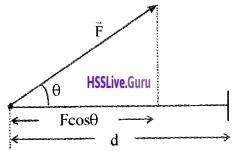
Consider a constant force \(\overrightarrow{\mathrm{F}}\) acting on an object of mass m. The object undergoes a displacement d in the positive x direction as shown in the figure. The projection of \(\overrightarrow{\mathrm{F}}\) on d is Fcosθ.
Hence work done w = Fcosθ. d
Plus One Physics Notes Chapter 6 Work, Energy and Power 11
There are three types of workdone

  1. positive workdone
  2. negative workdone
  3. zero workdone

1. Positive workdone:
Work will be positive, if the displacement has a component in the direction of the force. The angle between force and displacement is zero for positive workdone.
When q = 0 w = Fd
Example

  • A person carrying a load climbing up a staircase
  • A body being pushed along a surface
  • A body falling under gravitation force.

2. Negative workdone:
Work will be negative, if the displacement has a component opposite to the force F. The angle between force and displacement lies between 90° and 180°.
Example

  • When a person carrying a load on his head climbs down a staircase, (applied force by him on the load is upwards and the displacement is opposite to it)
  • When a body slides along a rough surface the displacement is opposite to the frictional force. Therefore the workdone by the frictional force is negative.

Plus One Physics Notes Chapter 6 Work, Energy and Power

3. Zero work done:
Work will be zero, if there is no component along the direction of force. The angle between applied force and displacement is 90°.
Example
1. When a person carrying a load on his head walks along a level road, the displacement is perpendicular to the force and therefore the work done is zero.
Plus One Physics Notes Chapter 6 Work, Energy and Power 12
2. In uniform circular motion the centripetal force is along the radius and direction of displacement is along the tangent.
Plus One Physics Notes Chapter 6 Work, Energy and Power 13

Kinetic Energy
Kinetic energy is the energy possessed by the body because of it’s motion. Kinetic energy of a body of mass m and velocity v,
Plus One Physics Notes Chapter 6 Work, Energy and Power 14

Workdone By Variable Force
Plus One Physics Notes Chapter 6 Work, Energy and Power 15
Consider a body moving from xi to xf under a variable force. The variation of force with position is shown in graph. Consider a small AB = Dx. The force in this interval is nearly a constant.

Plus One Physics Notes Chapter 6 Work, Energy and Power

Hence workdone to move a body from A to B is. Dw = F(x) Dx.F(x)dx gives the area of rectangle ABCD. When we add successive rectangular areas, we get total work as
Plus One Physics Notes Chapter 6 Work, Energy and Power 16
When we take Dx tends to zero, the summation can be replaced integration.
Plus One Physics Notes Chapter 6 Work, Energy and Power 17

Work Energy Theory For A Variable Force
Work energy theorem for a variable force can be derived from work energy theorem of constant force. According work energy theorem for constant force, Change in kE = work done
dk = dw
dk = F dx
Integrating from the initial position (xi) to (xf) we get
Plus One Physics Notes Chapter 6 Work, Energy and Power 18

Concept Of Potential Energy
Potential energy of a body is the energy possessed by it because of its position.
Explanation
Considera mass ‘m’on the surface of the earth. If this mass is raised to height ‘h’ against force of gravity,
work done w = Force × displacement
w = mg × h
w = mgh
This work gets stored as gravitational potential energy.
ie; Gravitational energy V = mgh.

1. Relation between gravitational potential and gravitational force:
If we take negative of the derivative of V(h) with respect to height (h), we get
Plus One Physics Notes Chapter 6 Work, Energy and Power 19
Where F is gravitational force. The above equation shows that gravitational force is the negative derivative of gravitational potential.

Plus One Physics Notes Chapter 6 Work, Energy and Power

2. Relation between kinetic energy and gravitational potential energy:
Considera body of mass ‘m’ at a height ‘h’ from the surface of the earth. The potential energy at height h
pE = mgh ______(1)
If the body is allowed to fall from this height, it attains kinetic energy,
kE = \(\frac{1}{2}\)mv2 _______(2)
But velocity at surface can be found from the formula
v2 = u2 + 2as
v2 = 2gh [Since u = 0, a = g, s = h]
Substituting this value in eq(2), we get
kE = \(\frac{1}{2}\) m2gh
kE = mgh
kE = pE [∵ pE = mgh]
Plus One Physics Notes Chapter 6 Work, Energy and Power 20
Properties of conservative force:

  • A force is conservative, if it can be derived from a scalar quantity (ie F = – \(\frac{d V}{d x}\))
  • The workdone by the conservative force depends only on the end points.
  • The workdone by conservative force in a closed path is zero.

Conservation of mechanical energy for a freely falling body:
Plus One Physics Notes Chapter 6 Work, Energy and Power 21
Consider a body of mass ‘m’ at a height h from the ground.
Total energy at the point A
Potential energy at A,
PE = mgh
Kinetic energy, KE = \(\frac{1}{2}\)mv2 = 0
(since the body at rest, v = 0).
∴ Total mechanical energy = PE + KE = mgh + 0
= mgh.

Total energy at the point B
The body travels a distance x when it reaches B. The velocity at B, can be found using the formula.
v2 = u2 + 2as
v2 = 0 + 2 gx
∴ KE at B, = \(\frac{1}{2}\)mv2
\(\frac{1}{2}\)m2gx
= mgx
P.E. at B, = mg (h – x)
Total mechanical energy = PE + KE
= mg (h – x) + mgx = mgh.

Plus One Physics Notes Chapter 6 Work, Energy and Power

Total energy at C
Velocity at C can be found using the formula
v2 = u2 + 2as
v2 = 0 + 2gh
∴ KE at C, = \(\frac{1}{2}\)mv2
\(\frac{1}{2}\)m2gh
= mgh
P.E. at C = 0
Total energy = PE + KE
= 0 + mgh = mgh.

The Potential Energy Of A Spring
Hooks law:
The restoring force developed in the spring is proportional to the displacement x and it is opposite to the displacement,
ie Fα – x
Plus One Physics Notes Chapter 6 Work, Energy and Power 22
Where k is a constant called the spring constant.
Potential energy stored in a spring:
Plus One Physics Notes Chapter 6 Work, Energy and Power 23
Consider a massless spring fixed to a rigid support at one end and a body attached to the other end. The body moves on a frictionless surface.

If a body is displaced by a distance dx, The work done for this displacement
dw = Fdx
∴ Total work done to move the body from x = 0 to x
Plus One Physics Notes Chapter 6 Work, Energy and Power 24
Plus One Physics Notes Chapter 6 Work, Energy and Power 25
This workdone is stored a potential energy in a spring. Hence potential energy of a spring.
Plus One Physics Notes Chapter 6 Work, Energy and Power 26
Spring force is a conservative force:
If the spring is displaced from an initial position xi to xf and again to xi;
Plus One Physics Notes Chapter 6 Work, Energy and Power 27

Plus One Physics Notes Chapter 6 Work, Energy and Power
W = 0
This zero workdone means that spring force is conservative.
Energy of a oscillating spring at any point:
Plus One Physics Notes Chapter 6 Work, Energy and Power 28
If the block of mass ‘m’ (attached to massless spring) is extended to xm and released, it will oscillate in between +xm and -xm. The total mechanical energy at any point x, (lies between -xm and +xm) is
Plus One Physics Notes Chapter 6 Work, Energy and Power 29
This block mass ‘m’ has maximum velocity at equilibrium equi¬librium position (x = 0). At this position, the potential energy stored in a spring is completely converted in to kinetic energy.
Plus One Physics Notes Chapter 6 Work, Energy and Power 30
Graphical variation of energy
Plus One Physics Notes Chapter 6 Work, Energy and Power 31

The Law Of Conservation Of Energy
Statement:
Energy cannot be created or destroyed. It can be transformed from one form to another.

Question 2.
Prove conservation of energy for a freely falling body.
Answer:
Conservation of mechanical energy for a freely falling body:
Plus One Physics Notes Chapter 6 Work, Energy and Power 32
Consider a body of mass ‘m’ at a height h from the ground.
Total energy at the point A
Potential energy at A,
PE = mgh
Kinetic energy, KE = \(\frac{1}{2}\)mv2 = 0
(since the body at rest, v = 0).
∴ Total mechanical energy = PE + KE = mgh + 0
= mgh.

Plus One Physics Notes Chapter 6 Work, Energy and Power

Total energy at the point B
The body travels a distance x when it reaches B. The velocity at B, can be found using the formula.
v2 = u2 + 2as
v2 = 0 + 2 gx
∴ KE at B, = \(\frac{1}{2}\)mv2
\(\frac{1}{2}\)m2gx
= mgx
P.E. at B, = mg (h – x)
Total mechanical energy = PE + KE
= mg (h – x) + mgx = mgh.

Total energy at C
Velocity at C can be found using the formula
v2 = u2 + 2as
v2 = 0 + 2gh
∴ KE at C, = \(\frac{1}{2}\)mv2
\(\frac{1}{2}\)m2gh
= mgh
P.E. at C = 0
Total energy = PE + KE
= 0 + mgh = mgh.

Various Form Of Energy
1. Heat:
Heat is a one form of energy, it is the internal energy of molecule.

2. Chemical energy:
Chemical energy arises from the fact that the molecules participating in the chemical reaction have different binding energies.

If the total energy of the reactants is more than the products of the reaction, heat is released and the reaction is said to be exothermic reaction. If the heat is absorbed in chemical reaction it is called endothermic.

3. Electrical energy:
The flow of electrons produce electric current.

4. The equivalence of mass and energy Mass and energy are equivalent and are related by the relation. E = mc2, where C, the speed of light in. vacuum.

Question 3.
How much energy will be liberated, when 1 Kg. matter converts in to energy?
Answer:
Energy liberated E = mc2
E = 1 × (3 × 108)2
= 9 × 10¹⁶J.

5. Nuclear energy:
Nuclear energy is obtained from the sun. In this case four light hydrogen nuclei fuse to form a helium nucleus, whose mass is less than the sum of the masses of the reactants. This mass difference (called the mass defect on) is the source of energy.

Plus One Physics Notes Chapter 6 Work, Energy and Power

Power
Power is defined as the time rate at which work is done.
Plus One Physics Notes Chapter 6 Work, Energy and Power 33
Expression for power in terms of F and V:
The work done (dw) by a force F for a displacement dr is
Plus One Physics Notes Chapter 6 Work, Energy and Power 34
Plus One Physics Notes Chapter 6 Work, Energy and Power 35
Where \(\overrightarrow{\mathrm{V}}\) is the instantaneous velocity when the force is \(\overrightarrow{\mathrm{F}}\).
Unit:
Unit of power is watt. 1 watt = 1J/S.
There is another unit of power, namely the horse power (hp)
1 hp = 746w
Kilowatt hour kwh:
Kilowatt hour (kwh) is the unit of energy used to mea-sure electrical energy. One kilowatt hour is the energy consumed in one hour at the rate of 1000 watts/ second.
1 kwh = 1000 watts × 60 × 60 seconds
= 3.6 × 10⁶ws
1 kwh = 3.6 × 10⁶J
Note : kwh is a unit of energy and not of power.

Collisions
There are two types of collisions.

  1. Elastic collision
  2. Inelastic collision

1. Elastic collision:
Elastic collision is one in which both momentum and kinetic energy are conserved.
Eg:

  • collision between molecules and atoms
  • collision between subatomic particles.

Characteristics of elastic collision:

  • Momentum is conserved
  • Total energy is conserved
  • K. E. is conserved
  • Forces involved during collision are conservative forces

2. Inelastic collision:
Inelastic collision is one in which the momentum is conserved, but KE is not conserved.
Example.

  • Mud thrown on a wall
  • Any collision between macroscopic bodies in every day life.

Characteristics of inelastic collision:

  • Momentum is conserved
  • Total energy is conserved
  • K.E. is not conserved
  • Forces involved are not conservative
  • Part or whole of the KE is converted into other forms of energy like heat, sound, light etc.

Plus One Physics Notes Chapter 6 Work, Energy and Power

2. Collisions in one Dimension:
If the initial velocities and final velocities of both the bodies are along the straight line, then it is called one dimensional motion.
Plus One Physics Notes Chapter 6 Work, Energy and Power 36
Consider two bodies of masses m1 and m2 moving with velocities u1 and u2 in the same direction and in the same line. If u1 > u2 they will collide. After collision let v1 and v2 be their velocities.
By conservation of linear momentum.
m1u1 + m2u2 = m1v1 + m2v2 ______(1)
m1u1 – m2u2 = m1v1 – m2v2 ______(2)
This is an elastic collision, hence K.E. is conserved.
Plus One Physics Notes Chapter 6 Work, Energy and Power 37
Plus One Physics Notes Chapter 6 Work, Energy and Power 38

Plus One Physics Notes Chapter 6 Work, Energy and Power
To find v1 and v2:
Plus One Physics Notes Chapter 6 Work, Energy and Power 39
Plus One Physics Notes Chapter 6 Work, Energy and Power 40
Discussion
Case -1 Mass of two bodies are equal
(i.e. m1 = m2 = m). Substitute these values in (7) and (8), we have
Plus One Physics Notes Chapter 6 Work, Energy and Power 41
ie. bodies exchange their velocities.

Plus One Physics Notes Chapter 6 Work, Energy and Power

Case – 2 (If u2 =0 and m2 >> m1 ie; m1 – m2 ≈ -m2, m1 + m2 ≈ -m2)
Plus One Physics Notes Chapter 6 Work, Energy and Power 42
The second body remains at rest while the first body rebounds with the same velocity.
Collisions in Two Dimensions:
Plus One Physics Notes Chapter 6 Work, Energy and Power 43
Consider two bodies of masses m1 and m2 moving with velocities u1 and u2 along parallel lines. If u1 > u2 they will collide. Let v1 and v2 be their velocities after collision along directions θ1 and θ2. v1 and v2 can be resolved in to v1 cosθ1, v2cosθ2 parallel to x axis and v1 sinθ1 and v2sinθ2 parallel to y axis.
By conservation of momentum parallel to X-axis,

Plus One Physics Notes Chapter 6 Work, Energy and Power
m1u1 + m2u2 = m1v1 cosθ1 + m2v2 cosθ2
By conservation of momentum parallel to y-axis.
m1v1sinθ1 + m2v2 sinθ2 = 0 + 0 = 0
By conservation of energy
Plus One Physics Notes Chapter 6 Work, Energy and Power 44

Plus One Computer Science Notes Chapter 12 Internet and Mobile Computing

Students can Download Chapter 12 Internet and Mobile Computing Notes, Plus One Computer Science Notes helps you to revise the complete Kerala State Syllabus and score more marks in your examinations.

Kerala Plus One Computer Science Notes Chapter 12 Internet and Mobile Computing

Summary
History of Internet:
Internet means international network of networks. The first form of Internet is ARPANET(Advanced Research Project Agency Network) started by US Department of Defence for their military during 1970’s. In 1989 a team lead by Tim Berners Lee introduced WWW(World Wide Web) by using the protocol HTTP. In 1998, Internet Corporation for Assigned Names and Numbers (ICANN) was established.

Internet:
It is a network of networks. It means that international network. We can transfer information between computers within nations very cheaply and speedily.

Intranet:
A private network inside a company or organisation is called intranet.

Extranet:
It allows vendors and business partners to access the company resources.

Plus One Computer Science Notes Chapter 12 Internet and Mobile Computing

The hardware and software requirement for internet:

  • A computer with a modem (internal/external)
  • A telephone connection
  • An account with an ISP
  • A browser S/W eg: Internet Explorer or Mozilla…

Types of connectivity:
There are two ways to connect to the internet. First one dialing to an ISP’s computer or with a direct connection to an ISP.

Dial-up Connection:
Here the internet connection is established by dialing into an ISP’s computer. If ISP is not busy they verify the user name and password if it is valid they will connect our computer to the internet.lt uses Serial Line Internet Protocol (SLIP) or Point to Point Protocol (PPP). It is slower and has a higher error rate.

Direct connection:
In direct connection there is a fixed cable or dedicated phone line to the ISP. Here it uses ISDN (Integrated Services Digital Network) a high speed version of a standard phone line. Another method is leased lines that uses fibre optic cables.

Digital Subscribers Line (DSL) is another direct connection, this uses copper wires instead of fibre optic for data transfer. Direct connection provides high speed internet connection and error rate is less. Fibre To The Home(FTTH) uses optical fibers for data transmission.

Wireless broadband connectivity:
1. Mobile broadband:
Accessing Internet using wireless devices like mobile phones, tablet, USB dongles.

2. Wi MAX(Wireless Microwave Access):
It uses micro waves to transmit information across a network in a range 2 GHz to 11 GHz over very long distance.

3. Satellite broadband:
Accessing internet through satellite. A Very Small Aperture Terminal(VSAT) dish antenna and transceiver and modem are required at the user’s location. Expensive and high speed.

Internet access sharing methods:
One Internet connection can be shared among several computers using a LAN, Wi Fi or Li Fi.
1. Using LAN:
The Internet connection in a LAN can be shared among other computers in the network

2. Using Wi Fi(Wireless Fidelity):
It uses radio waves to transmit information across a network in a range 2.4 GHz to 5 GHz in short distance. Nowadays this technology is used to access internet in campuses, hyper markets, hotels by using Laptops, Desktops, tablet, mobile phones etc

3. Using Li Fi(Light Fidelity) network:
It is a fast optical(uses visible light for data transmission) version of Wi Fi. Its main component is a LED lamp that can transmit data and a photodiode that acts as a receiver.

Plus One Computer Science Notes Chapter 12 Internet and Mobile Computing

Services on Internet:
1. www(World Wide Web):
This means this website address is unique and can be accessed each nook and corner of the world.

2. A browser is a piece of software that acts as an interface between the user and the internal working of the internet. With the help of a browser the user can search information on the internet and it allows user to navigate through the web pages. The different browsers are

  • Microsoft internet explorer
  • Mozilla Firefox
  • Netscape Navigator
  • Google Chrome
  • Opera.

3. Web Browsing:

  1. The browser determines the URL entered.
  2. The browser asks the DNS for URLS corresponding IP address (Numeric address)
  3. The DNS returns the address to the browser.
  4. The browser makes a TCP connection using the IP address.
  5. Then it sends a GET request for the required file to the server.
  6. The server collects the file and send it back to the browser.
  7. The TCP connection is released.
  8. The text and the images in the web pages are displayed in the browser.

Search engines:
By using search engines we will get a variety of information. It is a newly developed tool that helped to search the information on the internet more effectively and easily. Search engines are programs that help people to locate information from crores of website on internet using a database that consists of references.

Users can interact with the search engine through the home page of the search engine. To get the information about artificial intelligence just type this in the box provided for it and click the search button. Search engines searches by using a particular search algorithm then displays the matching documents or web addresses.

Search engine use soft wares called spiders or bots to search documents and their web addresses. Spiders search the internet using the directions given by the search engines and prepare an index and stores it in a database. The searching algorithm searched this database when the users submits a request and create a web page displaying the matching results as hyperlinks.
eg: Google, Yahoo, Rediff etc.

E mail(Electronic mail):
It is used to send text, multi media messages between computers over internet. An example of an email id is [email protected]. Here jobi_cg is the user name, rediffmail is the website address and .com is the top level domain which identifies the types of the organisation. To send an email we require an email address. Some websites provide free email facility.

To send an email first type the recipients address and type the message then click the send button. The website’s server first check the email address is valid, if it is valid it will be sent otherwise the message will not be sent and the sender will get an email that it could not deliver the message.

This message will be received by the recipient’s server and will be delivered to recipient’s mail box. He can read it and it will remain in his mail box as long as he will be deleted. Simple Mail Transfer Protocol(SMTP) is used.
The email message contains the following fields:

  1. To: Recipient’s address will be enter here. Multiple recipients are also allowed by using coma.
  2. CC: Enterthe address of other recipients to get a carbon copy of the message.
  3. bcc: The address to whom blind carbon copies are to be sent. This feature allows people to send copies to third recipient without the knowledge of primary and secondary recipients
  4. From: Address of the sender
  5. Reply to: The emait address to which replies are to be sent.
  6. Subject: Short summary of the message.
  7. Body: Here the actual message is to be typed.

The advantages of email are given below:

  1. Speed is high
  2. It is cheap
  3. We can send email to multiple recipients
  4. Incoming messages can be saved locally
  5. It reduces the usage of paper
  6. We can access mail box anytime and from anywhere.

The disadvantages are:

1. It requires a computer, a modem, software and internet connection to check mail.
2. Some mails may contain viruses
3. Mail boxes are filled with junk mail. So very difficult to find the relevant mail.

Plus One Computer Science Notes Chapter 12 Internet and Mobile Computing

Social media:
Various social medias are Internet forums, social blogs, microblogs etc.

  1. Internet forums: It is an online discussion site where people can exchange information about various issues like social, political, educational etc in the text form.
  2. Social blogs: Conducting discussions about . particular subjects by entries or posts. eg: Blogger.com
  3. Microblogs: It allows users to exchange short messages, multi media files etc. eg: www.twitter.com
  4. Wikis: In this we can give our contributions regarding various topics. eg: www.wikipedia.org
  5. Social networks: By using these web sites we can post our data and’ view others data. eg: www.facebook.com
  6. Content communities: By using these websites we can share multi media files. eg: www.youtube.com

Advantages of social media:

  1. Bring people together: It allows people to maintain the friendship
  2. Plan and organize events: It allows users to plan and organize events.
  3. Business promotion: It helps the firms to promote their sales.
  4. Social skills: There is a key role of the formation of society.

Disadvantages:

  1. Intrusion to privacy: Some people may misuse the personal information.
  2. Addiction: sometimes it may waste time and money.
  3. Spread rumours: The news will spread very quickly and negatively.

Cyber Security:
It is used to provide protection of valuable information such as credit card information from unauthorized access, intentional access, deletion, etc. while shopping on the internet.

Computer virus:
A virus is a bad program or harmful program to damage routine working of a computer system. It reduces the speed of a computer. It may delete the useful system files and make the computer useless.

Worm:
It is a stand alone malware program that replicates itself in order to spread to other computers. It slows down the traffic by consuming the bandwidth. In 2000 a worm called “ILOVEYOU” is affected many computers.

Trojan horse:
It appears as a useful software but it is a harmful software and it will delete useful software or files.

Spams:
Sending an email without recipient’s consent to promote a product or service is called spamming. Such an email is called a spam.

Hacking:
It is a process of trespassing computer networks. Two types white hats and black hats. White hats hack the computer networks to test the security but black hats intentionally stealing valuable data or destroying data.

Plus One Computer Science Notes Chapter 12 Internet and Mobile Computing

Phishing (Fishing):
It is an attempt to get others information such as usenames, passwords, bank a/c details etc by acting as the authorized website. Phishing websites have URLs and home pages similar to their original ones and mislead others , it is called spoofing.

Denial of Service(DoS) attack:
Its main target is a Web server. Due to this attack the Web server/computer forced to restart and this results refusal of service to the genuine users. If we want to access a website first you have to type the web site address in the URL and press Enter key, the browser requests that page from the web server.

Dos attacks send huge number of requests to the web server until it collapses due to the load and stops functioning.

Man in the Middle attacks:
It is an attack in which an attacker secretly intercepts electronic messages send by the sender to the receiver and then modifies the message and retransmit it to the receiver.

To prevent this type of attack encrypted connections such as HTTPS(HTTP Secure), SFTP(Secure FTP) etc, must be used, that will be displayed in the URL.

Preventing network attacks
Firewall:
It is a system that controls the incoming and outgoing network traffic by analyzing the data and then provides security to the computer network in an organization from other network (internet).

Antivirus scanners:
It is a tool used to scan computer files for viruses, worms and Trojan horses and cure the infected system. If any fault found it stops the file from running and stores the file in a special area called Quarantine(isolated area) and can be deleted later.

Cookies:
Cookies are small text files that are created when we visit a website that keep track of our details. This information will help the hacker to use it for malicious purposes. It acts as a spyware.

Guidelines for using computers over internet:

  • Emails may contain Viruses so do not open any unwanted emails
  • Download files from reputed sources(sites)
  • Avoid clicking on pop up Advt.
  • Most of the Viruses spread due to the use of USB drives so use cautiously.
  • Use firewall in your computer
  • Use anti virus and update regularly
  • Take backups in a regular time intervals

Plus One Computer Science Notes Chapter 12 Internet and Mobile Computing

Mobile Computing:
The advancements in computing technology have led to the developments of more computing power in hand held devices like laptops, tablets, smart phones, etc. Nowadays people are able to connect to others through internet even when they are in move.

Mobile communication:
The term ‘mobile’ help the people to change their life styles and become the backbone of the society. Mobile communication networks do not require any physical connection.

Generations in mobile communication:
The mobile phone was introduced in the year 1946. Early stage it was expensive and limited services hence its growth was very slow. To solve this problem, cellular communication concept was developed in 1960’s at Bell Lab. 1990’s onwards cellular technology became a common standard in our country.
The various generations in mobile communication are
1.First Generation networks(1 G):
It was developed around 1980, based on analog system and only voice transmission was allowed.

2. Second Generation networks (2G):
This is the next generation network that was allowed voice and data transmission. Picture message and MMS(Multimedia Messaging Service) were introduced. GSM and CDMA standards were introduced by 2G.
(i) Global System for Mobile(GSM):
It is the most successful standard. It uses narrow band TDMA(Time Division Multiple Access), allows simultaneous calls on the same frequency range of 900 MHz to 1800 MHz. The network is identified using the SIM(Subscriber Identity Module).
(a) GPRS(General Packet Radio Services):lt is a packet oriented mobile data service on the 2G on GSM. GPRS was originally standardized by European Telecommunications Standards Institute (ETSI) GPRS usage is typically charged based on volume of data transferred. Usage above the bundle cap is either charged per megabyte or disallowed.

(b) EDGE(Enhanced Data rates for GSM Evolution):
It is three times fasterthan GPRS. It is used for voice communication as well as an internet connection.

(ii) Code Division Multiple Access (CDMA):
It is a channel access method used by various radio communication technologies. CDMA is an example of multiple access, which is where several transmitters can send information simultaneously over a single communication channel. This allows several users to share a band of frequencies To permit this to be achieved without undue interference between the users, and provide better security.

3. Third Generation networks(3G):
It allows high data transfer rate for mobile devices and offers high speed wireless broadband services combining voice and data. To enjoy this service 3G enabled mobile towers and hand sets required.

4. Fourth Generation networks(4G):
lt is also called Long Term Evolution(LTE) and also offers ultra broadband Internet facility such as high quality streaming video. It also offers good quality image and videos than TV.

Plus One Computer Science Notes Chapter 12 Internet and Mobile Computing

Mobile communication services:
1. Short Message Service(SMS):
It allows transferring short text messages containing up to 160 characters between mobile phones. The sent message reaches a Short Message Service Center(SMSC), that allows ‘store and forward’ systems. It uses the protocol SS7(Signaling System No7). The first SMS message ‘Merry Christmas’ was sent on 03/12/1992 from a PC to a mobile phone on the Vodafone GSM network in UK.

2. Multimedia Messaging Service (MMS):
It allows sending Multi Media(text, picture, audio and video file) content using mobile phones. It is an extension of SMS.

3. Global Positioning System(GPS):
It is a space- based satellite navigation system that provides location and time information in all weather conditions, anywhere on or near the Earth where there is an unobstructed line of sight to four or more GPS satellites. The system provides critical capabilities to military, civil and commercial users around the world.

It is maintained by the United States government and is freely accessible to anyone with a GPS receiver. GPS was created and realized by the U.S. Department of Defense (DoD) and was originally run with 24 satellites. It is used for vehicle navigation, aircraft navigation, ship navigation, oil exploration, Fishing, etc. GPS receivers are now integrated with mobile phones.
Plus One Computer Science Notes Chapter 12 Internet and Mobile Computing 1

Smart Cards:
A smart card is a plastic card with a computer chip or memory that stores and transacts data. A smart card (may be like your ATM card) reader used to store and transmit data. The advantages are it is secure, intelligent and convenient. The smart card technology is used in SIM for GSM phones. A SIM card is used as an identification proof.

Plus One Computer Science Notes Chapter 12 Internet and Mobile Computing

Mobile operating system:
It is an OS used in hand held devices such as smart phone, tablet, etc. It manages the hardware, multimedia functions, Internet connectivity,etc. Popular OSs are Android from Google,iOS from Apple, BlackBerry OS from Black Berry and Windows Phone from Microsoft.

Android OS:
It is a Linux based OS forTouch screen devices such as smart phones and tablets.lt was developed by Android Inc. founded in Palo Alto, California in 2003 by Andy Rubin and his friends. In 2005, Google acquired this. A team led by Rubin developed a mobile device platform powered by the Linux Kernel.

The interface of Android OS is based on touch inputs like swiping, tapping, pinching in and out to manipulate on screen objects. In 2007 onwards this OS is used in many mobile phones and tablets. Android SDK(Software Development Kit) is available to create applications(apps) like Google Maps, FB, What’s App, etc.

It is of open source nature and many Apps are available for free download from the Android Play Store hence increase the popularity.
Different Android Versions are shown below
Plus One Computer Science Notes Chapter 12 Internet and Mobile Computing 2

Plus One Computer Science Notes Chapter 11 Computer Networks

Students can Download Chapter 11 Computer Networks Notes, Plus One Computer Science Notes helps you to revise the complete Kerala State Syllabus and score more marks in your examinations.

Kerala Plus One Computer Science Notes Chapter 11 Computer Networks

Summary
Computer network:
Two or more computers connected through a communication media that allows exchange of information between computers is called a Computer Network. Eg: Internet

Plus One Computer Science Notes Chapter 11 Computer Networks

Need for network:
The advantages of Networks are given below.
1. Resource sharing:
All the computers in a network can share software (programs, data ) and hardware (printer, scanner, CD drive, etc.).

2. Reliability:
If one computer fails, the other computer can perform the work without any delay. This is very important for banking, air traffic control and other application.

3. Price Vs Performance:
A main frame computer can be 10 times faster than a PC but it costs thousand times a PC. Therefore instead of a main frame 10 personal computers are used with less cost and same performance.

4. Communication Medium:
It is a powerful communication medium. We can exchange information between computers in a network.

5. Scalable:
This means, System performance can be increased by adding computers to a network.

Terminologies:

  1. Bandwidth: The maximum amount of data that can be transmitted by the medium measured in Hertz.
  2. Noise: It is the unwanted electrical or electromagnetic interferences that adversely affect the transmitted data signals.
  3. Node: A computer or an I/O device connected to a network is called Node.

Data communication system:
Communication is the exchange of information between two human beings. But data communication is the exchange of information between two computers(devices).

  1. Message: It is the data/information to be transmitted from one computer to another
  2. Sender: It is a computer or a device that sends data. It is also called.source or transmitter
  3. Receiver: It is a computer ora device that receives data
  4. Medium: It is the path through which message transmitted from the sender to the receiver. There are two types Guided and Un Guided media.
  5. Protocol: The rules and conventions for transmitting data.

Plus One Computer Science Notes Chapter 11 Computer Networks

Communication Medium:
There are two types guided and unguided.
Guided Media:
1. Twisted Pair cable:
2 types unshielded twisted pair and shielded twisted pair. Two copper wires individually insulated and twisted around each other and put in a plastic cover.

2. Coaxial cable:
A sturdy copperwire is insulated by plastic, it is covered just like a mesh by a conductor which is enclosed in an protective plastic coating. It is expenssive, less flexible and more difficult to install. But it is more reliable and carry for higher data rates.

3. Optical fibre:
These are made of glass fibres that are enclosed in a plastic jacket. It uses light instead of electrical signals. The light sources are LED or ILD.

Unguided Media:

  1. Radio waves: It transmits data at different frequencies ranging from 3 kHz. to 300 GHz.
  2. Microwaves: Microwave signals can travel in straight line if there is any obstacle in its path, it can’t bend. So it uses tall towers instead of short one.
  3. Infrared waves: These waves are used for transmitting data in short distance and its frequency range is 300 GHz to 400 GHz.

Plus One Computer Science Notes Chapter 11 Computer Networks

Wireless communication technologies using:
radio waves
1. Bluetooth:
This technology uses radio waves in the frequency range of 2.402 GHz to 2.480 GHz. And transmit data in short distance. Mobile phones, Laptops, tablets etc use Bluetooth technology to transmit data.

2. Wi Fi(Wireless Fidelity):
It uses radio waves to transmit information across a network in a range 2.4 GHz to 5 GHz in short distance. Nowadays this technology is used to access internet in Laptops, Desktops, tablets, Mobile phones etc.

3. Wi MAX(Wireless Microwave Access):
It uses micro waves to transmit information across a network in a range 2 GHz to 11 GHz over very long distance.

4. Satellites:
By using satellite we can communicate from eny part of the world to any other. The ground stations are connected via the satellite. The data signals transmitted from earth to satellite (uplink) and from the satellite to the earth (downlink).

Data communication devices:
It acts as an interface between computer and the communication channel

Network Interface Card (NIC):
This device enables a computer to connect to a network and transmit information.

Hub:
It is a small, simple and inexpensive device used to connect computers(devices) to a network. If a computer wants to transmit data to another computer. First it sends to the hub, the hub retransmits this data to all other computers.

Each and every computer gets the data and check whether it is for them or not. It increases the network traffic and hence the transmission speed is low.

Switch:
It is an expensive device used to connect computers(devices) to a network. Unlike hub, switch transmit data not to all computers, it retransmits data only to the intended computer. So the traffic is less and speed is high

Repeater:
It is a device used to strengthen weak signals on the network.

Bridge:
It is a device used to link same type of networks.

Router:
It is similar to a bridge, but it can connect two networks with different protocols.

Gateway:
It is used to connect two different networks with different protocols.

Data terminal equipments:
These devices are used to control data flow to and from a computer

Modem:
It is a device used to connect the computer to the internet. It converts digital signal into analog signal (modulation) and vice versa (Demodulation)

Multiplexer:
It combines the inputs from different channels of a medium and produces one output.

Plus One Computer Science Notes Chapter 11 Computer Networks

Network topologies:
Physical or logical arrangement of computers on a network is called structure or topology. It is the geometrical arrangement of computers in a network. The major topologies developed are star, bus, ring, tree and mesh.
1. Star Topology:
A star topology has a server all other computers are connected to it. If computer A wants to transmit a message to computer B. Then computer A first transmit the message to the server then the server retransmits the message to the computer B.

That means all the messages are transmitted through the server. Advantages are added or remove workstations to a star network is easy and the failure of a workstation will not effect the other. The disadvantage is that if the server fails the entire network will fail.

2. Bus Topology:
Here all the computers are attached to a single cable called bus. Here one computer transmits all other computers listen. Therefore it is called broadcast bus. The transmission from any station will travel in both the direction.

The connected computers can hear the message and check whether it is for them or not. Advantages are add or remove computer is very easy. It requires less cable length and the installation cost is less. Disadvantage is fault detection is very difficult because of no central computer.

3. Ring Topology:
Here all the computers are connected in the shape of a ring and it is a closed loop. Here also there is no central computer. Here a computer transmits a message, which is tagged along with its destination computer’s address.

The message travels in one direction and each node check whether the message is for them. If not, it passes to the next node. It requires only short cable length. If a single node fails, at least a portion of the network will fail. To add a node is very difficult.

4. Hybrid Topology:
It is a combination of any two or more network topologies. Tree topology and mesh topology can be considered as hybrid topology.
(a) Tree Topology:
The structure of a tree topology is the shape of an inverted tree with a central node and branches as nodes. It is a variation of bus topology. The data transmission takes place in the way as in bus topology. The disadvantage is that if one node fails, the entire portion will fail.

(b) Mesh Topology:
In this topology each node is connected to more than one node. It is just like a mesh (net). There are multiple paths between computers. If one path fails, we can transmit data through another path.

Types of networks:
The networks are classified into the following based upon the amount of geographical area that covers.
(i) Personal Area Network(PAN):
It is used to connect devices situated in a small radius by using guided media or unguided media

(ii) Local Area Network (LAN):
This is used to connect computers in a single room, rooms within a building or buildings of one location by using twisted pair wire or coaxial cable. Here the computers can share Hardware and software. Data transferrate is high and error rate is less, eg: The computers connected in a school lab.

(iii) Metropolitan Area Network (MAN):
A Metropolitan Area Network is a network spread over a city. For example a Cable TV network. MAN have lesser speed than LAN and the error rate is less. Here optical fiber cable is used.

(iv) Wide Area Network (WAN):
This is used to connect computers over a large geographical area. It is a network of networks. Here the computers are connected using telephone lines or Micro Wave station or Satellites. Internet is an example for this.

LAN and MAN are owned by a single organization but WAN is owned by multiple organization. The error rate in data transmission is high.

Plus One Computer Science Notes Chapter 11 Computer Networks

Logical classification of networks:
Peer to peer:
In this configuration all the computers have equal priority. That means each computer can function as both a client and a server. There is no dedicated server.

Client-Server:
In this configuration a computer is powerful which acts as a dedicated server and all others are clients (work stations). A Server fulfils the needs of the clients.

  1. File Server: A computer that stores and manages files for other devices on a network
  2. Web Server: A computer that handles the requests for web pages.
  3. Print Server: A computer that handles the print jobs from other computers on a network.
  4. Database Server: A computer that manages the database.

Network protocols:
A protocol is a collection of rules and regulations to transfer data from one location to another. Transmission Control Protocol (TCP), which uses a set of rules to exchange messages with other Internet points at the information packet level. Internet Protocol (IP), which uses a set of rules to send and receive messages at the Internet address level
1. FTP:
File Transfer Protocol which is used for transferring files between computers connected to local network or internet.

2. HTTP:
is a protocol used for WWW for enabling the web browse to access web server and request HTML documents.

3. DNS (Domain Name System):
When we type web sites address in the address bar, the browser determines the URL and asks the DNS for URLS corresponding IP address (Numeric address). The DNS returns the address to the browser.

Identification of computers over a network:
A computer gets a data packet on a network, it can identify the sender’s address easily. It is similar to our snails mail, each letter is stamped in sender’s post office as well as receiver’s post office.

Media Access Control(MAC) address:
It is a unique 12 digit hexadecimal number(IMEI for mobile phones, it is a 15 digit decimal number) assigned to each NIC by its manufacturer. This address is known as MAC address and its permanent. It is of the form. MM:MM:MM:SS:SS:SS.

The first MM:MM:MM contains the ID number of the adapter company and the second SS:SS:SS represents the serial number assigned to the adapter by the company.

Internet Protocol (IP) address:
An IP address has 4 parts numeric address. Each parts contains 8 bits. By using 8 bits we can represent a decimal number between 0 to 255(28 = 256 numbers). Each part is separated by dot. A total of 4 × 8 = 32 bits used. But nowadays 128 bits are used for IP address.

Plus One Computer Science Notes Chapter 11 Computer Networks

Uniform Resource Locator(URL):
Every resource on the internet has a unique URL. Mainly it has three parts
eg: http://www.hscap.kerala.gov.in /index.html.

  • http: http means hypertext transfer protocol. It is a protocol used to transfer hypertext.
  • www: World Wide Web. With an email address we can open our mail box from anywhere in the world.
  • hscap.kerala: It is a unique name. It is the official website name of Single Window System
  • gov: It is the top level domain. It means that it is a government organization’s website.
  • in: It is the geographical top level domain. It represents the country, in is used for India.
  • index.html: It represents the file name.

Top Level Domain Names:

  • .com The site register for commercial purpose
  • .edu The site register for educational purpose
  • .gov The site register by Government agencies
  • .mil The site register for military services
  • .net The site register for network purpose
  • .org The site register by organizations

Country Specific Domain Names:

  • .in India
  • .au Australia
  • .ca Canada
  • .ch China
  • .jp Japan
  • .us United States of America

Plus One Computer Science Notes Chapter 10 Functions

Students can Download Chapter 10 Functions Notes, Plus One Computer Science Notes helps you to revise the complete Kerala State Syllabus and score more marks in your examinations.

Kerala Plus One Computer Science Notes Chapter 10 Functions

Concept of modular programming:
The process of converting big and complex programs into smaller programs is known as modularisation. This small programs are called modules or sub programs or functions. C++ supports modularity in programming called functions
Merits of modular programming:

  • It reduces the size of the program
  • Less chance of error occurrence
  • Reduces programming complexity
  • Improves reusability

Demerits of modular programming:
While dividing the program into smaller ones extra care should be taken otherwise the ultimate result will not be right.

Plus One Computer Science Notes Chapter 10 Functions

Functions in C++:
Some functions that are already available in C++ are called pre-defined or built in functions. In C++, we can create our own functions for a specific job or task, such functions are called user defined functions. A C++ program must contain a main() function. A C++ program may contain many lines of statements(including so many functions) but the execution of the program starts and ends with main() function.

Pre-defined functions:
To invoke a function that requires some data for performing the task, such data is called parameter or argument. Some functions return some value back to the called function.

String functions:
To manipulate string in C++ a header file called string.h must be included.
1. strlen():
to find the number of characters in a string(i.e. string length).
Syntax: strlen(string);
eg:
cout<<strien(“Computer”); It prints 8.

2. strcpy():
It is used to copy second string into first string.
Syntax: strcpy(string1, string2);
eg:
strcpy(str,”BVM HSS”);
cout<<str; It prints BVM HSS.

3. strcat():
It is used to concatenate second string into first one.
Syntax: strcat(string1,string2)
eg:
strcpy(str1,’’Hello”);
strcpy(str2,” World”);
strcat(str1 ,str2);
cout<<str1; It displays the concatenated string “Hello World”

4. strcmp():
It is used to compare two strings and returns an integer.
Syntax: strcmp(string1,string2)

  • if it is 0 both strings are equal.
  • if it isgreaterthan 0(i.e. +ve) stringl is greater than string2
  • if it is less than 0(i.e. -ve) string2 is greater than stringl

eg:
#include<iostream>
#include<cstring>
using namespace std;
int main()
{
char str1 [10],str2[10];
strcpy(str1,”Kiran”);
strcpy(str2,”Jobi”);
cout<<strcmp(str1 ,str2);
}
It returns a +ve integer.

Plus One Computer Science Notes Chapter 10 Functions

5. strcmpi():
It is same as strcmpO but it is not case sensitive. That means uppercase and lowercase are treated as same.
eg: “ANDREA” and “Andrea” and “andrea” these are same.
#include<iostream>
#include<cstring>
using namespace std;
int main()
{
char str1 [10],str2[10];
strcpy(str1,”Kiran”);
strcpy(str2,”KIRAN”);
cout<<strcmpi(str1 ,str2);
}
It returns 0. That is both are same.

Mathematical functions:
To use mathematical functions a header file called math.h must be included.
1. abs():
To find the absolute value of an integer.
eg: cout<<abs(-25); prints 25.
Cout<<abs(+25); prints 25.

2. sqrt():
To find the square root of a number.
eg: cout<<sqrt(49); prints 7.

3. pow():
To find the power of a number.
Syntax. pow(number1, number2)
eg: cout<<pow(2,10); It is equivalent to 210. It prints 1024.

4. sin():
To find the sine value of an angle and the angle must be in radian. To convert an angle into radian multiply by 3.14(“) and divide by 180.
float x = 60 × 3.14/180;
cout<<sin(x); prints 0.86576.

5. cos():
To find the cosine value of an angle and the angle must be in radian. To convert an angle into radian multiply by 3.14(“) and divide by 180.
float x = 60 × 3.14/180;
cout<<cos(x); prints 0.50046.

Plus One Computer Science Notes Chapter 10 Functions

Character functions:
To manipulate character in C++ a header file called ctype.h must be included.
1. isupper():
To check whether a character is in uppercase or not. If the character is in uppercase it returns a value 1 otherwise it returns 0.
Syntax: isupper(charch);

2. islower():
To check whether a character is in lowercase or not. If the character is in lowercase it returns a value 1 otherwise it returns 0.
Syntax: islower(char ch);

3. isalpha():
To check whether a character is an alphabet or not. If the character is an alphabet it returns a value 1 otherwise it returns 0.
Syntax: isalpha(char ch);

4. isdigit():
To check whether a character is a digit or not. If the character is a digit it returns a value 1 otherwise it returns 0.
Syntax: isdigit(charch);

5. isalnum():
To check whether a character is an alphanumeric or not. If the character is an alphanumeric it returns a value 1 otherwise it returns 0.
Syntax: isalnum(char ch);

6. toupper():
It is used to convert the given character into uppercase.
Syntax: toupper(char ch);

7. tolower():
It is used to convert the given character into lowercase.
Syntax: tolower(char ch);

Conversion functions:
Some occasions we have to convert a data type into another for this conversion functions used. The header file stdlib.h must be included.
1. itoa():
It is used to convert an integer value to string type.
Syntax: itoa(int v, char str, int size); This function has 3 arguments, first one is the integer to be converted, second is the string variable to store and third is the size of the string.
eg: itoa(“123”,str,4);
cout<<str;

2. atoi():
It Is the opposite of itoa( ). That is it converts a string into integer.
Syntax: atoi(str);

I/O Manipulating function:
It is used to manipulate I /O operations in C++. The header file iomanip.h must be included,
(a) setw(): It is used to set the width for the subsequent string.
Syntax: setw(size);

User defined functions:
Syntax: Return type Function_name(parameterlist)
{
Body of the function
}

  • Return type: It is the data type of the value returned by the function to the called function;
  • Function name: A name given by the user.

Different types of User defined functions.

  • A function with arguments and return type.
  • A function with arguments and no return type.
  • A function with no arguments and with return type.
  • A function with no arguments and no return type.

Plus One Computer Science Notes Chapter 10 Functions

Prototype of functions:
Consider the following codes
Method 1:
#include<iostream>
using namespace std;
int sum(int n1,int n2)
{
return(n1 + n2);
}
int main()
{
int n1 ,n2;
cout<<“Enter 2 numbers:”;
cin>>n1>>n2;
cout<<“The sum is “<<sum(n1,n2);
}

Method 2:
#include<iostream>
using namespace std;
int main()
{
int n1 ,n2;
cout<<“Enter 2 numbers:”;
cin>>n1>>n2;
cout<<“The sum is “<<sum(n1,n2);
}
int sum(int n1 ,int n2)
{
return(n1 + n2); ‘
}
In method 1 the function is defined before the main function. So there is no error. In method 2 the function is defined after the main function and there is an error called “function sum should have a prototype”.

This is because of the function is defined after the main function. To resolve this a prototype should be declared inside the main function as follows.

Method 3:
#include<iostream>
using namespace std;
int main()
{
int n1,n2;
int sum(int.int);
cout<<“Enter 2 numbers:”;
cin>>n1>>n2;
cout<<“The sum is “<<sum(n1,n2);
}
int sum(int n1,int n2)
{
retum(n1 + n2);
}

Functions with default arguments:
We can give default values as arguments while declaring a function. While calling a function the user doesn’t give a value as arguments the default value will be taken. That is we can call a function with or without giving values to the default arguments.

Methods of calling functions:
Two types call by value and call by reference.
1. Call by value:
In call by value method the copy of the original value is passed to the function, if the function makes any change will not affect the original value.

2. Call by reference:
In call by reference method the address of the original value is passed to the function, if the function makes any change will affect the original value.

Plus One Computer Science Notes Chapter 10 Functions

Scope and life of variables and functions:
1. Local scope:
A variable declared inside a block can be used only in the block. It cannot be used any other block.
eg:
#include<iostream>
using namespace std;
int sum(int n1,int n2)
{
int s;
s = n1 + n2;
return(s);
}
int main()
{
int n1,n2;
cout<<“Enter 2 numbers:”;
cin>>n1>>n2;
cout<<“The sum is “<<sum(n1,n2);
}
Here the variable s is declared inside the function sum and has local scope;

2. Global scope:
A variable declared outside of all blocks can be used any where in the program.
#include<iostream>
using namespace std;
int s;
int sum(int n1,int n2)
{
s = n1 + n2;
return (s);
}
int main()
{
int n1 ,n2;
cout<<“Enter 2 numbers :”;
cin>>n1>>n2;
cout<<“The sum is “<<sum(n1 ,n2);
}
Here the variable s is declared out side of all functions and we can use variable s any where in the program

Recursive functions:
A function calls itself is called recursive function.

Plus One Computer Science Notes Chapter 9 String Handling and I/O Functions

Students can Download Chapter 9 String Handling and I/O Functions Notes, Plus One Computer Science Notes helps you to revise the complete Kerala State Syllabus and score more marks in your examinations.

Kerala Plus One Computer Science Notes Chapter 9 String Handling and I/O Functions

Summary
String handling using arrays:
A string is a combination of characters hence char data type is used to store string. A string should be enclosed in double quotes. In C++ a variable is to be declared before it is used.Eg. “BVM HSS KALPARAMBU”.

Plus One Computer Science Notes Chapter 9 String Handling and I/O Functions

Memory allocation for strings:
To store “BVM” an array of char type is used. We have to specify the size. Remember each and every string is end with a null (\0) character. So we can store only size- 1 characters in a variable. Please note that \0 is treated as a single character. \0 is also called as the delimiter.
char school_name[4]; By this we can store a maximum of three characters.
Plus One Computer Science Notes Chapter 9 String Handling and IO Functions 1
Consider the following declarations

  • char my_name[10] = ”Andrea”;
  • char my_name2[ ] = ”Andrea”;
  • char str[ ] = ”Hello World”

In the first declaration 10 Bytes will be allocated but it will use only 6 + 1 (one for ‘\0’) = 7 Bytes the remaining 3 Bytes will be unused. But in the second declaration the size of the array is not mentioned so only 7 Bytes will be allocated and used hence no wastage of memory.

Similarly in the third declaration the size of the array is also not mentioned so only 12( one Byte for space and one Byte for ‘\0’) Bytes will be allocated and used hence no wastage of memory

Input/output operations on strings:
Consider the following code
#include<iostream>
using namespace std;
int main()
{
char name[20];
cout<<“Enter your name:”;
cin>>name;
cout<<“Hello “<<name;
}
If you run the program you will get the prompt as follows
Enter your name: Alvis Emerin
The output will be displayed as follows and the “Emerin” will be truncated.
Hello Alvis
This is because of cin statement that will take upto the space. Here space is the delimiter. To resolve this gets() function can be used. To use gets() and puts() function the header file stdio.h must be included. gets() function is used to get a string from the keyboard including spaces.

puts() function is used to print a string on the screen. Consider the following code snippet that will take the input including the space.
#include<iostream>
#include<cstdio>
using namespace std;
int main()
{
char name[20];
cout<<“Enter your name:”;
gets(name);
cout<<“Hello “<<name;
}

Plus One Computer Science Notes Chapter 9 String Handling and I/O Functions

More console functions:
Plus One Computer Science Notes Chapter 9 String Handling and IO Functions 2

Stream functions for I / O operations:
Somefunctions that are available in the header file iostream.h to perforrn I/O operations on character and strings(stream of characters). It transfers streams of bytes between memory and objects. Keyboard and monitor are considered as the objects in C++.

Input functions:
The input functions like get( )(to read a character from the keyboard) and getline() (to read a line of characters from the keyboard) is used with cin and dot(.) operator.
Plus One Computer Science Notes Chapter 9 String Handling and IO Functions 3
eg:
#include<iostream>
using namespace std;
int main()
{
char str[80],ch=’z’;
cout<<“enter a string that end with z:”;
cin.getline(str,80,ch);
cout<<str;
}
If you run the program you will get the prompt as follows
Enter a string that end with z: Hi I am Jobi. I am a teacher. My school is BVM HSS The output will be displayed as follows and the string after ‘z’ will be truncated.
Hi, I am Jobi. I am a teacher

Plus One Computer Science Notes Chapter 9 String Handling and I/O Functions

Output function:
The outputt functions like put() (to print a character on the screen) and write() (to print a line of characters on the screen) is used with cout and dot(.) operator.
Plus One Computer Science Notes Chapter 9 String Handling and IO Functions 4


Plus One Computer Science Notes Chapter 8 Arrays

Students can Download Chapter 8 Arrays Notes, Plus One Computer Science Notes helps you to revise the complete Kerala State Syllabus and score more marks in your examinations.

Kerala Plus One Computer Science Notes Chapter 8 Arrays

Summary
An array is a collection of elements with same data type Or with the same name we can store many elements, the first or second or third, etc can be distinguished by using the index(subscript). The first element’s index is 0, the second elements index is 1, and so on.

Plus One Computer Science Notes Chapter 8 Arrays

Declaring arrays:
Suppose we want to find the sum of 100 numbers then we have to declare 100 variables to store the values. It is a laborious work. Hence the need for array arises.
Syntax: data_type array_name[size];
To store 100 numbers the array declaration is as follows
int n[100]; By this we store 100 numbers. The index of the first element is 0 and the index of last element is 99.

Memory allocation for arrays:
The amount of memory requirement is directly related to its type and size,

  • int n[100]; It requires 2Bytes(for each integer) × 100 = 200 Bytes.
  • float d[100]; It requires 4Bytes(for each float) × 100=400 Bytes.

Array initialization:
Array can be initialized in the time of declaration. eg: int age[4] = {16, 17, 15, 18};

Accessing elements of arrays:
Normally loops are used to store and access elements in an array.
eg:
int mark[50], i;
for(i=0;i<50;i++)
{
cout<<“Enter value for mark”<<i+1;
cin>>mark[i];
}
cout<<“The marks are given below:”;
for(i=0;i<50;i++)
cout<<mark[i];

Array operations:
Traversal:
Accessing all the elements of an array is called traversal.

Plus One Computer Science Notes Chapter 8 Arrays

Sorting:
Arranging elements of an array in an order(ascending or descending)
1. Bubble sort:
It is a simple sorting method. In this sorting considering two adjascent elements if it is out of order, the elements are interchanged. After the first iteration the largest(in the case of ascending sorting) or smallest(in the case of descending sorting) will be the end of the array. This process continues.

2. Selection sort:
In selection sort the array is divided into two parts, the sorted part and unsorted part. first smallest element in the unsorted part is searched and exchanged with the first element. Now there is 2 parts sorted part and unsorted part. This process continues.

Searching:
It is the process of finding the position of the given element.
1. Linear search:
In this method each element of the array is compared with the element to be searched starting from the first element. If it finds the position of the element in the array is returned.

2. Binary search:
It uses a technique called divide and conquer method. It can be performed only on sorted arrays. First we check the element with the middle element. There are 3 possibilities. The first possibility is the searched element is the middle element then search can be finished.

The second possibility is the element is less than the middle value so the upper bound is the middle element. The third possibility is the element is greater than the middle value so the lower bound is the middle element. Repeat this process.

Two dimensional (2D) arrays:
Some occasions we have to store 6 different marks of 50 students. For this we use 2D arrays. An array with two subscripts is used.
eg: int mark[r][c]; Here r is the row and c is the column.

Declaring 2D arrays:
Syntax: datatype array_name[rows][columns];
The elements of this array is referred as mark[0][0], mark[0][1], mark[r – 1][c – 1].
eg: int m[5][5]; This array can store 5 × 5 = 25 elements.

Matrices as 2D arrays:
Matrix is a concept in mathematics that can be represented by 2D array with rows and columns. A nested loop(a loop contains another loop) is used to store and access elements in an array.

Plus One Computer Science Notes Chapter 8 Arrays

Multi-dimensional arrays:
3 Dimensional(3D) array is an example for this.
Syntax: data_type array_name[size1 ][size2][size3];
eg: int m[5][5][5]; This array can store 5 × 5 × 5 = 125 elements.

Plus One Computer Science Notes Chapter 7 Control Statements

Students can Download Chapter 7 Control Statements Notes, Plus One Computer Science Notes helps you to revise the complete Kerala State Syllabus and score more marks in your examinations.

Kerala Plus One Computer Science Notes Chapter 7 Control Statements

Summary
These are classified into two decision making and iteration statements

Plus One Computer Science Notes Chapter 7 Control Statements

Decision making statements:
if statement:
Syntax: if (condition)
{
Statement block;
}
First the condition is evaluated if it is true the statement block will be executed otherwise nothing will be happened.

if…else statement:
Syntax: if (condition)
{
Statement block1;
}
else
{
Statement block2;
}

Nested if:
An if statement contains another if statement completely then it is called nested if.
if (condition 1)
{
if (condition 2)
{
Statement block;
}
}
The statement block will be executed only if both the conditions evaluated are true.

The else if ladder:
The syntax will be given below
if (expression1)
{
statement block1;
}
else if (expression 2)
{
statement block 2;
}
else if (expression 3)
{
statement block 3;
}
……..
else
{
statement block n;
}
Here firstly, expression 1 will be evaluated if it is true only the statement blockl will be executed otherwise expression 2 will be evaluated if it is true only the statement block2 will be executed and so on. If all the expression evaluated is false then only statement block n will be executed

Plus One Computer Science Notes Chapter 7 Control Statements

switch statement:
It is a multiple branch statement. Its syntax is given below.
switch(expression)
{
case value: statements;break;
………
default: statements;
}
First expression evaluated and selects the statements with matched case value. If all values are not matched the default statement will be executed.

Conditional operator:
It is a ternary operator hence it needs three operands. The operator is “?:”.
Syntax:
expression ? value if true : value if false. First evaluates the expression if it is true the second part will be executed otherwise the third part will be executed.

Iteration statements:
If we have to execute a block of statements more than once then iteration statements are used.

while statement:
It is an entry controlled loop. An entry controlled loop first checks the condition and execute(or enters in to) the body of loop only if it is true. The syntax is given below
Loop variable initialised
while(expression)
{
Body of the loop;
Update loop variable;
}
Here the loop variable must be initialised before the while loop. Then the expression is evaluated if it is true then only the body of the loop will be executed and the loop variable must be updated inside the body. The body of the loop will be executed until the expression becomes false.

Plus One Computer Science Notes Chapter 7 Control Statements

for statement:
The syntax of for loop is
for(initialization; checking ; update loop variable)
{
Body of loop;
}
First part, initialization is executed once, then checking is carried out if it is true the body of the for loop is executed. Then loop variable is updated and again checking is carried out this process continues until the checking becomes false. It is an entry controlled loop.

do-while statement:
It is an exit controlled loop. Exit control loop first execute the body of the loop once even if the condition is false then check the condition.
do
{
Statements
} while(expression);
Here the body executes at least once even if the condition is false. After executing the body it checks the expression if it false it quits the body otherwise the process will be continue.

Plus One Computer Science Notes Chapter 6 Data Types and Operators

Students can Download Chapter 6 Data Types and Operators Notes, Plus One Computer Science Notes helps you to revise the complete Kerala State Syllabus and score more marks in your examinations.

Kerala Plus One Computer Science Notes Chapter 6 Data Types and Operators

Summary
Concepts of data types:
The nature of data is different, data type specifies the nature of data we have to store.

C++ data types:
Plus One Computer Science Notes Chapter 6 Data Types and Operators 1

Plus One Computer Science Notes Chapter 6 Data Types and Operators

Fundamental data types:
It is also called built in data type. They are int, char, float, double and void
1. int data type:
It is used to store whole numbers without fractional (decimal point) part. It can be either negative or positive. It consumes 4 bytes (32 bits) of memory. i.e. 232 numbers. That is 231 negative numbers and 231 positive numbers (0 is considered as +ve) So a total of 232 numbers. We can store a number in between -231 to + 231-.

2. char data type:
Any symbol from the keyboard, eg: ‘A’, ‘?’, ‘9’ and so on. It consumes one byte( 8 bits) of memory. It is internally treated as integers, i.e. 28 = 256 characters. Each character is having a ASCII code, ‘a’ is having ASCII code 97 and zero is having ASCII code 48.

3. float data type:
It is used to store real numbers i.e. the numbers with decimal point. It uses 4 bytes(32 bits) of memory. eg: 67.89, 89.9 E-15.

4. double data type:
It is used to store very large real numbers. It uses 8 bytes(64 bits) of memory.

5. void data type:
void means nothing. It is used to represent a function returns nothing.

  1. User defined Data types: C++ allows programmers to define their own data type. They are Structure(struct), enumeration (enum), union, class, etc.
  2. Derived data types: The data types derived from fundamental data types are called Derived data types. They are Arrays, pointers, functions, etc

Plus One Computer Science Notes Chapter 6 Data Types and Operators

Variables:
The named memory locations are called variable. A variable has three important things

  1. variable name: A variable should have a name
  2. Memory address: Each and every byte of memory has an address. It is also called location (L) value.
  3. Content: The value stored in a variable is called content. lt is also called Read(R) value.

Operators:
An operator is a symbol that performs an operation. The data on which operations are carried out are called operands. Following are the operators
1. lnput(>>) and output(<<) operators are used to perform input and output operation.
eg: cin>>n;
cout<<n;

2. Arithmetic operators:
It is a binary operator. It is used to perform addition(+), subtraction(-), division (/), multiplication(*) and modulus(%- gives the remainder) operations.
eg: If x = 10 and y = 3 then
Plus One Computer Science Notes Chapter 6 Data Types and Operators 2
x/y = 3, because both operands are integer. To get the floating point result one of the operand must be float.

3. Relational operator:
It is also a binary operator. It is used to perform comparison or relational operation between two values and it gives either true(1) or false(O). The operators are <, <=, >, >=, == (equality)and !=(not equal to)
eg: If x = 10 and y = 3 then
Plus One Computer Science Notes Chapter 6 Data Types and Operators 3

4. Logical operators:
Here AND(&&) , OR(||) are binary operators and NOT (!) is a unary operator. It is used to combine relational operations and it gives either true(1) orfalse(O). If x = 1 and y = 0 then

Both operands must be true to get a true value in the case of AND (&&) operation. If x = 1 and y = 0 then
Plus One Computer Science Notes Chapter 6 Data Types and Operators 5
Either one of the operands must be true to get a true value in the case of OR(||) operation. If x = 1 and y = 0 then

!x!y
01

Plus One Computer Science Notes Chapter 6 Data Types and Operators

5. Conditional operator:
It is a ternary operator hence it needs three operands. The operator is”?:”.
Syntax:
expression ? value if true : value if false. First evaluates the expression if it is true the second part will be executed otherwise the third part will be executed.
eg: If x = 10 and y = 3 then x>y ? cout<<x : cout<<y;
Here the output is 10

6. sizeof():
This operator is used to find the size used by each data type. eg: sizeof(int) gives 2.

7. Increment and decrement operator:
These are unary operators.

  • Increment operator (++): It is used to increment the value of a variable by one i.e., x++ is equivalent to x = x + 1.
  • Decrement operator (- -): It is used to decrement the value of a variable by one i.e., x – – is equivalent to x = x – 1.

8. Assignment operator (=):
lt is used to assign the value of a right side to the left side variable.eg. x = 5; Here the value 5 is assigned to the variable x.

Expressions:
It is composed of operators and operands
Plus One Computer Science Notes Chapter 6 Data Types and Operators

Arithmetic expression:
It is composed of arithmetic operators and operands. In this expression the operands are integers then it is called Integer expression. If the operands are real numbers then it is called Floating point expression. If the operands are constants then it is called constant expression.

Relational expression:
It is composed of relational operators and operands

Logical expression:
It is composed of logical operators and operands

Statements:
Statements are smallest executable unit of a programming language. Each and every statement must be end with semicolon(;).

Declaration statement:
Each and every variable must be declared before using it. eg: int age;

Assignment statements:
Assignment operator is used to assign the value of RHS to LHS. eg: x = 100

Input statements:
lnput(>>) operator is used to perform input operation. eg: cin>>n;

Output statements:
output(<<) operator is used to perform output operation. eg: cout<<n;

Cascading of I/O operations:
The multiple use of input or output operators in a single statement is called cascading of i/o operators. eg: To take three numbers by using one statement is as follows
cin>>x>>y>>z;
To print three numbers by using one statement is as follows
cout<<x<<y<<z;

Plus One Computer Science Notes Chapter 5 Introduction to C++ Programming

Students can Download Chapter 5 Introduction to C++ Programming Notes, Plus One Computer Science Notes helps you to revise the complete Kerala State Syllabus and score more marks in your examinations.

Kerala Plus One Computer Science Notes Chapter 5 Introduction to C++ Programming

Summary
It is developed by Bjarne Stroustrup. It is an extension of C Language.

Plus One Computer Science Notes Chapter 5 Introduction to C++ Programming

Character set:
To study a language first we have to familiarize the character set. For example to study English language first we have to study the alphabets. Similarly here the character set includes letters(A to Z & a to z), digits(0 to 9), special characters(+, -, ?, *, /, …..) white spaces(non printable) etc..

Token:
It is the smallest individual units similar to a word in English or Malayalam language. C++ has 5 tokens
1. Keywords:
These are reserved words for the compiler. We can’t use for any other purposes eg: float is used to declare variable to store numbers with decimal point. We can’t use this for any other purpose

2. Identifier:
These are user defined words. Eg: variable name, function name, class name, object name, etc…

3. Literals (Constants):
Its value does not change during execution
(a) Integer literals:
Whole numbers without fractional parts are known as integer literals, its value does not change during execution. There are 3 types decimal, octal and hexadecimal.
eg:

  • For decimal 100, 150, etc
  • For octal 0100, 0240, etc
  • For hexadecimal 0x100, 0x1A, etc

(b)Float literals:
A number with fractional parts and its value does not change during execution is called floating point literals. eg: 3.14157, 79.78, etc.

(c) Character literal-: A valid C++ character enclosed in single quotes, its value does not change during execution. eg: ‘m’, ‘f ’ etc

(d) String literal:
One or more characters enclosed in double quotes is called string constant. A string is automatically appended by a null character(‘\0’)
eg: “Mary’s”, ’’India”, etc.

4. Punctuators:
In English or Malayalam language punctuation mark are used to increase the readability but here it is used to separate the tokens. eg: {,}, (,).

5. Operators:
These are symbols used to perform an operation(Arithmetic, relational, logical, etc…)

Plus One Computer Science Notes Chapter 5 Introduction to C++ Programming

Integrated Development Environment(IDE):
It is used for developing programs

  1. It helps to write as well as editing the program.
  2. It helps to compile the program and linking it to other (header files and other user) programs
  3. It helps to run the program

Turbo C++ IDE:
Following is an C++ IDE
Plus One Computer Science Notes Chapter 5 Introduction to C++ Programming 1
(a) Opening the edit window:
Method I: File → Click the menu item New
Method II: Press Alt and F simultaneously then press N

(b) Saving the program:
Click File → Save or Press Function key F2 or Alt + F and then press S. Then give a file name and press ok.

(c) Running/executing the program:
Press Alt + R then press R OR Click Run → press R, OR Press Ctrl + F9

(d) Viewing the output:
Press Alt + F5

(e) Closing Turbo C++ IDE:
Click File → then press Quit menu Or Press Alt + X

Plus One Computer Science Notes Chapter 5 Introduction to C++ Programming

Geany IDE
Plus One Computer Science Notes Chapter 5 Introduction to C++ Programming 2
Step 1: Take Geany Editor and type the program (source code)
Step 2: Save the file with extension .cpp
Step 3: Compile the program by Click the Compile Option
Step 4: After successful compilation, Click Build option
Step 5: Then click on Execute option

Plus One Computer Science Notes Chapter 4 Principles of Programming and Problem Solving

Students can Download Chapter 4 Principles of Programming and Problem Solving Notes, Plus One Computer Science Notes helps you to revise the complete Kerala State Syllabus and score more marks in your examinations.

Kerala Plus One Computer Science Notes Chapter 4 Principles of Programming and Problem Solving

Summary
Problem solving using computers:
It has no intelligent quotient. Hence they are slaves and human beings are the masters. It can’t take its own decisions.
They can perform tasks based upon the instructions given by the humans (programmers) .

Plus One Computer Science Notes Chapter 4 Principles of Programming and Problem Solving

Approaches in problem solving:
Top down design:
Larger programs are divided into smaller ones and solve each tasks by performing simpler activities. This concept is known as top down design in problem solving

Bottom up design:
Here also larger programs are divided into smaller ones and the smaller ones are again subdivided until the lowest level of detail has been reached. We start solving from the lowest module onwards. This approach is called Bottom up design.

Phases in Programming:
1. Problem identification:
This is the first phase in programming. The problem must be identified then only it can be solved, for this we may have to answer some questions.

During this phase we have to identify the data, its type, quantity and formula to be used as well as what activities are involved to get the desired out put is also identified for example if you are suffering from stomach ache and consult a Doctor.

To diagnose the disease the Doctor may ask you some question regarding the diet, duration of pain, previous occurrences etc, and examine some parts of your body by using stethoscope X-ray, scanning etc.

2. Deriving the steps to obtain the solution:
There are two methods, Algorithm and flowchart, are used for this.
(a) Algorithm:
The step-by-step procedure to solve a problem is known as algorithm. It comes from the name of a famous Arab mathematician Abu Jafer Mohammed Ibn Musaa Al-Khowarizmi, The last part of his name Al-Khowarizmi was corrected to algorithm.

(b) Flowchart:
The pictorial or graphical representation of an algorithm is called flowchart.
Flow chart symbols are explained below
(i) Terminal (Oval):
Plus One Computer Science Notes Chapter 4 Principles of Programming and Problem Solving 1
It is used to indicate the beginning and ending of a problem.
(ii) Input/Output (parallelogram):
Plus One Computer Science Notes Chapter 4 Principles of Programming and Problem Solving 2
It is used to take input or print output.
(iii) Processing (Rectangle):
Plus One Computer Science Notes Chapter 4 Principles of Programming and Problem Solving 3
It is used to represent processing. That means to represent arithmetic operation such an addition, subtraction,multiplication and, etc.
(iv) Decision (Rhombus):
Plus One Computer Science Notes Chapter 4 Principles of Programming and Problem Solving 4
Plus One Computer Science Notes Chapter 4 Principles of Programming and Problem Solving

It is used to represent decision making. It has one entry flow and two exit flows but one exit path will be executed at a time.
(v) Flow lines (Arrows):
Plus One Computer Science Notes Chapter 4 Principles of Programming and Problem Solving 5
It is used to represent the flow of operation
(vi) Connector:
Plus One Computer Science Notes Chapter 4 Principles of Programming and Problem Solving 6

3. Coding:
The dummy codes (algorithm) or flowchart is converted into program by using a computer language such s Cobol, Pascal, C++, VB, Java, etc.

4. Translation:
The computer only knows machine language. It does not know HLL, but the human beings HLL is very easy to write programs. Therefore a translation’ is needed to convert a program written in HLL into machine code (object code).

During this step, the syntax errors of the program will be displayed. These errors are to be corrected and this process will be continued till we get “No errors” message. Then it is ready for execution.

5. Debugging:
The program errors are called ‘bugs’ and the process of detecting and correcting errors is called debugging. In general there are two types of errors syntax errors and logical errors. When the rules or syntax of the language are not followed then syntax errors occurred and it is displayed after compilation.

When the logic of a program is wrong then logical errors occurred and it is not displayed after compilation but it is displayed in the execution and testing phase.

Plus One Computer Science Notes Chapter 4 Principles of Programming and Problem Solving

6. Execution and Testing:
In this phase the program will be executed and give test data for testing the purpose of this is to determine whether the result produced by the program is correct or not. There is a chance of another type of error, Run time error, this may be due to inappropriate data.

7. Documentation:
It is the last phase in programming. A computerized system must be documented properly and it is an ongoing process that starts in the first phase and continues till its implementation. It is helpful for the modification of the program later.

Plus One Computer Science Notes Chapter 3 Components of the Computer System

Students can Download Chapter 3 Components of the Computer System Notes, Plus One Computer Science Notes helps you to revise the complete Kerala State Syllabus and score more marks in your examinations.

Kerala Plus One Computer Science Notes Chapter 3 Components of the Computer System

Summary
Hardware:
The tangible parts of a computer that we can touch and see are called hardware. Eg: Monitor, Keyboard, Mouse, CPU, Etc.

Plus One Computer Science Notes Chapter 3 Components of the Computer System

Processors:
It is the brain of the computer and consists of three components

  • Arithmetic Logic Unit(ALU) – As the name implies it performs all calculations and comparison operations.
  • Control Unit(CU) – It controls overall functions of a computer
  • Registers – It stores the intermediate results temporarily.

A CPU is an Integrated Circuit(IC) package contains millions of transistors and other components. Popular Processors are Intel core i3, core i5, core i7, AMD Quadcore etc.

Important registers inside a CPU are:

  1. Accumulator: After performing an operation (arithmetic or logical) the result is stored in the accumulator
  2. Memory Address Register(MAR): It stores the address of memory location to which data is either read or written by the processor.
  3. Memory Buffer Register (MBR): It stores the data, either to be written to or read from the memory by the processor.
  4. Instruction Register(IR): It stores the instructions to be executed by the processor.
  5. Program Counter(PC): It stores the address of the next instruction to be executed by the processor.

Motherboard:
It is a Printed Circuit Board(PCB). All the major components like Processor (Remember the processor must be compatible with the Motherboard), RAM, ROM, HDD, Graphics card, Sound card, etc are connected to the Motherboard.

Peripherals and Ports:

  1. Serial Port: It transmits data one bit at a time(eg: 101000001010 ). Its transmission speed is low but it is cheaper. It is suitable to transmit data over long distance.
  2. Parallel port: It can transmit data more than one bit at a time. It is faster and used to connect printer.
  3. USB (Universal Serial Bus) port: It has high bandwidth hence it is faster. Nowadays it is used to connect all the devices like keyboard,mouse,printer, scanner, pen drive, digital camera, mobile phones, dongle etc.
  4. LAN port: By using this port we can connect our computer to another network by a cable.
  5. PS/2(Personal System/2) port: It is introduced by IBM for connecting keyboard and mouse earlier.
  6. Audio ports: It is used to connect audio devices like speakers, mic etc.
  7. Video Graphics Array(VGA) port: It is introduced by IBM to connect monitor or LCD projector to a computer.
  8. High Definition Multimedia Interface(HDMI): Through this port we can connect high definition quality video and multi-channel audio over a single cable.

Memory:
Storage Unit(Memory Unit): A computer has huge storage capacity. It is used to store data and instructions before starts the processing. Secondly it stores the intermediate results and thirdly it stores information(processed data), that is the final results before send to the output unit(Visual Display Unit, Printer, etc). Memory measuring units are given below.

  • 1 bit = 1 or 0(Binary Digit)
  • 4 bits = 1 Nibble
  • 8 bits = 1 Byte
  • 1024 Bytes = 1 KB(Kilo Byte)
  • 1024 KB = 1 MB(Mega Byte)
  • 1024 MB = 1 GB(Giga Byte)
  • 1024 GB = 1 TB(Tera Byte)
  • 1024 TB = 1 PB(Peta Byte)

1. Primary Storage alias Main Memory:
It is further be classified into Two – Random Access Memory (FRAM) and Read Only Memory(ROM). The one and only memory that the CPU can directly access is the main memory at a very high speed. It is expensive hence storage capacity is less.

RAM is volatile(when the power is switched off the content will be erased) in nature but ROM is non volatile(lt is permanent). In ROM a “boot up” program called BIOS(Basic Input Output System) is stored to “boots up” the computer when it switched on. Some ROMs are given below.

  • PROM(Programmable ROM): It is programmed at the time of manufacturing and cannot be erased.
  • EPROM (Erasable PROM): It can be erased and can be reprogrammed using special electronic circuit.
  • EEPROM (Electrically EPROM): It can be erased and rewritten electrically

Cache Memory:
The processor is a very high speed memory but comparatively RAM is slower than Processor. So there is a speed mismatch between the RAM and Processor, to resolve this a high speed memory is placed in between these two this memory is called cache memory. Commonly used cache memories are Level(L1) Cache(128 KB), L2(1 MB),L3(8 MB), L4(128MB).

2. Secondary Storage alias Auxiliary Memory:
Because of limited storage capacity of primary memory its need arises. When a user saves a file, it will be stored in this memory hence it is permanent in nature and its capacity is huge. Eg: Hard Disc Drive(HDD), Compact Disc(CD), DVD, Pen Drive, Blu Ray Disc etc.
(i) Magnetic storage device:
It uses plastic tape or metal/plastic discs coated with magnetic material. .
(a) Hard Disk:
Instead of flexible or soft disk it uses rigid material hence the name hard disk. Its storage capacity and data transfer rate are high and low access time. These are more lasting and less error prone. The accessing mechanism and storage media are combined together in a single unit and connect to the motherboard via cable.

(ii) Optical storage device:
(a) Optical Disk:
The high power laser uses a concentrated, narrow beam of light, which is focuses and directed with lenses, prisms and mirrors for recording data. This beams burns very very small spots in master disk, which is used for making molds and these molds are used for making copies on plastic disks.

A thin layer of aluminium followed by a transparent plastic layer is deposited on it. The holes made by the laser beam are called pits, interpreted as bit 0 and unburned areas are called lands interpreted as bit 1. Lower power laser beam is used to retrieve the data.

(b) DVD(Digital Versatile Disc):
It is similar to CD but its storage capacity is much higher. The capacity of a DVD starts from 4.7 GB

(c) Blu-ray Disc:
It is used to read and write High Definition video data as well as to store very huge amount of data. While Cd and DVD uses red laser to read and write but it uses Blue-Violet laser, hence the name Blu ray disc. The blue violet laser has shorter wavelength than a red laser so it can pack more data tightly.

(iii) Semiconductor storage (Flash memory):
It uses EEPROM chips. It is faster and long lasting.

  • USB flash drive: It is also called thumb drive or pen drive. Its capacity varies from 2 GB to 32 GB.
  • Flash memory cards: It is used in Camera, Mobile phones, tablets etc to store all types of data.

Plus One Computer Science Notes Chapter 3 Components of the Computer System

Input / Output devices:
It is used to supply: data to the computer for processing
1. Keyboard:
It is the most widely used device to input information in the form of words, numbers etc. There are 101 keys on a standard keyboard. The keys on the keyboard are often classified into alpha numeric keys (A to Z, 0 to 9), function keys (F1 to F12), special purpose keys (Special characters), cursor movement keys (arrow keys). While pressing a key, the corresponding code’s signal is transmitted to the computer.

2. Mouse:
It is a pointing device, that controls the movement of the cursor, or pointer as a display screen. A mouse has two or three buttons, it is often used in GUI oriented computers.

Under the mouse there is a ball, when the mouse moves o.n a flat surface this ball also moves. This mechanical motion is converted into digital values that represents x and y values of the mouse movement.

3. Light Pen:
It is an input device that use a lightsensitive detector to select objects directly on a display screen using a pen. Light pen has a photocell placed in a small tube. By using light pen, we can locate the exact position on the screen.

4. Touch screen:
It allows the user to enter data by simply touching on the display screen. This technology is applied in tablets, cell phones, computers etc.

5. Graphic tablet:
It consists of an electronic writing area. We can create graphical images by using a special pen.

6. Touchpad:
It is a pointing device found on the portable computers(lap top). Just like a mouse it consists of two buttons below the touch surface to do the operations like left click and right click. By using our fingers we can easily operate.

7. Joy Stick:
It is a device that lets the user move an object quickly on the screen. It has a liver that moves in all directions and controls the pointer or object. It is used for computer games and CAD/CAM systems.

8. Microphone:
By using this device we can convert voice signals into digital form.

9. Scanner:
It is used to read text or pictures printed on paper and translate the information into computer usable form. It is just like a photostat machine but it gives information to the computer.

10. Optical Mark Reader (OMR):
This device identifies the presence or absence of a pen or pencil mark. It is used to evaluate objective type exams. In this method special preprinted forms are designed with circles can be marked with dark pencil or ink.

A high intensity beam in the OMR converts this into computer usable form and detects the number and location ofthe pencil marks. By using this we can evaluate easily and reduce the errors.

11. Bar code/Quick Response (QR) code reader:
Light and dark bars are used to record item name, code and price is called Bar Code. This information can be read and input into a computer quickly without errors using Bar Code Readers.

It consists of a photo electric scanner and it is used in super market, jewellery, textiles etc. QR codes are similar to barcodes but it uses two dimensional instead of single dimensional used in Barcode.

12. Biometric sensor:
It is used to read unique human physical features like finger prints, retina, iris pattern, facial expressions etc. Most of you give these data to the Government for Aadhaar.

13. Smart card reader:
A plastic card(may be like your ATM card) stores and transmit data with the help of a reader.

Plus One Computer Science Notes Chapter 3 Components of the Computer System

14. Digital Camera:
By using digital camera, we can take photographs and store in a computer. Therefore we can reduce the use of film. Hence it is economical.

Output devices:
After the data processing the result is displayed as soft copy(soft copy can view, only by using a device) or hard copy(lt can read easily).
1. Visual Display Unit:
a. Cathode Ray Tube (CRT):
There are two types of CRT’s, monochrome (Black and white) and colour. Monochrome CRT consists of one electron gun but colour CRT consists of 3 electron guns (Red, Green and Blue) at one end and the other end coated with phosphor. It is a vacuum tube. The phosphor coated screen can glow when electron beams produced by electron guns hit.

It is possible to create all the colours using Red, Green and Blue. The images produced by this is refreshed at the rate of 50 or 60 times each second. Its disadvantage is it is heavy and bulky. It consumes more power and emits heat. But it is cheap. Nowadays its production is stopped by the company.

b. Liquid Crystal Display (LCD):
It consists of two electrically conducting plates filled with liquid crystal. The front plate has transparent electrodes and the back plate is a mirror.

By applying proper electrical signals across the plates, the liquid crystals either transmit or block the light and then reflecting it back from the mirror to the viewer and hence produce images. It is used in where small sized displays are required.

c. Light Emitting Diode(LED):
It uses LED behind the liquid crystals in order to light up the screen. It gives a better quality and clear image with wider viewing angle. Its power consumption is less.

d. Plasma Panels:
It consists of two glass plates filled with neon gas. Each plate has several parallel electrodes, right angles to each other. When low voltage is applied between two electrodes, one on each plate, a small portion of gas is glow and hence produce images.

Plasma displays provide high resolution but are expensive. It is used in, where quality and size is a matter of concern.

e. Organic Light Emitting Diode(OLED) Monitors:
It is made up of millions of tiny LEDs. OLED monitors are thinner and lighter than LCDs and LEDs. It consumes less power and produce better quality images but it is very expensive.

  • LCD projector: It is used to display video, images or data from a computer on a large screen. Its main component is a high intensity light producing bulb and a lens.

2. Printer:
There are two types of printers impact and non impact printers. Printers are used to produce hard copy.
Impact Printers:
There is a mechanical contact between print head and the paper.
(i) Dot Matrix Printer:
Here characters are formed by using dots. The printing head contains a vertical array of pins. The letters are formed by using 6 dot rows and 7 dot columns. Such a pattern is called 5 × 7 matrix.

This head moves across the paper, the selected pins fire against an inked ribbon to form characters by dot. They are capable of faster printing, but their quality is not good.

Non-impact Printers:
There is no mechanical contact between print head and paper so carbon copies cannot be possible to take. They are inkjet, laser, thermal printers etc.
(a) Inkjet Printer:
It works in the same fashion as dot matrix printers, but the dots are formed with tiny droplets of ink to be fired from a bottle through a nozzle. These droplets are deflected by an electric field using horizontal and vertical deflection plates to form characters and images.

It is possible to generate colour output. They produce less noise and produce high quality printing output. The printing cost is higher. Here liquid ink is used.

Plus One Computer Science Notes Chapter 3 Components of the Computer System

(b)Laser Printer:
It uses photo copying technology. Here instead of liquid ink dry ink powder called toner is used. A drum coated vyith positively charged photo conductive material is scanned by a laser beam.

The positive charges that are illuminated by the beam are dissipated. The drum is then rolled through a reservoir of negatively charged toner which is picked up by the charged portions of the drum.

It adheres to the positive charges and hence creating a page image on the drum. Monochrome laser printer uses a single toner whereas the colour, laser printer uses four toners. Its print quality is good less noise and printing cost is higher.

(c) Thermal Printers:
It is same as dot matrix printer but it needs heat sensitive paper. It produces images by pushing electrically heated pins to the special paper. It does not make an impact on the paper so we cannot produce carbon copies. It produce less noise, low quality print and inexpensive. It is used in fax machine.

3. Plotter:
A plotter is a device that draws pictures or diagrams on paper based on commands from a computer. Plotters draw lines using.a pen. Pen plotters generally use drum or flat bed paper holders. In a drum plotter the paper is mounted on the surface of a drum.

Here the paper is rotated. But in a flat bed plotter the paper does not move and the pen holding mechanism provides the motion that draws pictures. Plotters are used in engineering applications where precision is needed.

4. Three Dimensional (3D) printer:
This device is used to print 3D objects.

5. Audio output devices:
Speakers are used to produce sound by the backward and forward movement of the diaphragm in the speaker according to the electrical signals from the computer through the audio port.

e-Waste(electronic waste):
It refers to the mal functioning electronic products such as faulty computers, mobile phones, tv sets, toys, CFL etc.

Why should we concern about e Waste:
Itcontains poisonous substances such as lead, mercury, cadmium etc and may cause diseases if not properly managed.

What happens to the e Waste:
A small amount is recycled. Due to this our natural resources are contaminated(poisoned). Some of them can recycle properly. But it is a very big problem in front of the Government to collect segregate, recycle and disposal of e-Waste.

e-Waste disposal methods:

  1. Reuse: Reusability has an important role of e-Waste management and can reduce the volume of e-Waste
  2. Incineration: It is the process of burning e Waste at high temperature in a chimney
  3. Recycling of e-Waste: It is the process of making new products from this e-Waste.
  4. Land filling: It is used to level pits and cover by thick layer of soil.

Plus One Computer Science Notes Chapter 3 Components of the Computer System

Students’ role in e-Waste disposal:

  • Stop buying unnecessary electronic equipments
  • Repair Faulty electronic equipments instead of buying a new one.
  • Give electronic equipments to recycle
  • Buy durable, efficient, quality, toxic free, good warranty products
  • check the website or call the dealer if there is any exchange scheme
  • Buy rechargeable battery products

Green computing or Green IT:
It is the study and practice of eco friendly computing or IT such as designing, manufacturing, using and disposal of. computers and components (monitors, printers, storage devices etc.)
Following are some steps to follow to reduce the adverse impact on the global environment

  • Turn off computer and other devices when not in use
  • Use power saver mode
  • Use laptops instead of desktops
  • Avoid print outs if not needed
  • Use LCD s instead of CRT s to save power
  • Use Energy Star rated H/W or S/w and Solar energy(Hybrid Energy)
  • Dispose e Waste properly as per norms

Following are the steps to promote green computing:

  1. Green design: Design energy efficient and eco friendly devices
  2. Green manufacturing: reduce non eco friendly parts while manufacturing
  3. Green use: Use energy saver devices
  4. Green disposal: Use easily disposable devices

Software:
The set of instructions that tell the hardware how to perform a task is called software. Without software computer cannot do anything. Two types System s/w and Application s/w
A. System software: It is a collection of programs used to manage system resources and control its operations. It is further classified into two.

  1. Operating System
  2. Language Processor

1. Operating System:
It is collection of programs which acts as an interface between user and computer. Without an operating system computer cannot do anything. Its main function is make the computer usable and use hardware in an efficient manner, eg:- Windows XP, Windows Vista, Linux, Windows 7, etc.
Major functions of an operating System

  1. Process management: It includes allocation and de allocation of processes(program in execution) as well as scheduling system resources in efficient manner
  2. Memory management: It.takes care of allocation and de allocation of memory in efficient manner
  3. File management: This includes organizing, naming, storing, retrieving, sharing , protecting and recovery of files.
  4. Device management: Many devices are connected to a computer so it must be handled efficiently.

2. Language Processes:
We know that a program is a set of instructions. The instructions to the computer are written in different languages. They are high level language (HLL) and low level language. In HLL English like statements are used to write programs. They are C, C++, COBOL, PASCAL, VB, Java etc. HLL is very easy and can be easily understood by the human being.

Low level language are classified into Assembly Language and Machine Language. In assembly language mnemonics (codes) are used to write programs
Plus One Computer Science Notes Chapter 3 Components of the Computer System 1
In Machine Language 0’s and 1 ’s are used to write program. It is very difficult but this is the only language which is understood by the computer. Usually programmers prefer HLL to write programs because of its simplicity.

But computer understands only machine language. So there is a translation needed. The program which perform this job are language processors. The different language processors are given below:

  1. Assembler: This converts programs written in assembly language into machine language.
  2. Interpreter: This converts a HLL program into machine language by converting and executing it line by line. The first line is converted if there is no error it will be executed otherwise you have to correct it and the second line and so on.
  3. Compiler: It is same as interpreter but there is a difference it translate HLL program into machine language by converting all the lines at a time. If there is no error then only it will executed.

Plus One Computer Science Notes Chapter 3 Components of the Computer System

B. Application Software:
Programs developed to serve a particular application is known as application software. eg: MS Office, Compression Utility, Tally etc. Application software can further be sub divided into three categories.

  1. Packages
  2. Utilities
  3. Customized Software

1. Packages:
Application software that makes the computer useful, for people to do every task. Packages are used to do general purpose application.
They are given below:
(i) Word Processes:
This is used for creation and modification of text document. That means a word processor helps the people to create, edit and format a textual data with less effort and maximum efficiency.

By using word processor we can change font and font size of character, change alignment (left, right, center and justify), check spelling and grammar of the whole document etc. eg: MS Word.

(ii) Spread Sheets:
It contains data or information in rows and columns and can perform calculation (Arithmetic, Relational and logical operation). It helps to calculate results of a particular formula and the formula can apply different cells (A cell is the intersection of a row and column. Each column carries an alphabet for its name and row is numbered).

It is used to prepare budgets, balance sheets, P & L account, Pay roll etc. We can easily prepare graphs and charts using data entered in a worksheet. A file is a work book that contains one or more work sheets, eg: MS Excel is a spread sheet software.

(iii) Presentation and Graphics:
You can present your idea with sound and visual effects with the help of presentation software by preparing slides. The application software that manipulate visual images is known as graphics software. Eg: MS Power Point is a presentation package.

(iv) Data base package:
Data base is a collection of large volume of data. DBMS is a set of programs that manages the datas are for the centralized control of data such that creating new records to the database, deleting, records whenever not wanted from the database and modification of the existing database. Example for a DBMS is MS Access.

DTP Packages:
DTP means Desk Top Publishing. By using this we can create books, periodicals, magazines etc. easily and fastly. Now DTP packages are used to create in Malayalam also, eg: PageMaker.

2. Utilities:
Utilities are programs which are designed to assist computer for its smooth functioning. The utilities are given below.

  1. Text editor: It is used for creating and editing text files.
  2. Backup utility: Creating a copy of files in another location to protect them against loss, if your hard disk fails or you accidentally overwrite or delete data.
  3. Compression Utility: It is used to reduce the size of a file by using a program and can be restored to its original form when needed.
  4. Disk Defragmenter: It is used to speeds up disk access by rearranging the files that are stored in different locations as fragments to contiguous memory and free space is consolidated in one contiguous block.
  5. Virus Scanner: It is a program called antivirus software scans the disk for viruses and removes them if any virus is found.

3. Specific purpose software (Customized software):
It is collection of programs which are developed to meet user needs to serve a particular application. It is also called tailor made software.

Plus One Computer Science Notes Chapter 3 Components of the Computer System

Free and open source software:
Here “free” means there is no copyright or licensing. That is we can take copies of the s/w or modify the source code without legal permission of its vendor (creator) we can use and distribute its copy to our friends without permission. That is Freedom to use to modify and redistribute.
The Four freedoms are:

  1. Freedom 0: To run program for any purpose
  2. Freedom 1: To study how it works and allows you to adapt according to your needs. Also allows to access source code.
  3. Freedom 2: Allows to take copies and distribute
  4. Freedom 3: Allows you to change source code and release the program .

Examples for Free and open source software are given below
(i) Linux:
it is a free s/w. It was written by Linux Trovalds at the University of Helsinki. It is a GUI and multi-user, multi-tasking O.S. with many more other features. It is also independent of the hardware. It is used by ISP’s, programmers who uses Java to write program, etc. The main Linux distributors are. Open Linux Red hat, Debian, Gnu Linux, etc.

(ii) GNU/Linux:
It was organized by Richard Stallman in 1983

(iii) GIMP (GNU Image Manipulation Program):
It is a very helpful software to perform all the activities to an image.

(iv) Mozilla Firefox:
This web browser helps the users to browse safely.

(v) OpenOffice.org:
This package contains different s/w s that helps the users to draft letters neatly by using “Writer”, perform calculations by using “Calc” and prepare presentations by using “Impress”. It is platform independent (That means it works on both Linux and Windows platforms.

Freeware:
A s/w with Copy right is available free of cost for unlimited use.
Shareware: It is an introductory pack distributed on a trial basis with limited functionality and period.